
A good SOC alert management data model fields severity status lifecycle design gives every security alert a consistent structure from detection through triage, investigation, escalation, and closure. Instead of letting each SIEM, EDR, cloud platform, or detection product define the analyst workflow differently, the model normalizes the fields that matter: identity, source, severity, status, ownership, evidence, timestamps, disposition, and resolution.
This guide provides a practical reference model you can use when designing a SOC alert database, SIEM integration, SOAR workflow, security dashboard, API, or alert-management tool.
What Is a SOC Alert Management Data Model?
A SOC alert management data model is a standardized structure for storing, normalizing, tracking, and updating security alerts throughout their operational lifecycle.
The model answers six basic questions:
- What happened? — title, description, detection type, rule and evidence
- Where did it happen? — affected assets, users, endpoints, applications or cloud resources
- How serious is it? — severity, confidence and business impact
- What is happening now? — workflow status
- Who owns it? — analyst, team and escalation owner
- How did it end? — disposition, resolution and closure reason
That distinction matters when alerts arrive from several products. One EDR may use “Severe,” a SIEM may use “Critical,” and a cloud security product may assign a numerical score. A normalized model lets the SOC process those alerts consistently.
If you are still designing the broader telemetry layer behind your alert queue, the SafeNetworkHub Network Security Monitoring Tools assessment can help identify the SIEM, EDR, NDR and other monitoring components that feed the workflow.
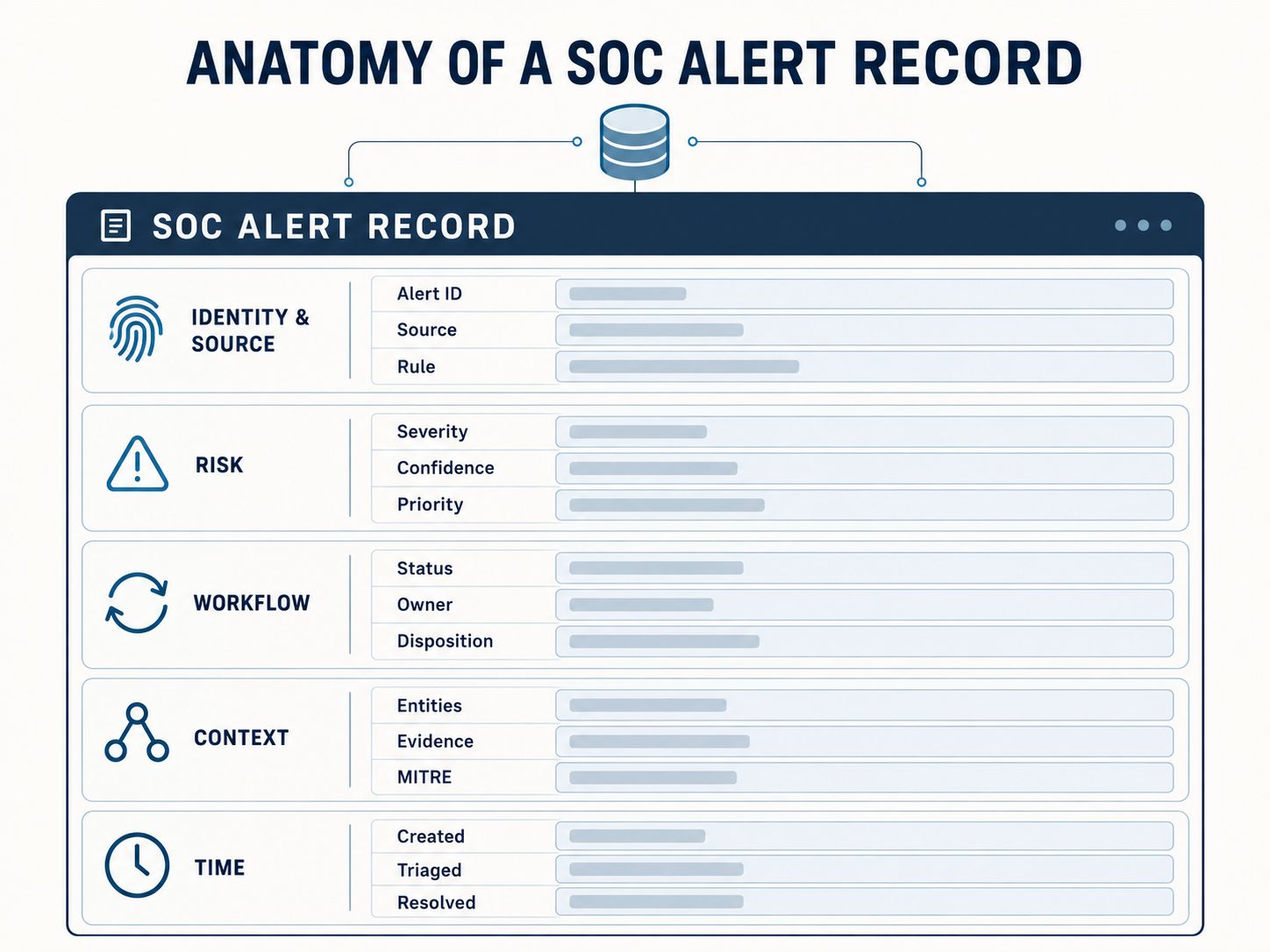
Recommended SOC Alert Data Model Fields
At minimum, a production SOC alert record should contain identity, detection, classification, workflow, entity, evidence and lifecycle information.
| Field | Example | Purpose |
|---|---|---|
alert_id |
ALT-2026-004281 | Unique internal identifier |
source_alert_id |
8fd21a7… | Original vendor alert ID |
title |
Suspicious PowerShell Execution | Human-readable alert name |
description |
Encoded PowerShell detected | Detection summary |
source_product |
EDR | Product or integration producing the alert |
source_vendor |
Vendor name | Original provider |
rule_id |
DET-PS-042 | Detection rule identifier |
rule_name |
Encoded PowerShell | Detection rule name |
category |
Execution | Detection category |
severity |
High | Normalized operational severity |
source_severity |
Severe | Original vendor severity |
confidence |
85 | Confidence in the detection |
status |
Investigating | Current workflow state |
disposition |
Confirmed Malicious | Analyst conclusion |
priority |
P1 | Operational queue priority |
assignee |
analyst_17 | Current owner |
team |
SOC Tier 2 | Responsible team |
first_seen_at |
2026-10-06T08:14:12Z | First observed activity |
last_seen_at |
2026-10-06T08:18:43Z | Most recent observation |
created_at |
2026-10-06T08:15:02Z | Alert creation time |
triaged_at |
2026-10-06T08:19:31Z | Initial triage completion |
assigned_at |
2026-10-06T08:20:04Z | Ownership time |
resolved_at |
2026-10-06T09:03:17Z | Resolution time |
closed_at |
2026-10-06T09:10:45Z | Workflow closure |
affected_entities |
host-27, user-42 | Assets associated with alert |
evidence |
process/network events | Supporting observations |
mitre_techniques |
T1059.001 | ATT&CK mappings |
resolution |
Process terminated | Response result |
closure_reason |
Confirmed and contained | Why alert was closed |
The most important modeling rule
Do not put everything into one status field.
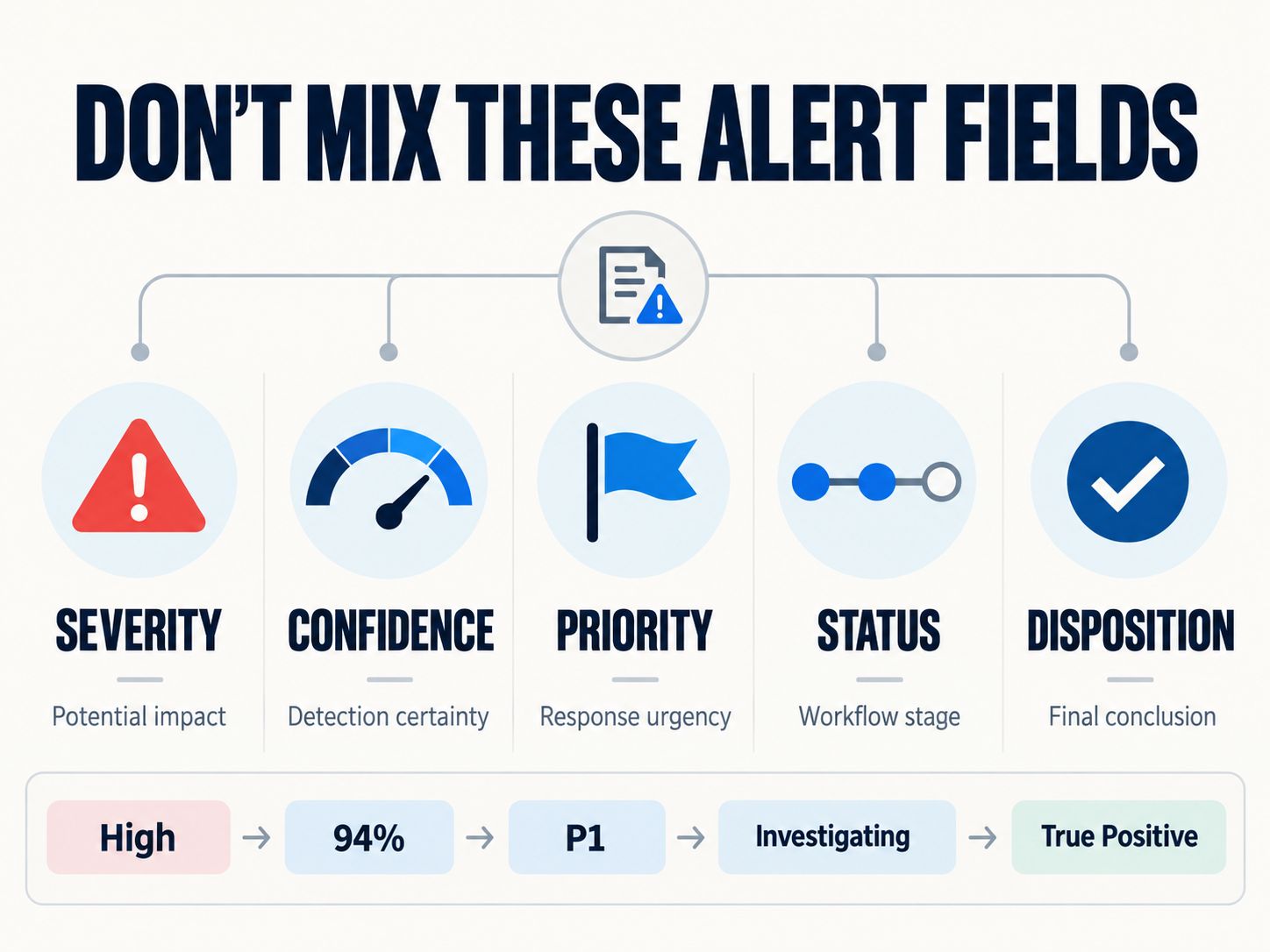
These concepts should remain separate:
Severity = How serious could this alert be?
Status = Where is the alert in the workflow?
Disposition = What did the analyst determine it actually was?
Priority = How urgently should the SOC work it?
Confidence = How strongly does the available evidence support the detection?
Mixing those concepts creates unreliable reports, automation failures and confusing SOC queues.
📌 Key Point
A “Critical” alert can still be New, Investigating, Resolved, or Closed. Critical is its severity—not its lifecycle state.
SOC Alert Severity Levels
Severity should represent the potential security impact of an alert, not simply whether an analyst has started investigating it.
A practical normalized scale is:
| Severity | Meaning | Typical Example |
|---|---|---|
| Informational | Useful security signal with no immediate action required | Successful administrative action |
| Low | Limited risk or weak suspicious signal | Unusual but low-risk behavior |
| Medium | Credible activity requiring investigation | Suspicious authentication pattern |
| High | Significant threat requiring prompt action | Malware execution or privilege abuse |
| Critical | Severe and potentially widespread impact | Active ransomware or privileged compromise |
Open Cybersecurity Schema Framework conventions are useful here because normalized security schemas separate a numerical severity identifier from its readable severity label. OCSF-style normalization also accommodates values such as Unknown and Other rather than forcing an unsupported mapping.
Keep source_severity and severity separately
Suppose a security product sends:
Your SOC normalization layer might convert that to:
Do not discard the original value.
Keeping both makes it possible to:
- troubleshoot normalization rules;
- reprocess historical alerts after mapping changes;
- compare vendor scoring;
- preserve source fidelity;
- investigate integration problems.
❌ Common Mistake
Do not automatically treat every vendor “High” as your organization’s High severity.
Asset criticality, identity privileges, exposure, detection confidence and business context may change the operational severity.
Severity, Priority and Confidence Are Not the Same Thing
These fields describe different dimensions of an alert.
Consider this example:
Severity: Critical
Confidence: Low
Priority: P2
A detection engine may identify behavior that would be extremely damaging if genuine, making the potential impact Critical. But weak evidence may produce low confidence. The SOC may therefore place it behind a high-confidence active compromise.
The opposite can also happen:
Severity: Medium
Confidence: High
Priority: P1
A medium-impact detection affecting the CEO’s identity, production infrastructure or a regulated system may warrant immediate attention.
A more useful prioritization model therefore considers:
It should not simply copy the severity value.
For organizations reviewing whether the necessary telemetry exists to make those decisions, the SafeNetworkHub Cybersecurity Monitoring Assessment evaluates logging, alerting, detection, investigation and incident-response capabilities.
📢 Share This Insight
“Severity tells a SOC how damaging an alert could be. Priority tells the team how urgently it should be worked.”
Recommended SOC Alert Status Lifecycle
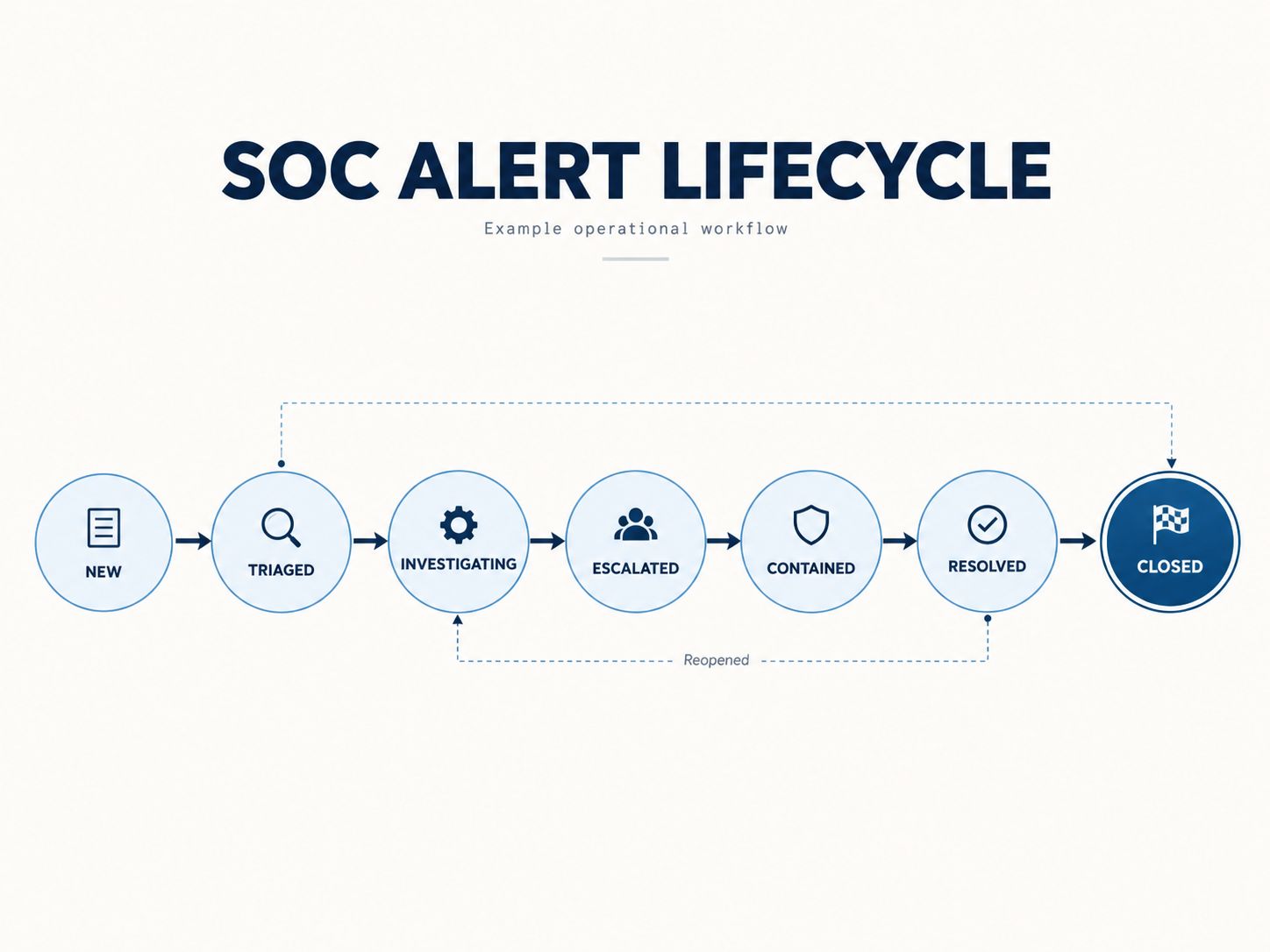
A clean operational lifecycle can use the following states:
New → Triaged → Investigating → Escalated → Contained → Resolved → Closed
Not every alert must visit every state.
A false positive might follow:
New → Triaged → Closed
A genuine compromise could follow:
New → Triaged → Investigating → Escalated → Contained → Resolved → Closed
A workflow should permit only meaningful transitions rather than allowing arbitrary state changes.
1. New
The alert has entered the alert-management system but has not yet been reviewed.
Recommended actions at creation:
- generate or validate the internal alert ID;
- retain the source alert ID;
- normalize severity;
- identify affected entities;
- record the creation timestamp;
- perform deduplication or correlation;
- assign the appropriate queue.
The alert should not automatically be considered malicious simply because it exists.
2. Triaged
An analyst or automation has performed an initial assessment.
Triage commonly determines:
- whether the alert contains enough information;
- whether it is obviously benign;
- whether duplicate alerts exist;
- whether immediate escalation is necessary;
- whether more investigation is required.
The current Expel explanation of the SOC alert lifecycle similarly places triage at the beginning of operational review, followed by investigation when analysts need more information, with alerts ultimately closing or escalating into an incident.
3. Investigating
The alert requires deeper analysis.
The analyst may review:
- authentication activity;
- endpoint telemetry;
- process trees;
- network connections;
- DNS activity;
- email evidence;
- cloud audit logs;
- identity activity;
- threat intelligence;
- historical behavior;
- related alerts.
This is where strong entity relationships become especially useful.
Instead of storing only a text description, associate the alert with structured entities such as:
That makes correlation and investigation considerably easier.
For network-derived detections, the SafeNetworkHub Network Security Monitoring Tool provides a useful example of separating observable security signals from conclusions about an incident.
4. Escalated
Escalation means the alert requires another analyst, specialist, incident-response team or business owner.
Record more than:
Also capture:
escalated_atescalated_byescalated_toescalation_reasonprevious_owner
Without those fields, you cannot reliably determine where handoffs create delays.
5. Contained
Containment indicates that action has been taken to limit further impact.
Examples can include:
- isolating an endpoint;
- disabling a compromised account;
- revoking a session;
- blocking a malicious domain;
- rotating exposed credentials;
- restricting a compromised cloud identity.
Containment should not automatically equal resolution.
An attacker may have been blocked while forensic analysis, credential rotation or recovery work remains unfinished.
6. Resolved
Resolved means the required investigation and response actions have been completed according to your organization’s workflow.
Record:
- resolution timestamp;
- remediation action;
- analyst conclusion;
- affected assets;
- residual risk;
- incident reference where applicable.
7. Closed
Closed should be the final workflow state.
Before closing an alert, require a disposition and sufficient resolution documentation.
A mature workflow should prevent analysts or automation from closing an alert with no explanation.
⭐ Expert Guidance
Current NIST SP 800-61 Revision 3 treats incident response as part of broader cybersecurity risk management rather than an isolated process. Its current model emphasizes Detect, Respond and Recover, supported by preparation activities and continuous improvement. That makes lifecycle data valuable beyond individual alerts: it can reveal systemic detection and response weaknesses across the organization.
Status and Disposition Must Be Separate
This is one of the most important decisions in the entire data model.
does not tell you why the alert was closed.
That belongs in disposition.
A useful disposition taxonomy might include:
| Disposition | Meaning |
|---|---|
| True Positive – Malicious | Confirmed malicious activity |
| True Positive – Policy Violation | Real activity violating policy |
| Benign Positive | Detection worked, but activity was legitimate |
| False Positive | Detection incorrectly identified benign activity |
| Duplicate | Another alert already represents the activity |
| Insufficient Evidence | Evidence cannot support a conclusion |
| Test / Simulation | Authorized security testing |
| Accepted Risk | Known condition explicitly accepted |
The distinction enables meaningful analytics.
For example:
and
represent completely different security outcomes despite sharing the same final workflow status.
A Practical SOC Alert Lifecycle Example
Imagine the SIEM detects suspicious PowerShell activity on a finance workstation.
Detection
The EDR observes encoded PowerShell execution.
The system creates:
Triage
An analyst checks the command, parent process, user activity and surrounding endpoint telemetry.
The alert becomes:
Investigation
Additional evidence shows the command was launched by an unexpected Office child process and contacted an unfamiliar external domain.
The workflow becomes:
Escalation
The analyst determines the behavior is likely malicious.
The alert becomes:
Containment
The endpoint is isolated and the active session is revoked.
Resolution
The malicious process is removed, credentials are reset, persistence checks are completed and related systems are reviewed.
Closure
Documentation and evidence are complete.
This history is much more useful than simply changing one database field from open to closed.
📖 Real Example
The real value of a lifecycle model appears when someone asks: “Why did this alert take 52 minutes to resolve?”
With separate timestamps, the answer can be measured rather than guessed.
Lifecycle Timestamps You Should Store
Never rely only on created_at and closed_at.
Recommended timestamps include:
| Timestamp | What It Measures |
|---|---|
source_event_at |
When source activity occurred |
first_seen_at |
Earliest observed related activity |
last_seen_at |
Latest observed related activity |
created_at |
When the alert record was generated |
ingested_at |
When your platform received it |
triaged_at |
When initial triage finished |
assigned_at |
When ownership was assigned |
investigation_started_at |
When deeper investigation began |
escalated_at |
When escalation occurred |
contained_at |
When containment occurred |
resolved_at |
When remediation was completed |
closed_at |
When the alert workflow ended |
The distinction between occurrence and record timestamps is not merely theoretical. OCSF’s Finding Information model, for example, differentiates created_time, first_seen_time, last_seen_time, modified_time, and resolved_time.
Why One Timestamp Is Not Enough
Consider:
If the system stores only created_at and closed_at, several operational delays disappear.
You cannot distinguish:
- detection latency;
- ingestion latency;
- queue waiting time;
- triage duration;
- investigation duration;
- containment time;
- remediation duration.
This is also why security metrics need explicit timer definitions. SafeNetworkHub’s guide to MTTD and MTTR benchmarks for cloud and SaaS security explains that metrics can produce very different numbers depending on where their timers begin and end.
📢 Share This Insight
“A SOC timestamp should describe an event, not merely record that time passed. Detection, ingestion, triage, containment and resolution are different moments.”
Track Status History, Not Just Current Status
A current-state field is useful:
but it cannot explain how the alert reached that point.
Add an immutable status-history collection.
Example:
Each transition should ideally record:
- previous status;
- new status;
- timestamp;
- actor;
- reason;
- optional comment.
This supports auditing, performance analysis and workflow debugging.
Recommended Alert Ownership Fields
Ownership should be explicit.
Useful fields include:
A single owner string is usually insufficient once alerts move among Tier 1 analysts, Tier 2 analysts, incident responders, cloud teams and identity teams.
For teams evaluating whether their monitoring architecture supports this workflow, the Cybersecurity Monitoring Assessment can be used alongside the broader Security Tool Finder to evaluate monitoring capabilities and relevant SIEM, EDR and security-platform categories.
Model Affected Entities as Structured Objects
Alerts rarely concern only one thing.
An alert can involve:
- users;
- service accounts;
- endpoints;
- servers;
- IP addresses;
- domains;
- URLs;
- email addresses;
- files;
- hashes;
- processes;
- applications;
- cloud accounts;
- containers;
- workloads;
- storage resources.
Instead of:
prefer a structured representation such as:
This enables reliable correlation and filtering.
If your environment spans AWS, Azure or Google Cloud, SafeNetworkHub’s Cloud Security Assessment and Cloud Security Controls Checker illustrate why cloud identity, resource configuration, logging and incident-response context often need to be considered together.
Evidence Should Be Separate From Analyst Notes
Evidence and analyst commentary are different data types.
Evidence
Machine-derived or externally observed information:
- event IDs;
- log references;
- process executions;
- hashes;
- domains;
- IP addresses;
- authentication events;
- email metadata;
- cloud audit events;
- detection-rule output.
Analyst notes
Human interpretation:
- investigation observations;
- hypotheses;
- handoff comments;
- decision rationale;
- remediation notes.
Do not overwrite raw evidence when an analyst adds context.
Preserve both.
⚠ Warning
Avoid storing passwords, private keys, access tokens, session cookies or unnecessary sensitive payloads in alert notes. Alert-management systems can become high-value repositories themselves.
SafeNetworkHub’s Data Privacy & Security Assessment includes centralized logging and real-time threat-detection controls while emphasizing appropriate data-security practices.
Preserve the Original Alert
Normalization should add structure rather than destroy source information.
A robust alert object can have three conceptual layers:
1. Source
Original vendor values and identifiers.
2. Normalized
Canonical severity, timestamps, entities and classifications.
3. Operational
SOC status, ownership, priority, disposition and analyst actions.
This separation is extremely useful when an integration changes.
If a vendor introduces a new severity called Emergency, you still retain the original value even before your normalized mapping is updated.
Suggested JSON-Style Alert Structure
A practical canonical object could look like this:
This is a reference pattern, not a mandatory universal schema. Your production model should reflect the systems, compliance requirements and investigation processes in your environment.
How Should Alert Deduplication Work?
Deduplication should group alerts only when there is sufficient evidence that they represent the same underlying detection or activity.
Useful matching inputs can include:
- rule or detection ID;
- affected entity;
- event fingerprint;
- source product;
- time window;
- process/hash combination;
- identity;
- destination;
- correlation key.
Do not deduplicate solely because two alerts have the same title.
Two “Impossible Travel” alerts affecting different identities are separate security observations.
A useful model stores:
That keeps deduplication transparent.
Alert vs Incident: Keep Separate Objects
An alert is a detection or security finding that requires evaluation.
An incident is a confirmed or sufficiently significant security situation requiring coordinated response.
Several alerts may belong to one incident.
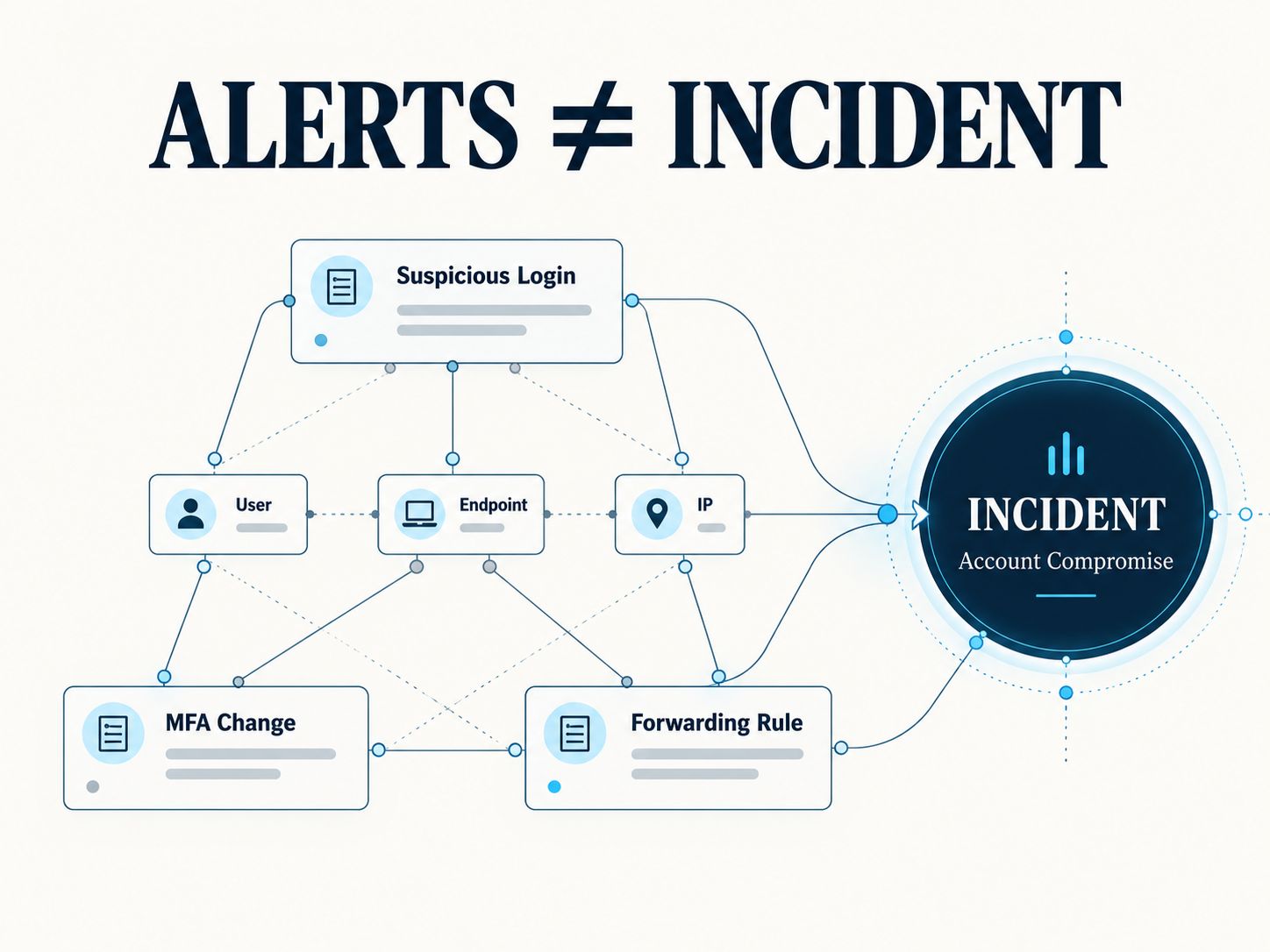
For example:
Your model should therefore support:
or an alert-to-incident relationship table.
Do not simply rename every escalated alert an incident.
Current NIST incident-response guidance also reinforces that incident handling belongs within a broader Detect, Respond and Recover process rather than being synonymous with every detection entering a SOC queue.
How Should SOC Alert Metrics Be Calculated?
Once lifecycle timestamps are structured correctly, useful metrics become much easier to calculate.
Time to Triage
Measures how long an alert waited for and underwent initial assessment, depending on your exact metric definition.
Time to Assign
Measures ownership latency.
Time to Contain
The starting point must be explicitly documented.
Time to Resolve
Again, define whether the timer starts at source activity, detection, ingestion, creation or analyst acknowledgment.
False-Positive Rate
Use a consistent disposition taxonomy.
Escalation Rate
Reopen Rate
Metrics become unreliable when timestamps, dispositions or status transitions are inconsistently populated.
What Fields Should Be Required?
Not every field needs to be mandatory at alert creation.
Required at creation
- alert ID;
- source;
- title;
- created timestamp;
- normalized severity or Unknown;
- initial status;
- detection identifier where available.
Required during investigation
- owner;
- affected entities where identifiable;
- evidence references;
- status history.
Required before closure
- disposition;
- resolution or closure reason;
- closed timestamp;
- closing actor.
This staged validation avoids forcing analysts or integrations to invent information they do not yet know.
Use Unknown Instead of Guessing
A mature data model explicitly supports uncertainty.
Examples:
That is preferable to assigning arbitrary defaults that make dashboards look complete while corrupting the underlying data.
🧠 AI Insight
The same rule applies when AI assists SOC triage. AI-generated enrichment should not silently replace observed evidence. Store the generated assessment, its provenance and, where practical, its confidence separately from source telemetry and analyst conclusions.
How Automation Should Update Alerts
SOAR or workflow automation can safely handle repetitive transitions when the transition criteria are explicit.
Examples include:
- assign alerts by category;
- enrich IP/domain reputation;
- attach asset criticality;
- correlate related detections;
- suppress approved duplicates;
- escalate critical detections;
- create incident tickets;
- record containment actions.
However, automation should record the same audit information as a human:
This prevents automation from becoming invisible in the audit trail.
For cloud environments, the Cloud Security Tool Finder provides additional context on CSPM, CWPP, CIEM, CDR and other technologies that can produce or enrich security findings.
SOC Alert Data Model Validation Checklist
Before deploying a data model, verify the following:
- Every alert has a stable unique identifier.
- Original source IDs are preserved.
- Source severity and normalized severity are separate.
- Severity and priority are separate.
- Severity and confidence are separate.
- Status and disposition are separate.
- Status changes have history.
- Ownership changes are auditable.
- First-seen and created timestamps are distinct.
- Resolution and closure are distinct where the workflow requires them.
- Entities use structured identifiers.
- Evidence is not mixed with analyst commentary.
- Duplicate relationships are explicit.
- Alerts can link to incidents.
- Unknown values are supported.
- Required closure fields are validated.
- Automation actions identify their actor.
- Sensitive secrets are excluded from notes and evidence unless specifically required and appropriately protected.
Teams building their monitoring program from scratch may also benefit from reviewing Network Security Fundamentals before designing detection and response workflows, while the Network Security Assessment Tool can help evaluate supporting defensive controls.
Common SOC Alert Data Modeling Mistakes
Using only Open and Closed
This hides triage, investigation, escalation, containment and resolution delays.
Using severity as workflow state
Critical does not mean Escalated.
Overwriting vendor fields
Normalization should preserve the source value.
Closing alerts without disposition
You lose the ability to measure false positives, benign positives and confirmed malicious activity.
Using one generic timestamp
You cannot calculate meaningful operational latency.
Storing entities as free text
Correlation becomes unreliable.
Allowing unrestricted status changes
Alerts can jump from New to Closed without required analysis.
Editing history instead of appending history
Auditability disappears.
Treating every alert as an incident
Detection volume becomes confused with actual incident volume.
Measuring MTTR without defining the timer
Two dashboards can report different MTTR values while both calculations are mathematically correct.
First-Hand Implementation Perspective
From our experience building security assessment and monitoring workflows at SafeNetworkHub, the hardest part is rarely adding another field. The harder problem is defining exactly what each field means and ensuring that the meaning remains stable across tools and workflow transitions.
For example, severity, priority, status, and disposition may initially look like four labels describing roughly the same thing. They are not. Once automation, dashboards, escalation rules and reporting depend on them, ambiguous definitions quickly produce inconsistent results.
Our preferred approach is therefore to start with a relatively small canonical model, preserve original source values, record lifecycle transitions append-only, and add optional enrichment fields only when they support a real investigation or reporting requirement.
Our Perspective
A strong SOC alert model should optimize for traceability rather than field count.
An analyst should be able to reconstruct:
what was detected → when it happened → why it was prioritized → who investigated it → what evidence was reviewed → what conclusion was reached → what response occurred → why it was closed.
If the data model can answer that chain reliably, it is doing its job.
Adding dozens of optional fields without preserving that chain makes the schema larger, not necessarily better.
Frequently Asked Questions
What are the essential fields in a SOC alert?
At minimum, store a unique alert ID, source information, title, normalized severity, status, creation timestamp, affected entities when available, ownership, evidence references, disposition and closure information. More mature implementations should also preserve source values and lifecycle history.
What is the difference between SOC alert severity and status?
Severity represents the potential impact or seriousness of the alert. Status represents where the alert currently sits in the operational workflow. For example, an alert can have severity = Critical while its status = Investigating.
What is the difference between severity and priority?
Severity describes potential security impact. Priority determines how urgently the SOC should work the alert. Priority can incorporate severity plus confidence, asset importance, exposure, threat context and business impact.
What is the difference between alert status and disposition?
Status tells you where the alert is in the workflow, such as New, Investigating or Closed. Disposition records the analyst’s conclusion, such as False Positive, Benign Positive or True Positive – Malicious.
What are common SOC alert lifecycle stages?
A practical model is:
New → Triaged → Investigating → Escalated → Contained → Resolved → Closed
Not every alert needs every stage. Benign alerts may move directly from triage to closure.
Should resolved and closed be separate statuses?
They can be. Resolved can indicate that required response actions are complete, while Closed indicates that documentation and final workflow requirements are also complete. Smaller SOCs may combine them if there is no operational reason to maintain the distinction.
Should a SOC keep the original vendor severity?
Yes. Keep the original severity alongside the normalized severity. This preserves source fidelity and makes future mapping changes and integration troubleshooting easier.
Should false positive be an alert status?
Usually no. False Positive is better modeled as a disposition. The workflow status can be Closed while the disposition records False Positive.
What is the difference between first seen and created time?
first_seen_at represents when the underlying activity was first observed. created_at represents when the alert record was generated. Those times can differ substantially.
Should SOC alert history be immutable?
Operational history should generally be append-oriented so previous transitions and actions remain auditable. Corrections may be necessary, but systems should preserve enough audit information to show what changed, when and by whom.
How should SOC alerts link to incidents?
Use an explicit incident identifier or relationship model. Multiple alerts should be able to reference the same incident without losing their individual detection histories.
Can AI assign SOC alert severity automatically?
AI can assist with enrichment and prioritization, but AI-derived assessments should remain distinguishable from observed telemetry, deterministic mappings and analyst conclusions. High-impact automated decisions should have clear provenance and appropriate human oversight.
Build the Model Around Decisions, Not Just Data
A useful SOC alert management data model fields severity status lifecycle framework does more than store security detections. It gives analysts and automation a consistent language for moving an alert from initial detection to a defensible final outcome.
Keep severity, priority, confidence, status and disposition separate. Preserve original source data. Record meaningful lifecycle timestamps. Maintain an auditable transition history. Link structured entities and evidence instead of burying everything inside free-text notes.
Those decisions make alert triage faster, metrics more trustworthy and security automation substantially easier to maintain.
If you are designing or already operating a SOC alert workflow, share your current status stages or the fields you find hardest to normalize in the comments. Comparing real implementations can help other security teams avoid the same modeling problems.
Share This Network Security Guide
Help IT professionals, network engineers, and students strengthen their cyber defense.
Zubayer Hasan
LinkedIn Profile →Md Zubayer AL Hasan is the lead cybersecurity platform architect and security researcher at SafeNetworkHub. Dedicated to zero-knowledge cryptography, infrastructure vulnerability auditing, and building accessible privacy tools.
0 Comments
No comments yet
Have a question or insight about this network security guide? Be the first to share your thoughts!
Write the first comment →