

The AutoMapper GHSA-rvv3-g6hj-g44x fixed version is 15.1.1 or 16.1.1, depending on the release branch. CVE-2026-32933 is a high-severity vulnerability that can crash a .NET application through uncontrolled recursive mapping. This guide helps you check your installed AutoMapper version, understand whether your application is exposed, and choose a safe upgrade or mitigation.
Check Your AutoMapper Version for CVE-2026-32933
Use the AutoMapper Version Checker on this page to compare your resolved NuGet package version with the published security advisory.
The checker returns one of three results: Affected, Advisory-Patched, or Manual Review Required. It does not upload your project files, scan source code, or test whether your running application can be exploited.
AutoMapper affected and fixed versions
| AutoMapper version | Security status | What to do |
|---|---|---|
| 13.0.1 and older | Affected range | Upgrade or mitigate |
| 14.0.0 | Affected | Upgrade, migrate, or mitigate |
| 15.0.0–15.1.0 | Affected | Upgrade to 15.1.3 |
| 15.1.1–15.1.2 | Advisory-patched | Prefer 15.1.3 |
| 15.1.3 | Patched | Recommended 15.x target |
| 16.0.0–16.1.0 | Affected | Upgrade to 16.1.1 or later |
| 16.1.1 | Patched | Minimum patched 16.x release |
| 16.2.0 | Patched | Latest verified stable release |
| Unknown or prerelease | Manual review | Check official release data |
These classifications follow the official GitHub security advisory. AutoMapper 15.1.3 is particularly useful for developers staying on 15.x because its release notes explicitly document the security fix.
Important: A version checker identifies package-level advisory status. It cannot determine whether a vulnerable code path is reachable in your application.
How was the version checker tested?
The SafeNetworkHub checker uses deterministic semantic-version comparisons against the advisory ranges and a verified release snapshot.
Its JavaScript classification logic was tested locally against 16 representative inputs, including affected versions, patched versions, unknown releases, and invalid inputs. All 16 produced the expected classifications.
This is original tool-logic testing, not a reproduction of the AutoMapper denial-of-service exploit. It does not establish that the checker has completed browser compatibility or WordPress integration testing.
What Is CVE-2026-32933 in AutoMapper?
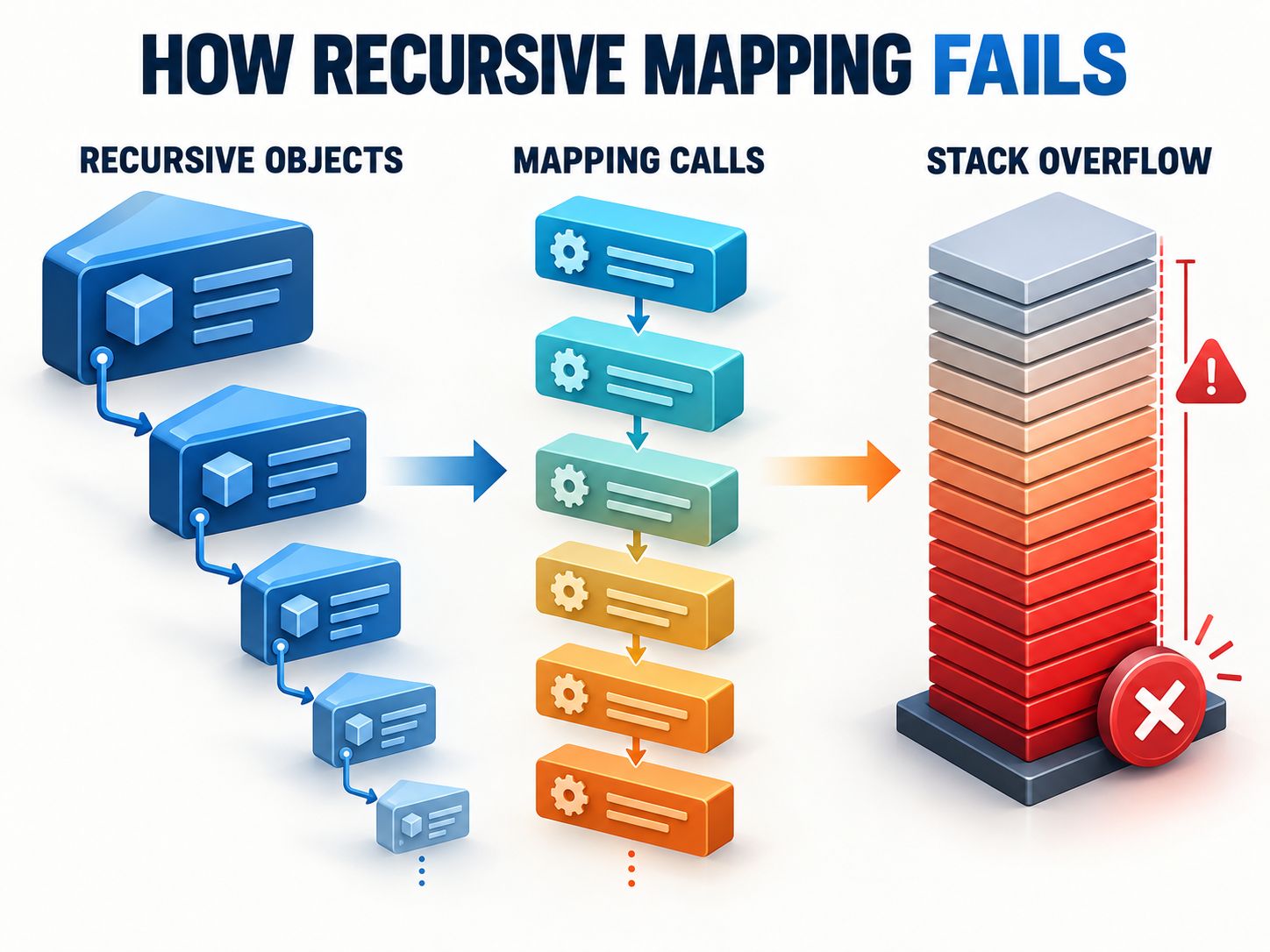
CVE-2026-32933 is a denial-of-service vulnerability caused by uncontrolled recursion when AutoMapper processes certain deeply nested object graphs.
AutoMapper is a .NET library that transfers data between object types, such as domain models and Data Transfer Objects (DTOs).
The affected mapping engine can repeatedly follow a property that refers to the same type, or a sequence of types that eventually forms a recursive relationship.
When the recursive structure becomes sufficiently deep, the mapping operation may exhaust the available call stack.
The resulting StackOverflowException can terminate the application process.
Security advisory details
| Property | Value |
|---|---|
| CVE ID | CVE-2026-32933 |
| GitHub advisory | GHSA-rvv3-g6hj-g44x |
| Package | AutoMapper |
| Ecosystem | NuGet / .NET |
| Severity | High |
| CVSS 3.1 | 7.5 |
| Weakness | CWE-674: Uncontrolled Recursion |
| Primary impact | Denial of Service |
| Advisory published | March 13, 2026 |
| Patched versions | 15.1.1, 16.1.1 |
The advisory’s CVSS vector is:
This indicates high availability impact without directly identifying a confidentiality or integrity impact.
You can examine those severity metrics using the Web Application Vulnerability & CVSS Scorer.
Can Attackers Exploit the AutoMapper Vulnerability in Your Application?
A vulnerable AutoMapper package does not automatically mean your application has a remotely exploitable endpoint.
Actual exposure depends on whether untrusted data can reach a recursive mapping operation capable of exhausting the stack.
Consider a service that processes a category hierarchy:
Category → Subcategory → Child Category → More nested categories
The individual records may be valid. However, if an attacker can influence the overall hierarchy, the assembled structure may become much deeper than the application expects.
When the service maps the completed hierarchy, an affected mapping configuration may recursively traverse too many levels.
Input validation versus AutoMapper mapping
The data path matters:
External data → Input validation or deserialization → AutoMapper → Application process
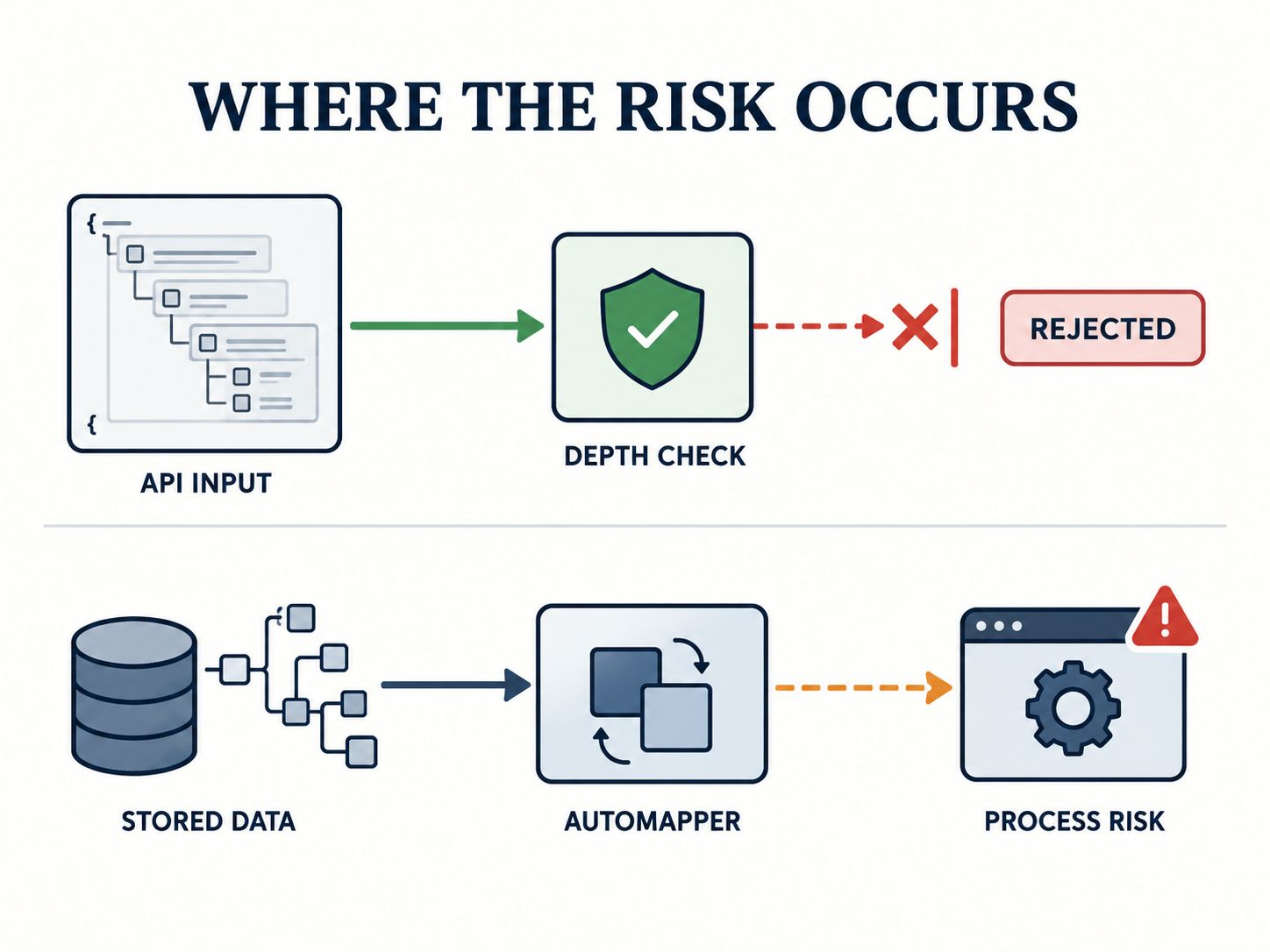
Some deserializers enforce their own nesting limits. They may reject excessively deep input before AutoMapper receives it.
However, database-generated hierarchies, external data integrations, message queues, and other processing paths can behave differently.
A useful exposure assessment asks:
- Is the installed AutoMapper version affected?
- Does the application contain recursive mappings?
- Can untrusted data influence the mapped structure?
- Does an earlier processing stage enforce a suitable depth limit?
- Could a mapping failure terminate an important application process?
A serializer depth limit is defense in depth, not a substitute for patching AutoMapper.
For a broader review of input handling and dependency controls, use the Application Security Best-Practices Checker.
Shareable insight: A vulnerable NuGet package is a confirmed dependency finding. Remote exploitability requires a reachable vulnerable mapping path.
How to Check AutoMapper for CVE-2026-32933 in .NET
The most reliable starting point is to check the actual package version resolved by your project and run a NuGet vulnerability audit.
Step 1: Find the installed version
For .NET 9 SDK and earlier:
For .NET 10 SDK:
Find AutoMapper in the output and identify its resolved version.
Do not rely only on the version written in a project file. Dependency resolution, central package management, and transitive references can affect the actual result.
Step 2: Run the security audit
For .NET 9 SDK and earlier:
For .NET 10 SDK:
Check for CVE-2026-32933 or GHSA-rvv3-g6hj-g44x.
A package audit is useful for discovering known vulnerable dependencies, but it does not prove that an application’s data flow is exploitable.
Step 3: Inspect package configuration
For a conventional project, check the .csproj file:
Projects using Central Package Management may define the version in Directory.Packages.props:
These are examples of affected-version references, not recommended configurations.
Step 4: Find potentially affected mapping paths
Search your codebase for:
- CreateMap
- IMapper
- .Map(
- MaxDepth
- PreserveReferences
Look for mappings involving nested comments, organizational trees, product categories, folder hierarchies, and other recursive structures.
When multiple applications are involved, use a Vulnerability Management Checklist to track each dependency finding and its remediation status.
How to Fix AutoMapper GHSA-rvv3-g6hj-g44x
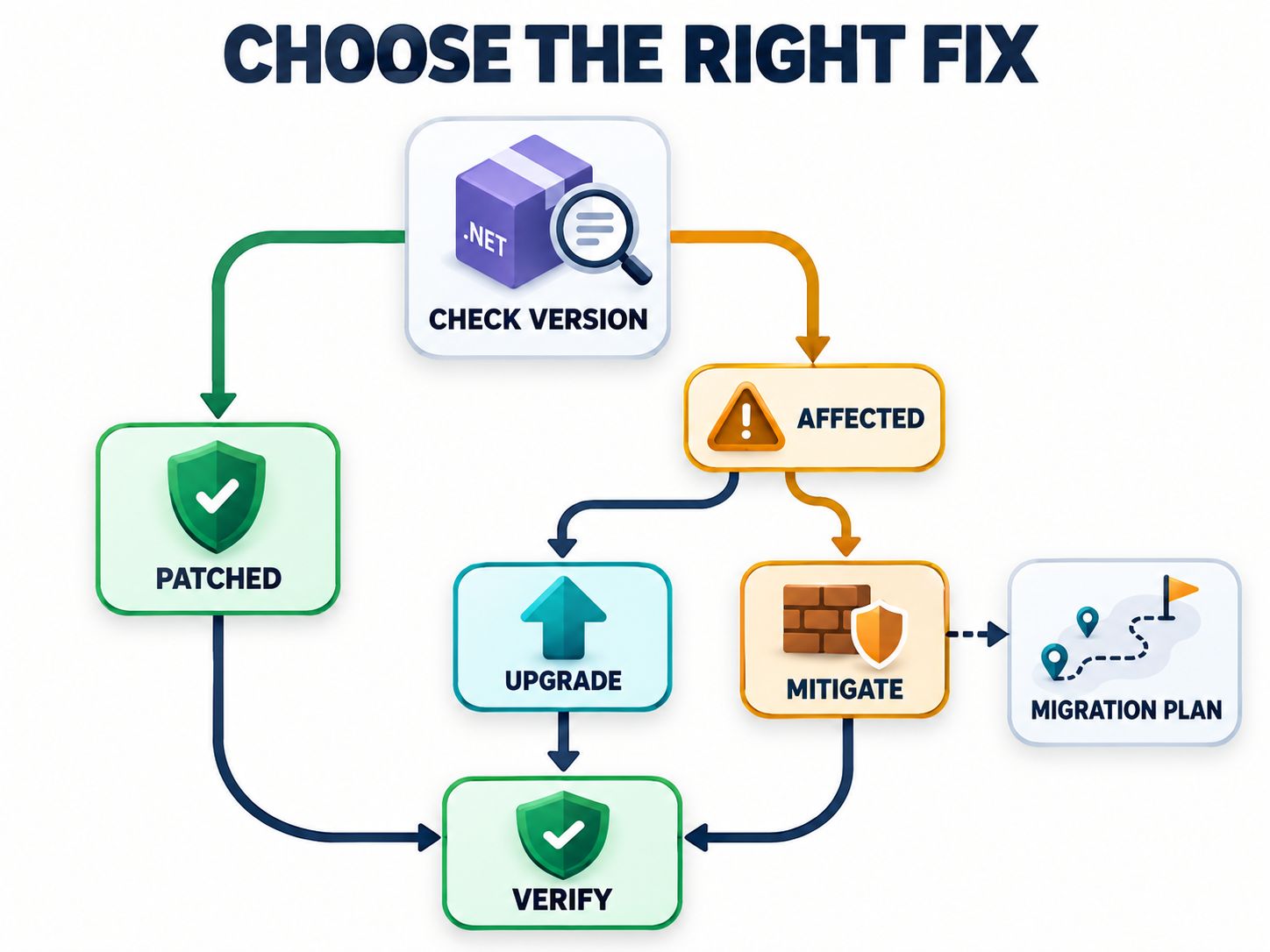
The preferred fix is to upgrade to an officially patched release, confirm framework and licensing compatibility, and test the deployed application.
Choose the right remediation path
| Your situation | Recommended action |
|---|---|
| Running an affected 16.x version | Upgrade to 16.2.0 where compatible |
| Running an affected 15.x version | Upgrade to 15.1.3 |
| Running 14.0.0 | Review Community License eligibility or migration |
| Unable to upgrade immediately | Apply and test bounded recursion controls |
| Using ABP with legacy mappings | Check framework mitigation and Mapperly migration |
| Already on a patched release | Verify package resolution and deployment |
Option 1: Upgrade to AutoMapper 15.1.3
If your application must remain on the 15.x release line:
Option 2: Upgrade to AutoMapper 16.2.0
For applications able to adopt the current verified stable release:
The official AutoMapper releases provide the release notes and security-fix history.
If your solution uses Central Package Management, modify Directory.Packages.props rather than adding an independent version to an individual project.
After upgrading, run:
Then repeat the vulnerability audit.
Warning: Upgrading from AutoMapper 14 to 15 or 16 requires additional compatibility review. AutoMapper 15 introduced licensing requirements, changed dependency-injection setup, and updated its target framework support.
Test these changes before deploying to production. An Interactive App Security Checklist can help track the release validation process.
AutoMapper 14: Is It Really the Last Free Version?
AutoMapper 14.0.0 is the last release under the previous MIT licensing model. However, AutoMapper 15 and later can still be used under a free Community License by eligible individuals and organizations.
This distinction is important for developers deciding whether to upgrade because of CVE-2026-32933.
Who can qualify for the Community License?
According to the vendor’s published conditions, the Community License is available to eligible organizations meeting requirements that include:
- Annual gross revenue or nonprofit budget below US$5 million.
- No more than US$10 million in outside capital received.
- Not being a government or quasi-government entity.
- Not being a university or higher-education institution using the software for institutional operations.
Additional conditions can apply to agencies and client work. These terms were reviewed on October 9, 2026 and may change.
The Community License still requires registration and compliance with the applicable license agreement.
What if your organization cannot qualify?
You have three main choices.
Upgrade using an appropriate commercial license. This may require the fewest code changes, provided your project is compatible.
Apply temporary mitigations while remaining on the affected package. This may be reasonable when immediate upgrading is blocked, but residual risk remains.
Migrate to another mapping solution. Mapperly, Mapster, or explicit mapping code may be appropriate depending on your architecture and maintenance requirements.
There is no official patched AutoMapper 14.x release for this advisory.
Community forks may offer alternative patches, but they should be evaluated independently for maintenance, security, licensing, and compatibility.
For organizations managing software across several teams, the Vulnerability Management Readiness Checker can help assess whether ownership and remediation procedures are in place.
Can MaxDepth(64) Mitigate CVE-2026-32933?
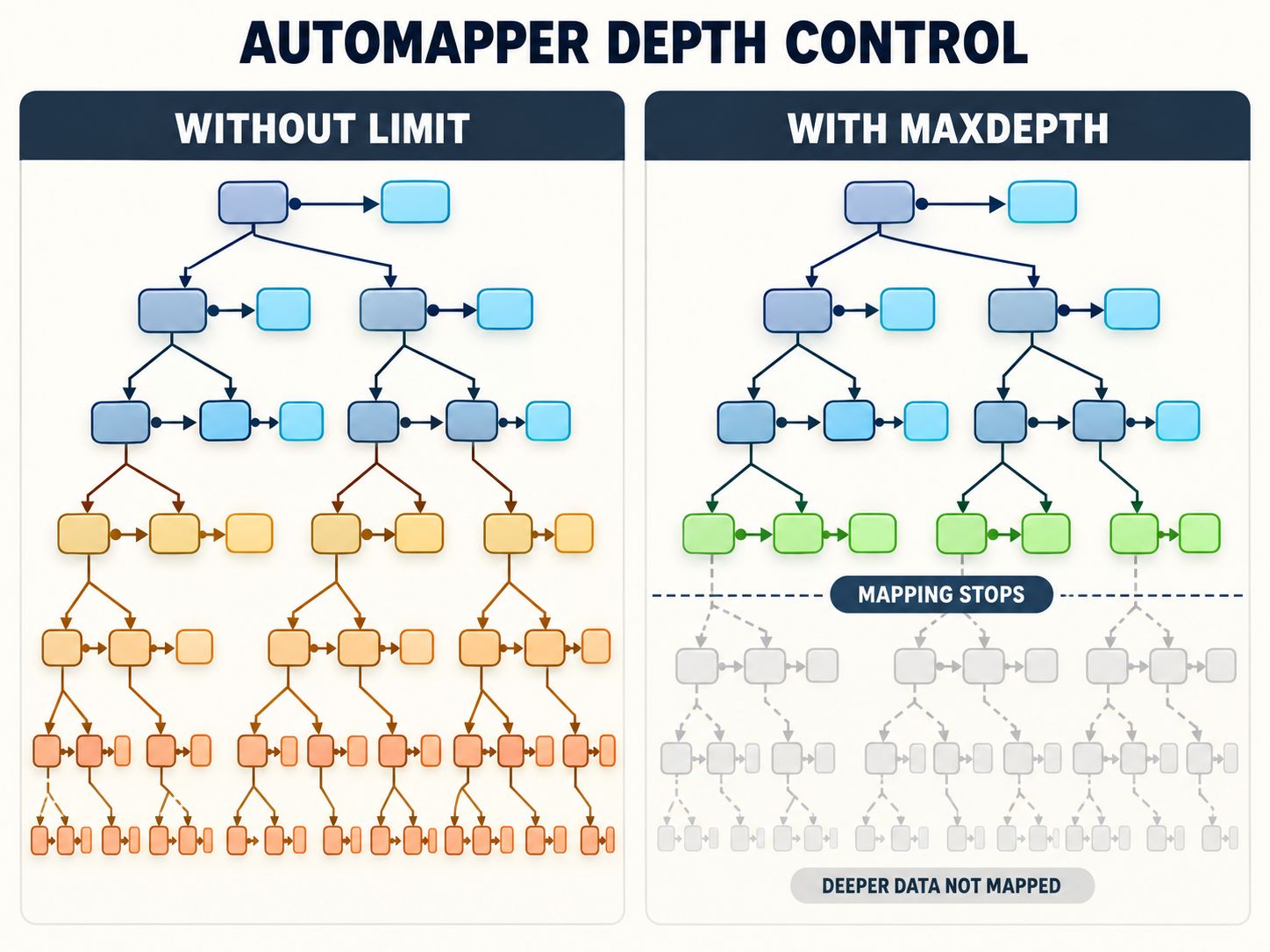
An explicit MaxDepth limit can mitigate uncontrolled recursion in relevant AutoMapper mappings when upgrading is temporarily impossible.
For example:
The configured limit prevents the mapping process from following that type map indefinitely.
The AutoMapper maintainer documented this approach as a mitigation for known recursive mappings. The 15.1.3 security-fix release explicitly describes a default depth of 64 for self-referential types.
Important limitations
It is not an official package patch. Your NuGet package can remain classified as affected.
It may affect legitimate output. Data beyond the configured mapping depth may not be fully mapped.
Every relevant recursive path needs review. A single configured map does not necessarily protect an entire project.
The depth value should match application requirements. A limit of 64 is a documented mitigation example, not a guarantee that 64 is optimal for every application.
Avoid copying internal AutoMapper configuration snippets across different major versions without confirming API compatibility.
You should also validate input complexity before mapping wherever possible. Review these compensating controls using the Security Controls Assessment.
Shareable insight: MaxDepth(64) is a possible mitigation. Only an officially patched package version resolves the dependency’s advisory status.
What Should ABP Framework Users Do?
ABP users should distinguish between framework-provided mappings and custom application mappings.
In the ABP support discussion concerning this vulnerability, the framework team confirmed a code-level mitigation in Volo.Abp.AutoMapper. It sets a maximum depth of 64 for maps without an explicit configured depth limit.
ABP 10 also uses Mapperly as its primary object-mapping integration, so applications still referencing AutoMapper may be relying on legacy integrations or custom code.
Developers should:
- Identify their ABP and AutoMapper package versions.
- Check whether Volo.Abp.AutoMapper is used.
- Review custom mapping profiles.
- Confirm whether the appropriate framework-level mitigation is present.
- Evaluate migration to Mapperly where supported.
A framework mitigation does not turn AutoMapper 14 into an officially patched package.
If migration cannot happen immediately, document the remediation stages in a Vulnerability Management Plan.
Why Does NuGet Still Show NU1903 After Applying MaxDepth?
NU1903 is a NuGet warning associated with a high-severity package vulnerability.
If you apply a code-level mitigation but continue using an affected AutoMapper version, NuGet may still display NU1903.
This is expected because NuGet checks package versions against published security advisories. It does not automatically inspect your application to determine whether custom mitigations are sufficient.
Should you suppress NU1903?
Avoid suppressing the warning unless you have evaluated the vulnerability, verified compensating controls, and documented why upgrading is temporarily unavailable.
Supported NuGet versions allow advisory-specific suppression with NuGetAuditSuppress.
For this vulnerability, the advisory URL can be specified in that configuration.
A narrowly scoped suppression is safer than broadly disabling high-severity package warnings, but it still hides that advisory from future audit reporting.
Security exceptions should have an owner, justification, review date, and eventual remediation plan.
Teams can formalize those requirements using the Application Security Policy Generator.
How to Verify Your AutoMapper Vulnerability Fix
After upgrading or applying a mitigation, verify both the resolved dependency version and application behavior.
Production verification checklist
- Confirm the installed AutoMapper version in every affected project.
- Repeat the NuGet vulnerability audit.
- Test normal recursive mappings with representative data.
- Confirm legitimate nested objects are not unexpectedly truncated.
- Test input depth validation using safely bounded examples.
- Verify the updated package exists in the deployed application.
- Review logs, crashes, and restart monitoring.
- Document any remaining vulnerability warnings and compensating controls.
For example, if your application maps product-category trees, test normal hierarchies and structures close to the supported maximum depth.
Do not deliberately trigger uncontrolled stack exhaustion in production.
A Continuous Monitoring Checklist can help establish recurring checks after deployment.
If the same type of dependency finding regularly remains unresolved across projects, use the Vulnerability Management Maturity Checker to evaluate the broader remediation process.
Shareable insight: A security fix is not fully verified until the intended package is deployed and the application’s normal mapping behavior has passed regression tests.
Frequently Asked Questions
What is the first fixed version of AutoMapper for GHSA-rvv3-g6hj-g44x?
The advisory lists AutoMapper 15.1.1 and 16.1.1 as the initial patched releases. Version 15.1.3 explicitly documents the security-fix backport for the 15.x branch.
Is AutoMapper 13.0.1 vulnerable to CVE-2026-32933?
Yes. AutoMapper 13.0.1 falls within the affected version range. Its practical exploitability depends on the application’s mapping configuration and data flow.
Is AutoMapper 14.0.0 safe?
AutoMapper 14.0.0 is affected by the published advisory. No official 14.x security-patch release is available for this vulnerability.
What is the latest fixed version of AutoMapper?
As of October 9, 2026, AutoMapper 16.2.0 is the latest stable release verified from the official release history.
Is AutoMapper 15.1.1 fixed?
Yes, the advisory lists 15.1.1 as patched. Version 15.1.3 is a preferable 15.x target because its release notes specifically document the security-fix backport.
Is AutoMapper still available for free?
Yes, eligible individuals and organizations can obtain a free Community License for newer AutoMapper releases. These licenses have eligibility requirements and are different from the previous MIT license.
Can a StackOverflowException be caught safely?
In normal modern .NET application execution, StackOverflowException is not a recoverable exception. Prevent excessive recursion rather than relying on exception handling to keep the process running.
Does setting MaxDepth(64) remove NU1903?
Not necessarily. Applying a mapping configuration does not change the NuGet package version. A vulnerability warning may remain until the dependency is upgraded or an appropriate audit exception is configured.
Do I have to switch from AutoMapper to Mapperly?
No. Upgrading AutoMapper is the direct package-level remediation. Mapperly is an alternative for projects where licensing, compatibility, or architectural goals make migration preferable.
Final Recommendation
For CVE-2026-32933, the preferred approach is to upgrade to a verified patched AutoMapper version, test recursive mapping behavior, and confirm the correct package reaches production.
For affected AutoMapper 14 projects, review Community License eligibility before assuming a paid upgrade is the only option. If upgrading remains blocked, apply and test suitable depth limits while planning a maintained solution.
Most importantly, distinguish three questions: Is the package affected? Can the vulnerable behavior be reached? Has the solution been verified in production? A complete remediation addresses all three.
Written by Md Zubayer Al Hasan
Last reviewed: October 9, 2026
Research and testing disclosure: Security claims in this guide are based on published advisories, vendor release notes, technical documentation, and maintainer discussions. The accompanying checker uses independently authored version-classification logic tested against 16 sample inputs. No live exploit test or production vulnerability assessment is claimed.
Have you encountered GHSA-rvv3-g6hj-g44x in your .NET project? Share your installed AutoMapper version, upgrade experience, or questions in the comments.
Share This Network Security Guide
Help IT professionals, network engineers, and students strengthen their cyber defense.
Zubayer Hasan
LinkedIn Profile →Md Zubayer AL Hasan is the lead cybersecurity platform architect and security researcher at SafeNetworkHub. Dedicated to zero-knowledge cryptography, infrastructure vulnerability auditing, and building accessible privacy tools.
0 Comments
No comments yet
Have a question or insight about this network security guide? Be the first to share your thoughts!
Write the first comment →