
MTTD MTTR benchmarks cloud saas security 2020-2026 cannot be reduced to one universal number. A complete breach study may start its timer from the attacker’s initial access and stop it only after containment, while a SOC dashboard may begin measuring after an alert has already been generated.
Those two measurements can differ by days or even months.
That difference will matter more in 2026 as attackers are moving faster. The average eCrime breakout time in 2025 was 29 minutes, CrowdStrike said, with the fastest lateral movement observed taking only 27 seconds. Other advanced intrusions can remain undetected for much longer, Mandiant reported, with a median attacker dwell time of 14 days worldwide.
The Short Version
A good MTTD or MTTR relies on the severity of the incident, business impact, data affected, criticality of the asset and the events used to start and stop the clock.
For a critical privileged-account takeover, ransomware event or confirmed data-exfiltration incident, a strong internal target may be:
| Response Stage | Suggested P1 Target |
|---|---|
| Alert triage | 15 minutes or less |
| Analyst acknowledgement | 5–15 minutes |
| First containment action | 15–30 minutes |
| Verified containment | 30–60 minutes |
| Technical remediation | 4–8 hours where possible |
| Complete recovery | Based on business recovery objectives |
These are practical planning targets not industry wide standards.
IBM’s 2026 breach study found the median time to identify a breach was 183 days, and the median time to contain a breach was 64 days, for a total lifecycle of 247 days. That metric includes times when the organization didn’t have a useful security alert. This should not be directly compared with a 15 minute SOC triage target.
Table of Contents
- What MTTD and MTTR actually measure
- Why MTTR definitions create confusion
- MTTD and MTTR benchmark data from 2020–2026
- Cloud and SaaS security benchmarks
- Good SOC targets by incident severity
- How to calculate MTTD and MTTR
- Why benchmark numbers differ
- Five cloud and SaaS response workflows
- How to reduce MTTD
- How to reduce MTTR
- US cyber incident reporting context
- Metrics to track beyond MTTD and MTTR
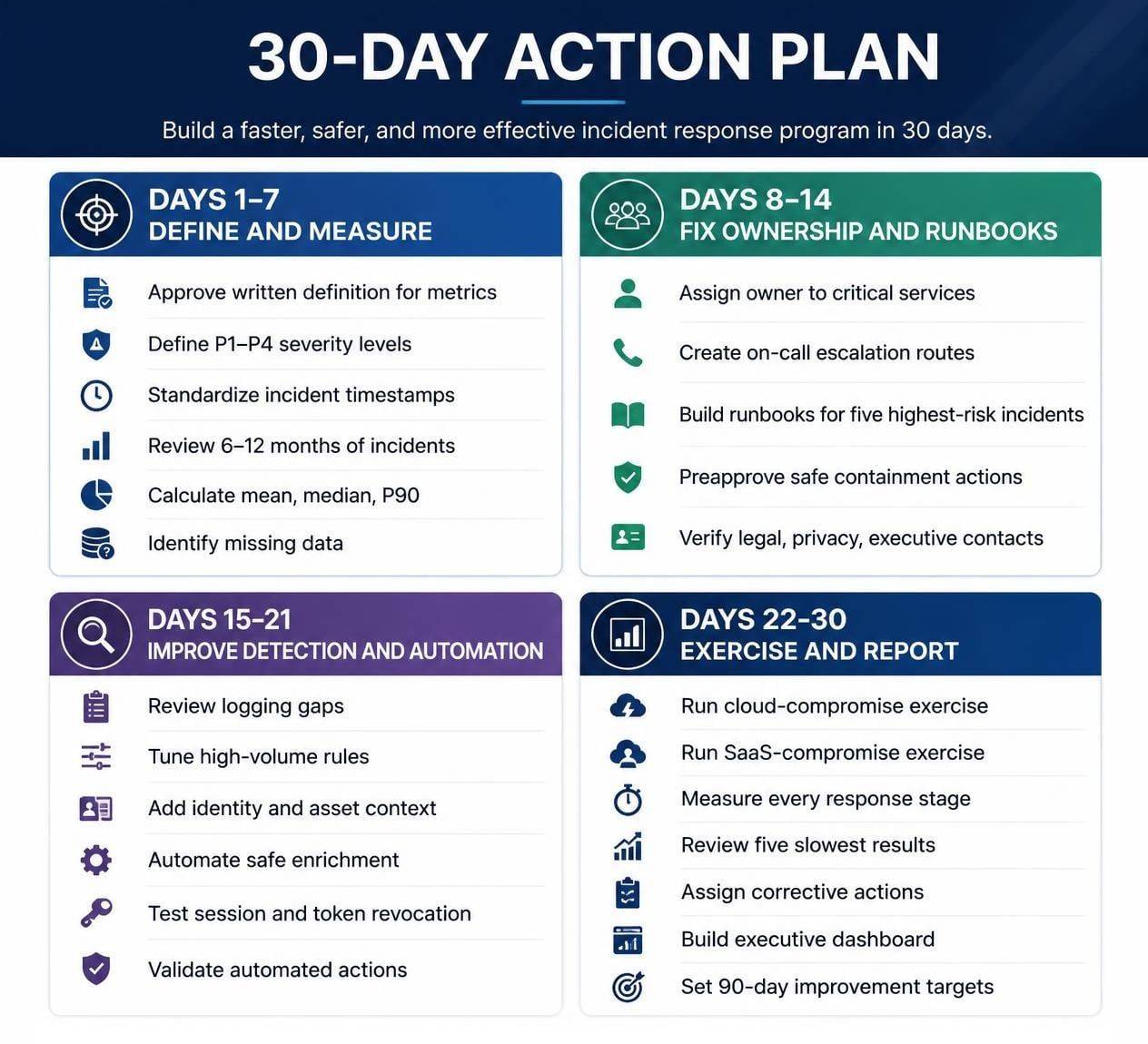
- A 30-day improvement plan
- Frequently asked questions
- Conclusion
What Do MTTD and MTTR Actually Measure?
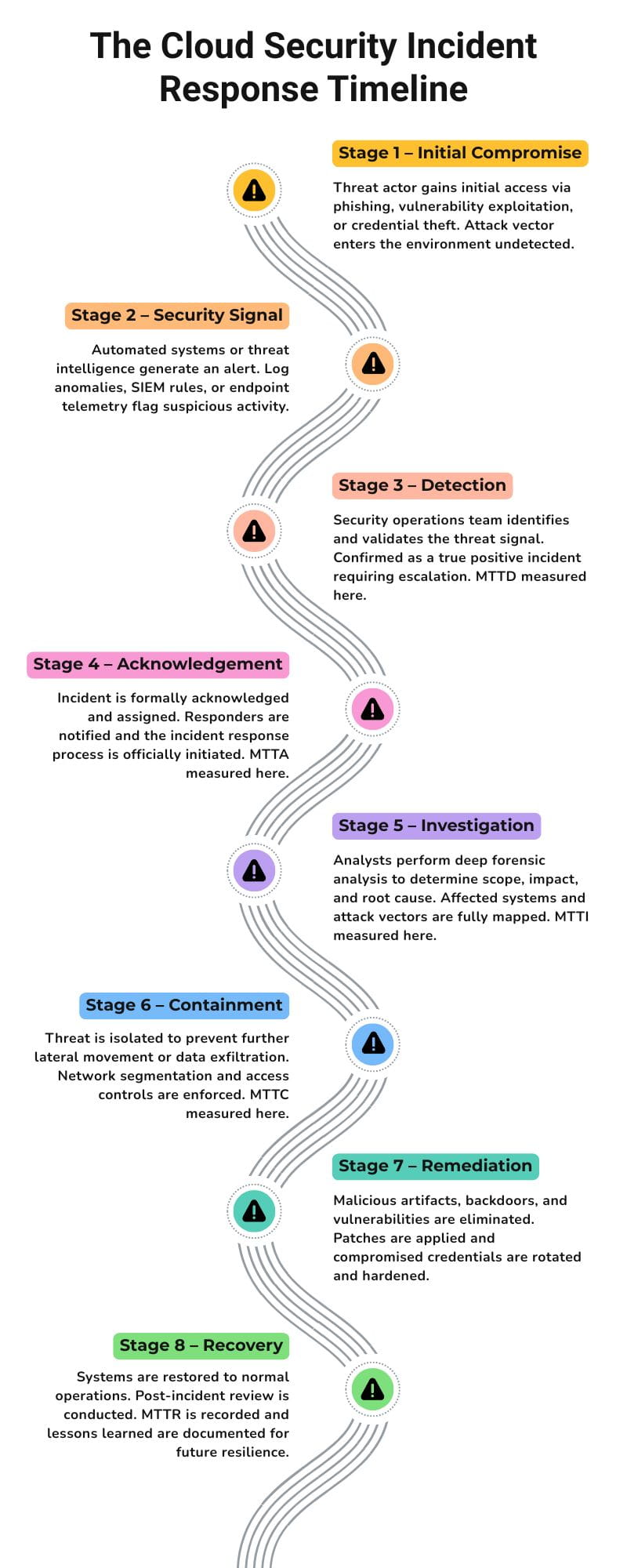
MTTD — measures the time an incident goes undetected. MTTR is the time taken to achieve a defined response, containment, remediation, resolution or recovery outcome.
The problem is that different teams mean different things when they say MTTR.
MTTD, MTTA, MTTI, MTTC and MTTR Compared
| Metric | Clock Starts | Clock Stops | Main Question |
|---|---|---|---|
| MTTD | Initial compromise or malicious activity | Detection | How quickly did we find the threat? |
| MTTA | Alert generation | Analyst or automation acknowledgement | How long did the alert wait? |
| MTTI | Detection or investigation start | Investigation reaches a verdict | How quickly did we understand it? |
| MTTC | Confirmed incident | Effective containment | How quickly did we stop additional damage? |
| MTTR | Defined response event | Defined response, remediation or recovery outcome | How quickly did we complete the selected objective? |
| Dwell time | Initial compromise | Discovery | How long was the attacker present? |
| Breakout time | Initial access | Lateral movement to another system | How quickly did the attacker expand access? |
Why Does the “R” in MTTR Cause Confusion?
Depending on the organization, MTTR may mean:
- Mean Time to Respond: Detection to the first meaningful response
- Mean Time to Remediate: Detection to a verified security fix
- Mean Time to Recover: Incident declaration to safe restoration
- Mean Time to Resolve: Ticket creation to complete resolution
- Mean Time to Repair: Diagnosis and repair of a failed component
A team reporting an MTTR of 20 minutes may only be measuring acknowledgement. Another team reporting eight hours might be measuring full technical remediation.
The numbers are not on the same footing until they are both measuring the same thing.
A Clear Internal Definition
A cloud-security team could define MTTR as:
“The elapsed time from confirmed incident classification to verified containment. Long-term recovery, legal assessment and post-incident reporting are measured separately.”
This is more useful than measuring the time between ticket creation and ticket closure.
Step-by-Step Card: Define the Clock
Step 1: Identify the Starting Event
Choose one measurable event, such as:
- Earliest confirmed malicious activity
- Security alert generation
- Analyst acknowledgement
- Incident declaration
Step 2: Identify the Stopping Event
Choose a verifiable outcome, such as:
- Every active session revoked
- Endpoint successfully isolated
- Public cloud access removed
- Exposed secret rotated
- Service restored from a clean environment
Step 3: Document Exclusions
State whether the metric excludes:
- Legal review
- Customer notification
- Long-term hardening
- Post-incident reporting
- Third-party delays
Step 4: Apply the Same Definition
Use the same clock across comparable incidents and reporting periods.
Minimum Evidence to Preserve
Record the source of each timestamp, including SIEM data, cloud audit records, identity-provider logs, ticket events and containment-command results.
MTTD and MTTR Benchmarks for Cloud and SaaS Security: 2020–2026
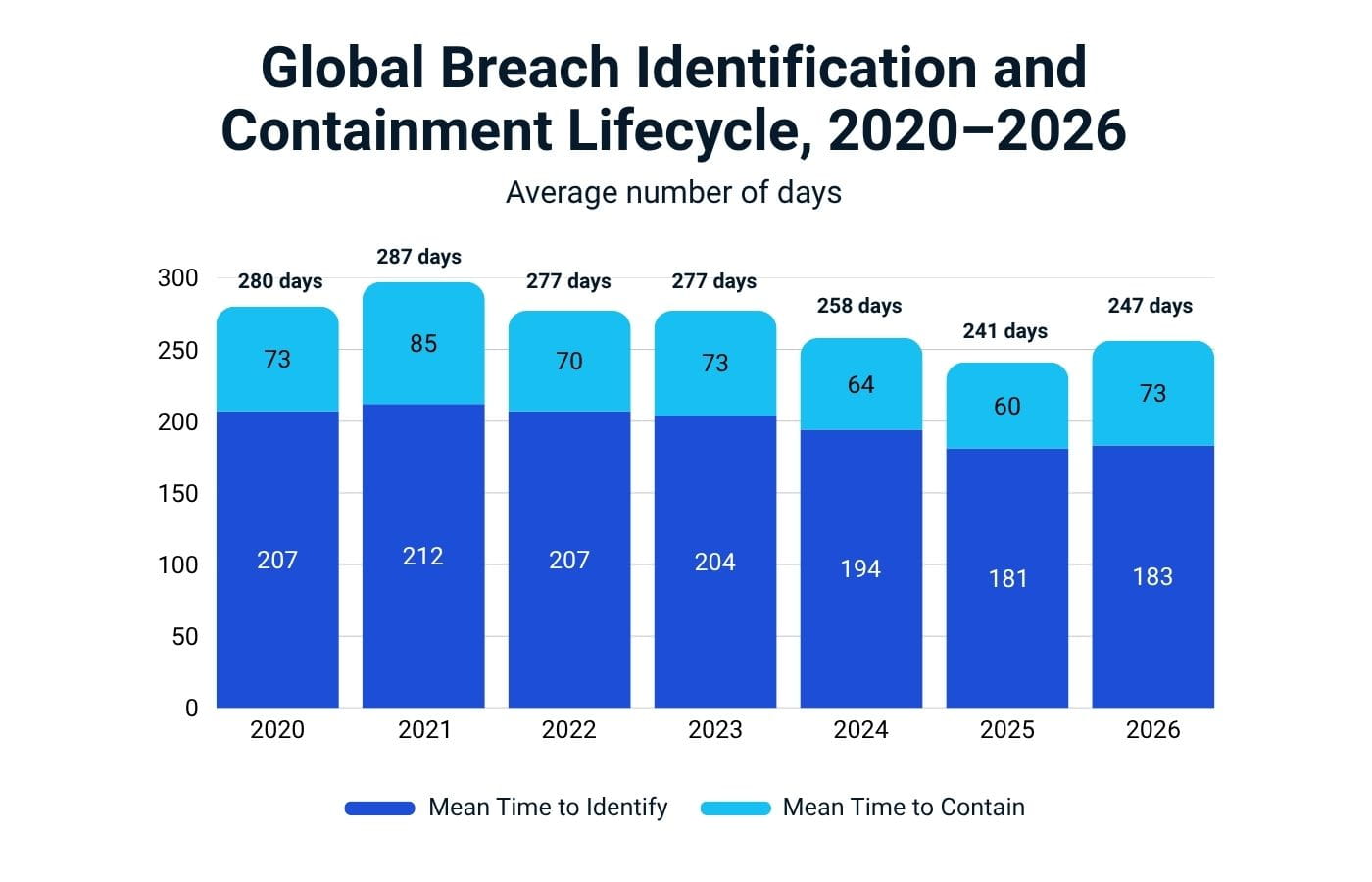
Global breach-lifecycle data improved significantly between 2021 and 2025. However, the total identification-and-containment period increased again in IBM’s 2026 study.
Verified Data Breach Lifecycle Benchmarks
| Report Year | Mean Time to Identify | Mean Time to Contain | Total Lifecycle |
|---|---|---|---|
| 2020 | 207 days | 73 days | 280 days |
| 2021 | 212 days | 75 days | 287 days |
| 2022 | 207 days | 70 days | 277 days |
| 2023 | 204 days | 73 days | 277 days |
| 2024 | 194 days | 64 days | 258 days |
| 2025 | 181 days | 60 days | 241 days |
| 2026 | 183 days | 64 days | 247 days |
IBM calls these measurements Mean Time to Identify, or MTTI, and Mean Time to Contain, or MTTC. Relabelling the entire lifecycle as an alert-level MTTR would be inaccurate.
What Changed in 2026?
The total breach lifecycle increased from 241 days in 2025 to 247 days in 2026. That reversed part of the improvement recorded during the previous five years.
The 2026 report also found:
- Global average breach cost reached USD 4.99 million.
- Average US breach cost reached USD 11.5 million.
- AI-driven attacks increased by 56%.
- Extensive security AI and automation shortened breach lifecycles by 65 days.
- Extensive security AI and automation produced average savings of USD 1.93 million compared with organizations not using those solutions extensively.
Why Are Breach Benchmarks Measured in Days?
A serious breach may begin weeks or months before the first useful security alert.
Investigators may reconstruct initial access using:
- Authentication records
- Endpoint activity
- Cloud audit trails
- Network-device logs
- SaaS administrative events
- API activity
- Email records
- Forensic artifacts
Identity abuse can resemble normal employee behavior because attackers may use legitimate credentials, administrative tools and approved cloud services.
Mandiant’s 2026 report found that global median dwell time increased from 11 to 14 days. Cyber-espionage and North Korean IT-worker investigations each recorded a median dwell time of 122 days.
How Do Cloud Environments Affect MTTD and MTTR?
Cloud and hybrid environments increase the complexity of response as identities, applications, data, workloads and audit records can be distributed across several platforms.
According to IBM, incidents involving data across on-premises, public-cloud and private-cloud environments had the longest lifecycle at 256 days, extending to 2026. Among the storage types compared, private-cloud incidents had the shortest lifecycle at 240 days.
Cloud Breach Lifecycle by Data Location
| Breached Data Environment | MTTI | MTTC | Total 2026 Lifecycle |
|---|---|---|---|
| Private cloud | 178 days | 62 days | 240 days |
| On-premises | 182 days | 62 days | 244 days |
| Public cloud | 184 days | 67 days | 251 days |
| All three locations | 189 days | 67 days | 256 days |
Public-cloud breaches produced an average cost of USD 5.38 million in IBM’s study. Incidents involving data across all three locations averaged USD 5.39 million.
A multi-cloud or hybrid strategy therefore needs unified coverage across:
- Human identities
- Non-human identities
- SaaS applications
- Cloud control planes
- Workloads and containers
- Data repositories
- CI/CD environments
- Source-code platforms
- Third-party integrations
- Centralized logging
Related reading: cloud security strategy · major cloud storage security threats
Which Metrics Matter Most for SaaS Security?
A SaaS security program should measure real containment outcomes, not only how quickly a ticket was closed.
| SaaS Incident | Operational Metric to Track |
|---|---|
| Stolen employee session | Time to revoke every active session |
| Malicious OAuth application | Time to remove the grant and invalidate tokens |
| Exposed API key | Time to rotate the key and investigate misuse |
| Privileged account takeover | Time to disable access and preserve evidence |
| Unauthorized data export | Time to stop the export and identify affected records |
| Third-party integration compromise | Time to disconnect the integration and validate downstream access |
| Suspicious mailbox activity | Time to remove forwarding rules and revoke sessions |
| Cloud-storage exposure | Time to restrict access and determine whether data was downloaded |
| Service-account misuse | Time to revoke credentials and identify connected resources |
| Compromised CI/CD pipeline | Time to stop deployment and validate affected artifacts |
Why Password Resets Are Not Always Enough
Resetting a user’s password may not terminate:
- Existing sessions
- Refresh tokens
- OAuth grants
- API credentials
- Application passwords
- Malicious mailbox rules
- Trusted devices
- Session cookies
A SaaS containment runbook should specify how each access mechanism is invalidated.
What Is a Good MTTD and MTTR for a SOC?
There is no universally accepted benchmark for every SOC.
A useful target must reflect:
- Incident severity
- Business impact
- Data sensitivity
- Attacker speed
- Asset criticality
- Monitoring coverage
- Staff availability
- Response authority
- Regulatory exposure
- The outcome being measured
Practical US SOC Starting Targets
The following figures are editorial planning recommendations. They are not regulatory standards or universally established industry benchmarks.
| Severity | Example Incident | Triage Target | Verified Containment | Remediation Target |
|---|---|---|---|---|
| P1 Critical | Active ransomware, confirmed exfiltration or privileged takeover | 15 minutes or less | 30–60 minutes | 4–8 hours where possible |
| P2 High | Compromised credentials, lateral movement or malicious OAuth grant | 30 minutes | Within 2 hours | Within 8–24 hours |
| P3 Medium | Suspicious access, isolated malware or serious policy violation | Within 1 hour | Within 4 hours | Within 1–3 days |
| P4 Low | Informational alert or configuration drift | Within 4 hours | Planned queue | Risk-based schedule |
P1 Target Examples
For a compromised cloud administrator:
- Detect the anomaly within 5–15 minutes.
- Acknowledge it within 5 minutes.
- Revoke sessions within 15 minutes.
- Disable or restrict the account within 15–30 minutes.
- Verify containment within 30 minutes.
- Review privileged activity within 60 minutes.
For a leaked API key:
- Detect exposure within 15 minutes.
- Revoke the secret within 15 minutes.
- Issue a replacement within 30 minutes.
- Review related activity within two hours.
- Determine business impact within four hours.
For active ransomware:
- Detect high-confidence behavior within five minutes.
- Isolate affected systems within 15 minutes.
- Restrict compromised identities within 30 minutes.
- Protect identity and backup infrastructure immediately.
- Begin scope analysis within one hour.
CrowdStrike’s average 29-minute breakout time illustrates why a critical hands-on-keyboard incident cannot remain unattended in a queue for an hour.
How Do You Calculate MTTD and MTTR?
Add the relevant durations for comparable incidents and divide the result by the number of incidents.
MTTD Formula
MTTD = Total time from incident start to detection ÷ Number of confirmed incidents
Three incidents remained undetected for two, eight and four hours:
MTTD = (2 + 8 + 4) ÷ 3
MTTD = 4.67 hours
MTTA Formula
MTTA = Total time from alert generation to acknowledgement ÷ Number of acknowledged alerts
MTTC Formula
MTTC = Total time from incident confirmation to verified containment ÷ Number of confirmed incidents
MTTR Formula
MTTR = Total defined response, remediation or recovery time ÷ Number of incidents
Five incidents took 30, 60, 90, 40 and 80 minutes to contain:
MTTR = 300 minutes ÷ 5
MTTR = 60 minutes
Five-Step Measurement Card
Step 1: Define the Clock
Document the exact event that starts and stops every metric.
Step 2: Separate Severity Levels
Do not combine a low-risk configuration warning with active ransomware.
Step 3: Separate Incident Categories
Measure identity compromise, malware, data exfiltration and cloud misconfiguration independently.
Step 4: Report Mean, P50 and P90
The mean can be distorted by one unusually slow incident.
- Mean: Arithmetic average
- P50: Median or middle result
- P90: The point below which 90% of results fall
Step 5: Review Outliers
Determine whether delays came from:
- Missing logs
- Alert noise
- Approval bottlenecks
- Another department
- Unavailable personnel
- Vendor dependence
- Technical complexity
- Poor asset ownership
Why Do MTTD and MTTR Benchmark Numbers Differ?
Benchmark numbers differ as organizations use different clocks, definitions, incident samples and severity levels.
Common measurement differences include:
- Incident start versus alert creation
- Detection versus analyst acknowledgement
- Acknowledgement versus containment
- Containment versus complete recovery
- Mean versus median
- Human response versus automated response
- Business hours versus 24/7 monitoring
- Critical incidents versus all alerts
- Confirmed incidents versus false positives
- Single-cloud versus hybrid environments
- In-house SOC versus managed provider
- Technical recovery versus complete business restoration
A Simple Comparison Example
Company A reports an MTTR of 12 minutes. Its clock starts when an analyst acknowledges an alert and stops when the incident ticket is assigned.
Company B reports an MTTR of four hours. Its clock starts at confirmed detection and stops only after sessions are revoked, credentials rotated, malicious persistence removed and recovery verified.
Company B may have the stronger response process even though its reported number is higher.
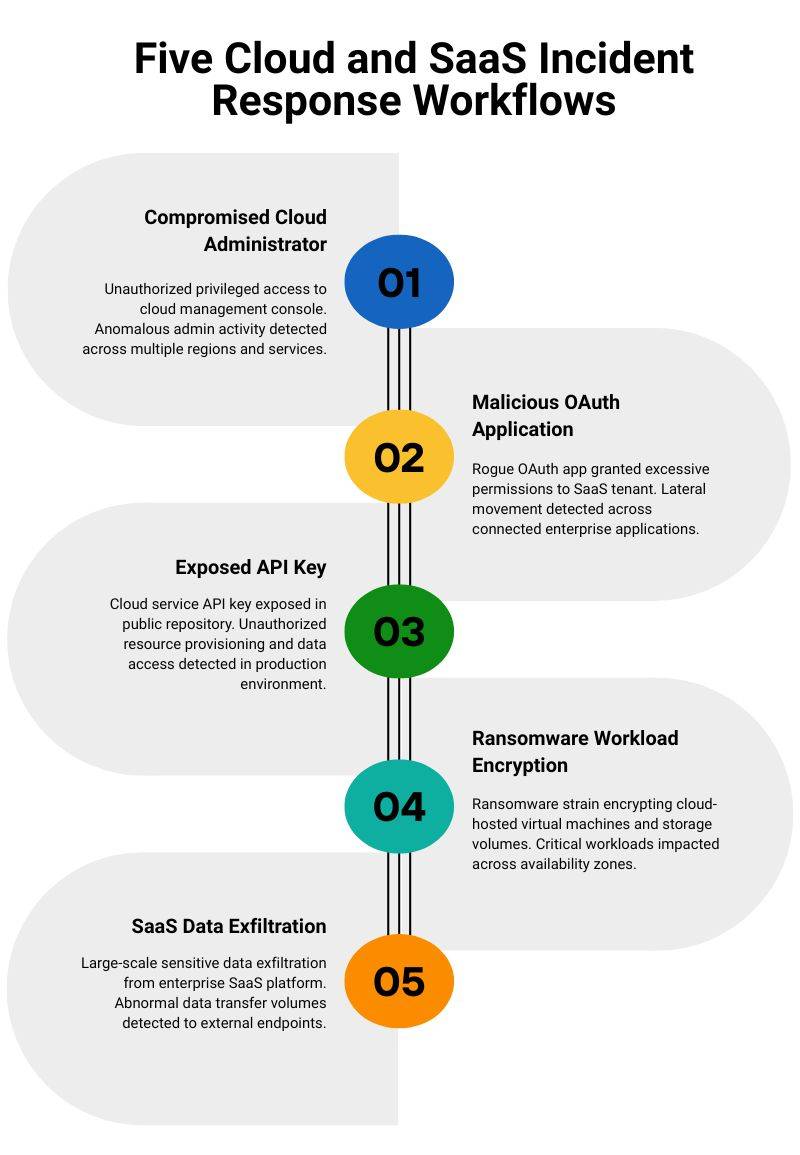
Five Workflows That Reduce Cloud and SaaS MTTR
1. Compromised Cloud Administrator
Detect — Look for:
- Impossible or highly unusual travel
- New MFA registration
- Unexpected privileged role assignment
- New API keys
- Unusual control-plane activity
- Disabling of security tools
- Suspicious token creation
Contain
- Disable or restrict the account.
- Revoke every active session.
- Invalidate access and refresh tokens.
- Remove unauthorized MFA methods.
- Rotate related credentials.
- Restrict newly created identities.
Validate
- Review cloud audit logs.
- Identify new users, keys and policies.
- Check data-access activity.
- Examine connected SaaS applications.
- Confirm the attacker has no remaining access.
Best metric: Time to revoke privileged access completely.
2. Malicious SaaS OAuth Application
Detect — Look for:
- High-risk consent grants
- Unusual API activity
- Broad mailbox permissions
- Bulk file access
- New application credentials
- Consent from a high-value user
Contain
- Remove the application.
- Revoke grants and tokens.
- Terminate affected sessions.
- Restrict the user account.
- Block unauthorized future consent.
Validate
- Review mailbox activity.
- Check file storage and export logs.
- Remove malicious rules.
- Identify other users who approved the application.
Best metric: Time from consent anomaly to verified token revocation.
3. Exposed API Key or Secret
Detect — Use:
- Repository secret scanning
- CI/CD scanning
- Unusual API-source detection
- Cloud-provider alerts
- Threat-intelligence notifications
- Usage anomaly detection
Contain
- Revoke the exposed credential.
- Issue a replacement through an approved secret manager.
- Block suspicious requests.
- Stop affected pipelines where necessary.
Validate
- Search repository history.
- Review logs for prior misuse.
- Check forks and build output.
- Identify related exposed credentials.
Best metric: Time to revoke the secret and determine impact.
4. Ransomware or Cloud Workload Encryption
Detect — Look for:
- Mass file changes
- Backup deletion
- Endpoint behavior anomalies
- Sudden privilege escalation
- Remote-administration abuse
- Unusual encryption activity
Contain
- Isolate affected workloads.
- Disable compromised identities.
- Segment affected network areas.
- Protect backup systems.
- Preserve volatile evidence.
Validate
- Check lateral movement.
- Identify persistence.
- Confirm clean recovery points.
- Monitor restored systems.
- Verify identity infrastructure.
Best metric: Time to effective, verified containment.
5. Suspected SaaS Data Exfiltration
Detect — Look for:
- Abnormal bulk downloads
- Unusual exports
- High-volume API activity
- Access outside the user’s normal role
- Downloads from unfamiliar devices
- Third-party application access
Contain
- Suspend the affected account.
- Stop the export.
- Revoke sessions and tokens.
- Restrict external sharing.
- Disconnect suspicious integrations.
Validate
- Identify affected data.
- Determine the destination.
- Review external sharing.
- Identify affected users and records.
- Begin privacy and legal assessment.
Best metric: Time to stop the transfer and identify affected records.
Related reading: cybersecurity incident response plan · SaaS security best practices
How Can an Organization Reduce MTTD?
Reducing MTTD requires better visibility, detection quality and monitoring coverage.
Improve Telemetry Coverage
Collect and retain relevant logs from:
- Identity providers
- SaaS administrator activity
- Cloud control planes
- Endpoint security platforms
- Email systems
- CI/CD pipelines
- Source-code repositories
- API gateways
- Privileged-access systems
- Data-security tools
- Firewalls and secure-access platforms
A detection system cannot identify activity that was never logged.
Prioritize Identity-Based Detection
Modern cloud and SaaS incidents are usually valid credentials, not easily identifiable malware.
Monitor for:
- New authentication methods
- Unexpected token creation
- Privilege escalation
- Dormant account activity
- Service-account anomalies
- OAuth consent changes
- Mass file access
- Suspicious mailbox rules
- Unusual administrator actions
- Non-human identity misuse
CrowdStrike’s data also showed that 82% of detections in 2025 were malware-free, highlighting the importance of monitoring identity, behavior, cloud and SaaS activity, not just malware signatures.
Improve Alert Quality
A high-priority alert should immediately tell the analyst:
- What happened
- Why the activity is suspicious
- Which identity or asset is affected
- What privileges are involved
- What data may be accessible
- What investigation should begin first
- What containment actions are available
- Who owns the affected service
Extend Log Retention
Mandiant found cases of advanced persistence that lasted well beyond the normal 90-day retention period. Critical identity, network, hypervisor and cloud administration logs may require longer retention.
Use Threat Hunting
Threat hunting can find:
- Attacker behavior that did not generate an alert
- Valid-account misuse
- Persistence on edge devices
- Unusual SaaS integrations
- Long-running data access
- In-memory activity
- Control-plane anomalies
How Can an Organization Reduce MTTR?
A fast MTTR is not delivered by technology alone. The longest delays are often in authority, ownership and coordination.
Preapprove Safe Containment Actions
Security teams should not require executive approval for every reversible, low-risk action.
Possible preapproved actions include:
- Revoking a suspicious session
- Temporarily restricting a compromised identity
- Isolating an endpoint
- Revoking an exposed secret
- Removing public cloud-storage access
- Disabling a malicious OAuth grant
- Blocking a confirmed malicious domain
High-impact actions should still have safeguards and escalation requirements.
Build Incident-Specific Runbooks
Create separate runbooks for:
- Compromised administrator
- Business email compromise
- Ransomware
- Public-cloud data exposure
- API-key leakage
- Malicious OAuth application
- SaaS data exfiltration
- Insider misuse
- Third-party compromise
- CI/CD pipeline compromise
Each runbook should define:
- Incident owner
- Technical commands
- Required evidence
- Communication steps
- Approval thresholds
- Legal and privacy escalation
- Recovery validation
- Metric start and stop events
Automate Repetitive Work Safely
Automation may help:
- Enrich alerts
- Retrieve identity context
- Identify asset owners
- Open incident tickets
- Preserve logs
- Revoke tokens
- Isolate endpoints
- Rotate secrets
- Notify on-call personnel
- Run approved investigation queries
Automation needs to be tested and bound. High-impact containment that is misplaced can interfere with legitimate operations.
IBM discovered that organizations that extensively use security AI and automation shortened breach lifecycles by 65 days and saved an average of USD 1.93 million compared with organizations that did not extensively use those tools.
Test the Incident-Response Plan
NIST published SP 800-61 Revision 3 in April 2025. The guidance discusses incident response throughout the management of cybersecurity risk to improve preparation, detection, response, and recovery.
Run:
- Tabletop exercises
- Technical simulations
- Cloud-compromise exercises
- Identity-takeover simulations
- Ransomware recovery tests
- Executive decision exercises
- Legal and communication drills
Measure exercises using the same timestamps used for real incidents.
US Cyber Incident Reporting Context
US organizations should set internal detection and escalation targets long before any applicable reporting deadline.
A regulatory deadline is not a metric of operations. It can take some time to:
- Confirm the incident
- Preserve evidence
- Contain access
- Determine affected information
- Assess materiality
- Evaluate legal obligations
- Identify affected jurisdictions
- Prepare notifications
- Coordinate with executives and regulators
Important US Reporting Timelines
| Regulatory Context | General Timeline |
|---|---|
| SEC-reporting domestic public company | Four business days after determining that an incident is material |
| New York DFS-covered entity | As promptly as possible and no later than 72 hours after determining a reportable incident occurred |
| New York DFS extortion payment | Notice generally required within 24 hours of payment |
| HIPAA breach affecting individuals | Without unreasonable delay and no later than 60 days after discovery |
| HIPAA breach affecting 500 or more individuals | HHS Secretary notification without unreasonable delay and within 60 days |
| HIPAA breach affecting fewer than 500 individuals | Secretary report generally due within 60 days after the calendar year ends |
| Proposed CIRCIA framework | 72 hours for covered incidents and 24 hours for ransom payments after the final rule becomes effective |
SEC Cybersecurity Disclosure
A domestic public company must generally file an Item 1.05 Form 8-K within four business days of the company determining that a cybersecurity incident is material.
The deadline is based on the materiality determination, and not the date of the initial incident or date of discovery. The company must make that determination without undue delay.
New York Department of Financial Services
Entities covered by 23 NYCRR Part 500 must report qualifying cybersecurity events as promptly as possible and no later than 72 hours.
New York DFS guidance also requires covered entities to notify the regulator of an extortion payment within the applicable 24-hour window. New York remains particularly relevant to financial institutions, insurers and other DFS-regulated businesses.
HIPAA Breach Notification
Following a breach of unsecured protected health information, HIPAA-covered entities may need to notify affected individuals, the HHS Secretary and, in certain cases, the media.
Individual notice must be provided without unreasonable delay and no later than 60 days after discovery. Breaches affecting 500 or more individuals must generally be reported to the HHS Secretary within the same outer limit. Smaller breaches may be reported annually under the applicable schedule.
Current CIRCIA Status
CIRCIA establishes a future framework for covered critical-infrastructure entities to report covered incidents within 72 hours and qualifying ransom payments within 24 hours.
However, organizations are not required to submit CIRCIA reports until the final rule’s effective date. CISA was still conducting rulemaking and stakeholder engagement during 2026.
What Metrics Should Be Tracked Beyond MTTD and MTTR?
MTTD and MTTR are speed metrics. They do not exhibit full detection coverage or successful containment.
A more useful SOC dashboard includes:
| Metric | Why It Matters |
|---|---|
| MTTA | Measures alert-queue delay |
| MTTI | Measures investigation speed |
| MTTC | Measures containment effectiveness |
| Median response time | Shows typical performance |
| P90 response time | Exposes slow outliers |
| False-positive rate | Measures alert quality |
| Detection coverage | Shows which attack techniques are monitored |
| Critical assets producing usable logs | Measures visibility |
| Percentage detected internally | Measures monitoring effectiveness |
| Customer- or third-party-detected incidents | Reveals blind spots |
| Reopened incident rate | Measures containment quality |
| Repeat root causes | Measures whether lessons are implemented |
| Time to revoke access | Measures identity and SaaS containment |
| Recovery-test success rate | Measures resilience |
| Business-hours versus after-hours results | Reveals coverage gaps |
| Time to reach a reporting decision | Measures security, legal and compliance coordination |
In 52% of Mandiant’s 2025 investigations, organizations detected malicious activity internally, compared to 43% in the previous reporting period. Other cases were spotted by external entities, while some organizations learned about incidents from the adversaries themselves.
Do Not Measure Only the Mean
Consider these detection times:
- 4 minutes
- 5 minutes
- 6 minutes
- 8 minutes
- 10 hours
The mean exceeds two hours even though four incidents were detected within eight minutes.
Report:
- Mean
- Median
- P90
- P95
- Best result
- Worst result
- Number of incidents
- Severity
- Incident category
- Business-hours status
Practitioner Reality Check
Security practitioners commonly emphasize that priority must determine the target.
A three-hour average may appear acceptable until the underlying incidents are separated. It could include dozens of low-risk warnings and one ransomware incident that waited far too long.
A P1 incident needs a response measured in minutes, while a low-risk configuration issue may reasonably remain in a planned remediation queue.
The most important question is therefore not:
“What is our average MTTR?”
It is:
“What is our P90 verified-containment time for P1 incidents?”
Safe Network Hub Team’s Recommendation
Organizations should stop searching for one universal MTTR number.
Start by defining the clock and recording a 30-day baseline. Then identify which stage is genuinely slow:
- Detection
- Acknowledgement
- Investigation
- Containment
- Remediation
- Recovery
- Legal assessment
- Management escalation
- Third-party coordination
Fact-Checker Clarifications
- IBM’s 183-day figure is MTTI, not an alert-level MTTD SLA.
- IBM’s 64-day figure is MTTC across studied breaches.
- The 247-day total is not a recommended SOC target.
- CrowdStrike breakout time measures initial access to lateral movement.
- Mandiant dwell time measures compromise to discovery.
- Regulatory deadlines are not detection or containment targets.
- The CIRCIA statutory framework should not be described as currently effective until the final rule takes effect.
Helpful Resources
- IBM Cost of a Data Breach Report 2026
- Mandiant M-Trends 2026
- CrowdStrike 2026 Global Threat Report
- NIST SP 800-61 Revision 3
- SEC Cybersecurity Disclosure Guide
- HHS HIPAA Breach Notification Rule
- New York DFS Cybersecurity Resource Center
Frequently Asked Questions
What is a good MTTD benchmark in cybersecurity?
A good MTTD is relative to the incident and where you start measuring. Critical identity, ransomware and active-exfiltration alerts should be identified and triaged ideally in minutes. Studies of complete breaches show much longer periods because they include malicious activity that occurred before a useful alert was available.
What is a good MTTR for a SOC?
A mature team might have a goal of validated containment within 30-60 minutes for a validated P1 incident. Complete remediation and business recovery may take hours or longer.
What was the average data breach lifecycle in 2026?
IBM took 183 days to identify a breach and 64 days to contain it, resulting in a total breach lifecycle of 247 days.
Why does IBM report breach identification in days?
IBM looks at real-world breaches that have happened. The timeline from initial compromise to discovery might be reconstructed by investigators, including weeks or months where the attacker remained invisible to the SOC.
Should MTTR mean response, remediation or recovery?
Any of those meanings may be used, but the organization must document which definition was chosen. The start event, stop event, and excluded activities should appear next to the reported number.
How should a SaaS company measure MTTR?
For a SaaS company, it’s essential to track certain outcomes such as session revocation, malicious OAuth removal, token invalidation, account restriction, API-key rotation, unauthorized-export termination and safe service recovery.
Should mean or median MTTR be reported?
Both should be reported. The mean is the arithmetic average and the median reduces distortion from extreme cases. P90 should be added to surface slow incidents as well.
What is the difference between MTTC and MTTR?
MTTC is a specific measure of the time it takes to stop the threat from causing any more damage. MTTR is a broader term and can mean response, remediation, resolution or recovery.
Is dwell time the same as MTTD?
They are very closely related, but they are not always calculated the same. Dwell time is usually a measure of time from compromise to detection. MTTD can be used across a wider range of security incidents.
Does a lower MTTD always mean better security?
No. A company might be quick to detect simple malware but miss advanced identity abuse. Detection coverage, false positives, incident severity and containment quality must be taken into account together.
Can automation reduce MTTR?
Yes, especially when it improves alerts, assigns responsibility, collects evidence and employs validated containment measures. But unsafe automation may interfere with legitimate systems.
What US cyber incident reporting timeline applies?
There is no universal timeline for US organizations. Publicly traded companies, health care organizations, financial institutions, critical infrastructure and companies that handle personal information may have different federal, state, sector and contractual obligations.
Conclusion
The most useful MTTD and MTTR benchmarks for cloud and SaaS security are not single universal numbers.
IBM’s breach-lifecycle data shows that it still takes months to identify and contain a breach that is already complete. But operational SOC targets for critical alerts are in minutes or hours. Both can be right. They are using different clocks.
Author: Safe Network Hub Team
Expertise: Cloud Security Researchers and IT Infrastructure Specialists
Last Update: August 4, 2026
Share This Network Security Guide
Help IT professionals, network engineers, and students strengthen their cyber defense.
Zubayer Hasan
LinkedIn Profile →Md Zubayer AL Hasan is the lead cybersecurity platform architect and security researcher at SafeNetworkHub. Dedicated to zero-knowledge cryptography, infrastructure vulnerability auditing, and building accessible privacy tools.
0 Comments
No comments yet
Have a question or insight about this network security guide? Be the first to share your thoughts!
Write the first comment →