
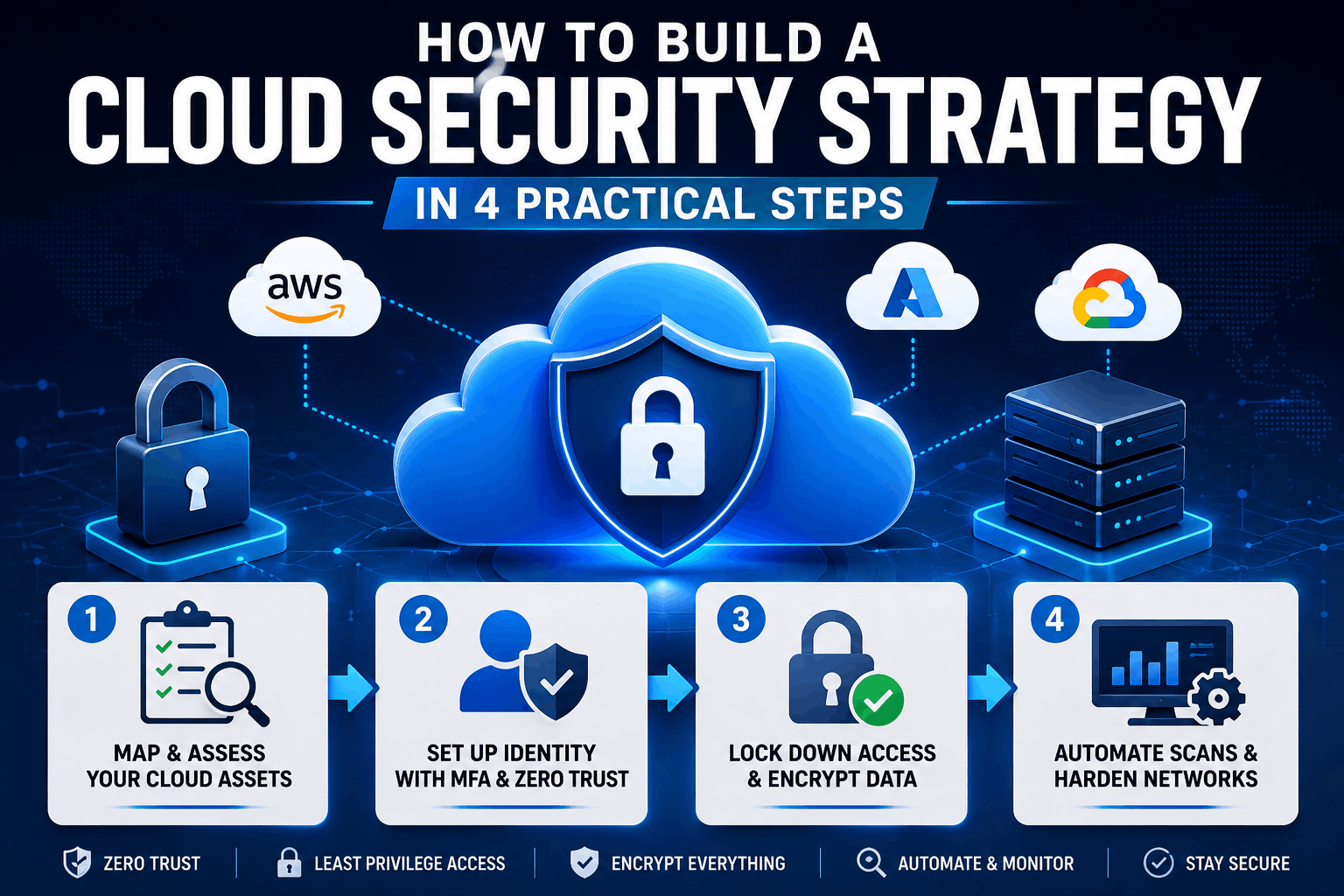
Most cloud breaches don’t start with a sophisticated hack. They start with a misconfigured storage bucket. An over-privileged service account.
A forgotten API key sitting in a public repository, yet if you’re responsible for your organization’s cloud security strategy. You already know this reality keeps people up at night.
Plus, but knowing the problem exists and actually fixing it are two night and day things, and the gap between awareness and action is where real damage happens. Industry data from CrowdStrike points to that misconfigurations remain the leading cause of cloud security incidents.
Not zero-day exploits or advanced persistent threats. That should bother you.
Because it means most breaches were preventable with (as one might expect) the right strategy in place.
TL; DR
- A real cloud security strategy starts by mapping every single asset and understanding exactly where your responsibility ends and the cloud provider’s begins. Skip this step and you’re securing blind spots you don’t even know exist.
- Zero Trust with mandatory MFA, strict least privilege access controls, and AES-256 encryption form the non-negotiable technical backbone of any defensible cloud posture. Leave any one of these out and attackers will find the gap.
- Automation through IaC scanning tools, CSPM platforms, and scheduled permission audits is what separates a strategy that actually works from one that only exists in a document nobody reads after the quarterly review meeting.
Main points
- Roughly 7 out of 10 cloud breaches trace back to misconfigurations, not sophisticated attack chains. Your cloud security strategy has to tackle configuration hygiene before anything else.
- Zero Trust means exactly what it says. Trust nobody by default. Every user, every workload, every API call gets verified. No exceptions for internal traffic.
- Encryption without proper key lifecycle management is like locking your front door and leaving the key under the welcome mat. Use a dedicated secrets manager, not environment variables or config files.
- If your security strategy lives exclusively in a PDF and never touches your CI/CD pipeline, it’s already obsolete the moment it’s printed. Security has to be executable.
- The shared responsibility model means your provider secures the cloud itself. You secure everything you put in it. Confusing those two responsibilities is how the worst breaches happen.
Table of Contents
- What You’ll Build
- Prerequisites
- Step 1: Map Your Cloud Assets and Define Shared Responsibility
- Step 2: Set Up Identity with MFA and Zero Trust
- Step 3: Lock Down Access with Least Privilege and Encryption
- Step 4: Automate Security Scanning and Harden Networks
- Verification and Next Steps
- People Also Ask & FAQs
What You’ll Build
In real-world terms, which means not a theoretical structure. Not a 40-page document nobody will read. A practical, practical setup.
You’ll walk away with a mapped inventory of your cloud assets tied to clear ownership… try it out. You’ll have MFA enforced across every user account and workload identity. With Zero Trust policies that verify every single access ask for.
Truly — your permissions model will follow least privilege, reviewed automatically on a schedule. All data, both at rest and in transit, will be encrypted using AES-256. 3 with keys managed through a dedicated secrets vault, and you’ll have automated scanning embedded in your deployment pipeline.
Misconfigurations pick up caught before they ever reach production.
Prerequisites
Before you start building out your cloud security strategy, you need a few things in place. Nothing exotic, just the fundamentals.
**Accounts and Access.**You need administrative access to your organization’s cloud console (AWS, Azure, GCP, or whichever provider you’re using). Read-only access won’t cut it. You’ll be creating policies, enabling services, and modifying configurations that require full admin rights. If you don’t have this, get it sorted first.
Tools You’ll Need.A CSPM tool for continuous monitoring. Wiz, Prisma Cloud, or even the native tools like AWS Security Hub work fine. You’ll also need an IaC scanning tool for your CI/CD pipeline. Checkov, tfsec, or Snyk are solid options. And a secrets manager. AWS Secrets Manager, Azure Key Vault, or HashiCorp Vault. Pick one. Actually, pick the one that integrates best with your existing stack.
Knowledge Baseline.
You should understand basic IAM concepts, what a VPC is, and how your CI/CD pipeline works. If terms like “RBAC” or “TLS termination” are completely foreign, spend an hour with your provider’s documentation first. This tutorial assumes you know what a subnet is and why encryption matters.
Step 1: Map Your Cloud Assets and Define Shared Responsibility
You can’t secure what you don’t know exists. An unexpected detail. The first step in any cloud security strategy is building a complete inventory of every asset running in your cloud environment, and plainly defining who’s responsible for securing each layer. The shared responsibility model isn’t optional reading.
It’s the foundation everything else sits on.
Then again. You probably know someone who’s made this exact mistake. Truly, they assumed the cloud provider handled encryption by default.
Nope. You’ve to turn that on.
Measurable difference. The provider gives you the answers. Using them is your job.
**Expected Result:**you’ve a complete, tagged inventory spreadsheet or dashboard showing every cloud resource, its owner, and a clear RACI chart mapping security responsibilities between your team and the provider.
Step 2: Set Up Identity with MFA and Zero Trust
If you think about it, identity is the new perimeter, and the old model of a hardened network boundary with a trusted interior is dead. In a proper cloud security strategy. A striking point. Every access ask for gets challenged regardless of where it originates. That’s Zero Trust in practice.
MFA is the bare minimum gatekeeper.
How does Zero Trust actually change daily operations?
It adds a verification step to every access try. Which sounds painful but becomes invisible once configured properly. Users authenticate once through a modern identity provider.
The system continuously validates their session context, and if someone’s behavior suddenly looks odd, access gets revoked automatically. The big shift is cultural.
Teams used to wide-open internal networks will feel the friction initially.
Expected Result:
Every human user and every workload identity in your cloud environment requires MFA to access anything. Network-level trust based on location no longer exists. Access decisions happen at the identity layer every single time.
Step 3: Lock Down Access with Least Privilege and Encryption
Once identity is verified, the next question is. Plus, nine times out of ten, the answer, in almost every case, is less than what they now have, and for data protection, the rule is simple. If it’s not encrypted.
Actually, let’s talk about key management for a moment. Because it’s where even careful teams slip up. You’d be surprised how a lot of organizations encrypt their databases, but then store the decryption keys in an environment variable that gets logged in (at least in many practical scenarios) plaintext during debugging.
The encryption becomes theater at that point, and honestly, real protection means the key never appears in application code, never appears in logs, and only gets accessed by authorized services at runtime through a secure API call to your vault.
What’s the biggest mistake people make with least privilege?
These days, the gist so far: blocksep matters. They treat it as a one-time cleanup project instead of an ongoing practice.
Permissions drift. New services get deployed. Developers copy-paste overly broad IAM policies from Stack Overflow. Without automated audits running every week. Your least-privilege posture erodes within months.
Schedule it, automate it. Make permission reviews as routine as code reviews.
Expected Result:
Every identity in your cloud environment has the absolute minimum permissions required. No wildcard policies exist. All stored data is encrypted with AES-256, all data in transit uses TLS 1.3, and all encryption keys live in a managed vault with automatic rotation enabled.
Step 4: Automate Security Scanning and Harden Networks
Under normal conditions, a cloud security strategy that relies on manual reviews doesn’t scale. Humans miss things — they get tired, they get distracted, and they can’t review hundreds of Terraform files every sprint.
Why does that matter? Automation is what makes your strategy enforceable.
It could go either way…which means you could say it make defense in depth that buys you time when something as expected slips through.
Keep this in mind; it shows up again soon.
If you think about it, network segmentation is the safety net for. When all your other controls fail.
An attacker might get a foothold through a vulnerable container or a stolen credential, but if that compromised asset can only talk to two other services on distinct ports.
Why does this matter? The blast radius stays small. The attacker can’t pivot laterally across your entire environment…which means that containment buys your detection systems time to catch the intrusion before (depending entirely on the context) data gets exfiltrated.
According to research cited by Wiz, agentless vulnerability management has become popular because it hands over full coverage without the performance overhead of installing agents on every workload. For ephemeral containers that spin up, and die in minutes, agent-based scanning simply doesn’t keep up. File that away.
You’ll see why it matters in a bit.
Is network segmentation still relevant in a Zero Trust world?
Yes, without a doubt. Zero Trust and network segmentation handle different layers of the problem.
Zero Trust handles authentication and authorization at the identity level; segmentation limits the network paths available even to authenticated actors.
Think of Zero Trust as checking everyone’s ID at every door. Segmentation is locking most of the doors. Quite a bit, so there’re fewer doors to guard. You need both.
Expected Result:
Every infrastructure change goes through automated security scanning before deployment. Your CSPM dashboard shows zero high-severity misconfigurations. Network segmentation limits lateral movement so that a breach in one segment can’t cascade across your entire cloud environment.
- Run a full asset inventory — Use your CSPM tool to enumerate every resource across all regions and tag each one with an owner.
- Enforce MFA for all identities — Turn on multi-factor authentication for every human user and every service account in your identity provider.
- Strip over-privileged permissions — Audit IAM policies, remove wildcard access, and implement RBAC with ABAC for granular control.
- Encrypt everything and vault the keys — Enable AES-256 for storage, enforce TLS 1.3 for transit, and store all keys in a dedicated secrets manager with rotation enabled.
- Automate IaC scanning in CI — Add Checkov or tfsec to your pipeline and fail builds on critical misconfigurations before deployment.
- Segment your networks — Implement private subnets, strict security groups, and micro-segmentation to contain lateral movement during a breach.
Verification and Next Steps
On the surface, zooming out a bit, you’ve put in the work. The thing is, now prove it’s actually working. Verification isn’t optional in a serious cloud security strategy. Now, it’s the feedback loop that tells you whether your controls are (depending entirely on the context) real or just theater.
Run a penetration test or a red team exercise against your environment, and, hmm, let me put it differently, even better, use an automated security validation tool that continuously tests your controls. Check that public S3 buckets pick up auto-remediated within minutes. Verify that a developer trying to deploy infrastructure with an overly permissive IAM role gets blocked at the CI stage. Confirm that network traffic between unrelated application tiers gets dropped at the security group level.
Industry data consistently points to regular testing catches gaps that design reviews miss.
For next steps, consider these three logical extensions of what you’ve built:
**Container image scanning.**If you’re running Kubernetes or any containerized workloads, add image vulnerability scanning to your pipeline. Sysdig and Wiz both offer this. Default container images are often packed with known CVEs that your runtime security inherits.
Incident response automation.Connect your CSPM alerts to a SOAR platform or webhook-powered runbook. When a misconfiguration gets detected, the first remediation step should fire automatically. Manual triage is too slow for cloud-scale incidents.
Governance alignment. Map your controls to a formal structure like NIST CSF or ISO 27001. This pays off during audits and compliance reviews. Having a documented cloud security strategy aligned to a recognized standard makes proving your posture to customers and regulators bigly easier. SentinelOne notes that organizations following NIST CSF tend to pass security reviews faster and with fewer findings.
People Also Ask & FAQs
How much does building a cloud security strategy cost?
Costs vary widely based on tooling choices and team size, but the biggest expense is usually the CSPM platform license. Expect to spend roughly $15,000 to $50,000 annually for a mid-sized organization plus the engineering hours to set up, and holds the controls.
The cost of a breach is far higher.
Can a small company with limited budget still build an effective strategy?
Here’s the thing – here’s the long, and short of it: blocksep matters. Nothing overly complex. Yes. Start with the free tier of your cloud provider’s native security tools, and honestly, aWS Security Hub. Azure Defender, and GCP Security Command Center all offer baseline posture management at no extra cost.
It clicks once you see it in action. Combine these with open-source IaC scanners like Checkov.
And you’ve solid coverage without a large line item.
How long does it take to implement everything described here?
For a mid-sized environment with a few dozen cloud accounts, plan on 4 to 8; wait, let me rephrase, weeks of focused effort spread across (at least in quite a few practical scenarios) engineering and security teams. The longest phase is usually the permission cleanup, not the tool deployment. It is transparent. Technical configurations can be done in days. Untangling years of accumulated over-privileged access takes real time.
What’s the difference between CSPM and CIEM?
This reflects what I mentioned a while ago, cSPM monitors your cloud infrastructure for misconfigurations and compliance drift. CIEM focuses in particular on identity and entitlement management. It needs observation. Analyzing whether users. And service accounts have more access than they need. Both are important.
CSPM catches the open bucket. CIEM catches the over-privileged admin who shouldn’t exist.
Do I need a dedicated cloud security team?
From a practical standpoint, not necessarily at the start. But you do need someone who owns security as their primary responsibility.
So naturally, in smaller organizations. This might be a senior engineer splitting their time. In larger ones, a dedicated cloud security architect pays for itself quickly. According to industry surveys.
Around 64% of organizations with mature cloud postures have at least one dedicated security engineer.
Is agentless security scanning good enough?
For most posture management and vulnerability assessment use cases, yes. Agentless scanning covers configuration risks, exposed secrets, and known CVEs without performance impact. For runtime threat detection, you still need some form of workload-level monitoring. And every industry trend is toward agentless for posture and lightweight agents for runtime.
🔍 Research Sources
Verified high-authority references used for this article
Share This Network Security Guide
Help IT professionals, network engineers, and students strengthen their cyber defense.
Zubayer Hasan
LinkedIn Profile →Md Zubayer AL Hasan is the lead cybersecurity platform architect and security researcher at SafeNetworkHub. Dedicated to zero-knowledge cryptography, infrastructure vulnerability auditing, and building accessible privacy tools.
0 Comments
No comments yet
Have a question or insight about this network security guide? Be the first to share your thoughts!
Write the first comment →