
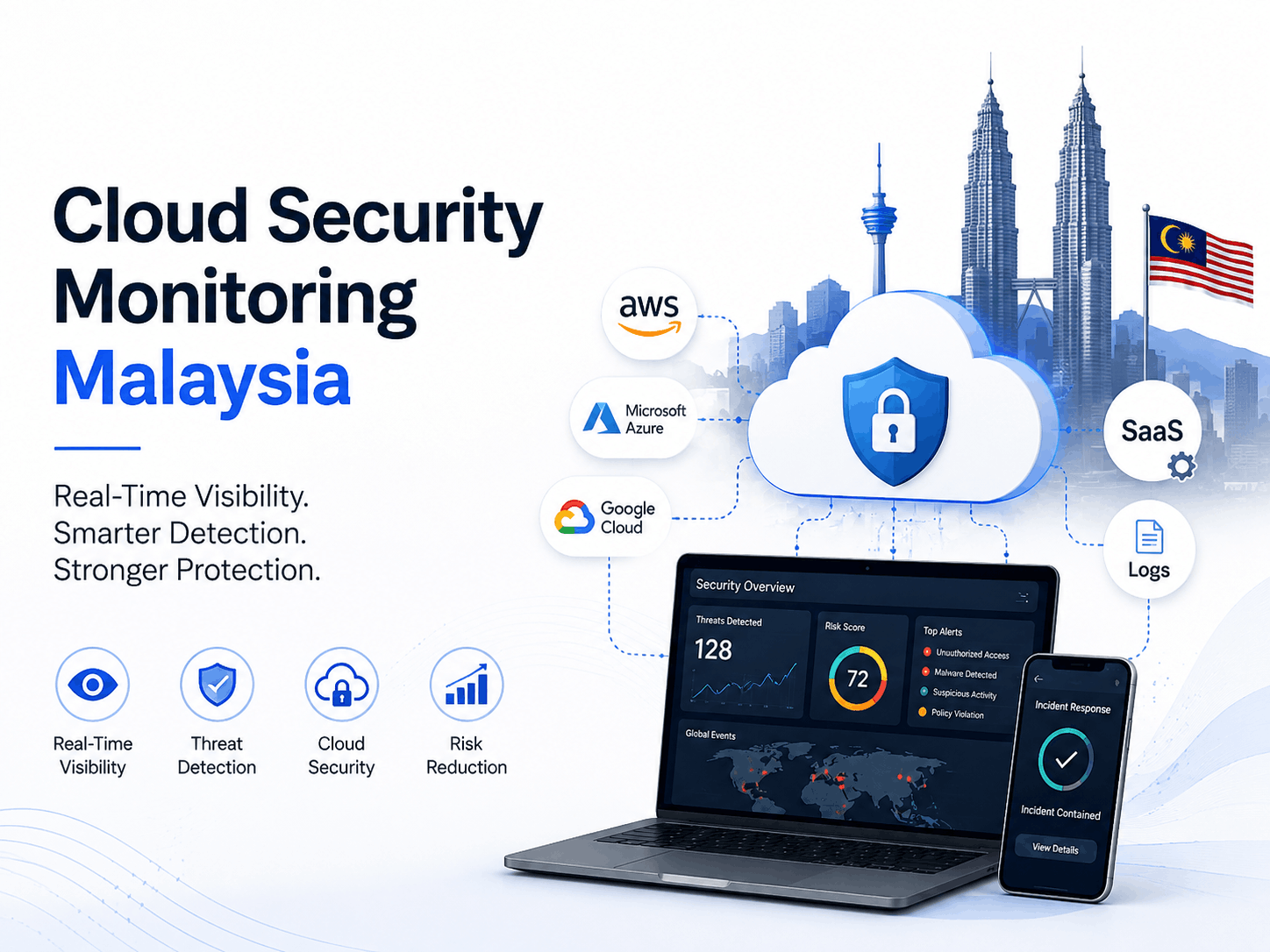
Cloud security monitoring Malaysia assists organisations in identifying suspicious logins, exposed storage, unauthorized configuration changes, compromised workloads and potential data theft across AWS, Microsoft Azure, Google Cloud and SaaS environments.
For Malaysian businesses, effective monitoring is not about the highest number of alerts. It’s about understanding what could affect customer data, business operations, regulatory obligations or critical services – and doing something about it before the damage spreads.
The Short Version
Cloud security monitoring Malaysia continuously collects and analyses events from identity, network, workload, application, storage and administration sources.
Malaysian organisations should first focus on five risks:
- Compromised user accounts
- Publicly exposed cloud storage
- Unexpected administrator access
- Abnormal data transfers
- Disabled security controls
The best programs combine sound logging, clear alert ownership, documented response workflows, and regular detection tuning.
Key Cloud Security Facts for Malaysia
Malaysia’s Cyber999 Incident Response Centre recorded 1,881 reported cybersecurity incidents in Q4 2025.
Although the total number of incidents declined from the previous quarter, reported data breaches increased from 142 to 171. That represents an increase of about 20%.
MyCERT stated:
“Data Breach incidents increased from 142 to 171 incidents.”
Source: Cyber999, MyCERT
Report: Cyber Incident Quarterly Summary Report—Q4 2025
Source link: mycert.org.my
MyCERT said that the exposed information may include personally identifiable information such as names, identification details, contact information and account credentials.
These numbers don’t prove that all of the reported breaches came from a cloud environment. They also show why Malaysian organisations require trustworthy visibility into:
- Where sensitive information is stored
- Who has access to it
- When permissions change
- Whether data is downloaded
- Whether unusual activity is occurring
Table of Contents
- What Is Cloud Security Monitoring?
- Why Malaysian Organisations Need Continuous Monitoring
- How Cloud Security Monitoring Works
- Which Cloud Risks Should Be Monitored?
- Malaysia Cloud Security and Compliance Requirements
- Best Cloud Security Monitoring Tools
- Five Practical Monitoring Workflows
- Step-by-Step Implementation Plan
- Cloud Monitoring Metrics and KPIs
- In-House vs Managed Monitoring
- What Malaysian Organisations Should Do Next
- Frequently Asked Questions
- Conclusion
What Is Cloud Security Monitoring Malaysia?
Cloud security monitoring Malaysia is the ongoing process of collecting, analyzing and correlating activities from across cloud users, accounts, workloads, applications, networks, configurations and data stores.
The goal is to identify anomalous behaviour, security flaws and unauthorised modifications in time for an organisation to investigate and react to them.
A monitoring platform can collect millions of events. But not every event should be considered an incident by the security team.
Events need identity context, asset importance, data sensitivity and behavioural information before they can be properly prioritised.
What Does Cloud Security Monitoring Cover?
| Monitoring Area | Examples of Activity |
|---|---|
| Identity and access | Failed logins, unfamiliar devices, MFA changes and privilege escalation |
| Cloud configuration | Public storage, exposed ports and disabled security controls |
| Data access | Bulk downloads, unusual database queries and file-sharing changes |
| Workloads | Malware, crypto-mining, suspicious processes and vulnerable containers |
| Networks | Unexpected outbound traffic, port scanning and abnormal connections |
| Applications | API abuse, suspicious sessions and authentication errors |
| Administration | Logging disabled, policies changed and new administrator accounts |
| SaaS platforms | Suspicious mailbox rules, mass downloads and external sharing |
Is Monitoring the Same as a Security Assessment?
No.
A security assessment is a snapshot of the environment at a specific point in time. Once the assessment is complete, continuous monitoring identifies new threats and changes.
| Cloud Security Assessment | Continuous Cloud Monitoring |
|---|---|
| Point-in-time review | Ongoing visibility |
| Finds existing weaknesses | Detects new events and changes |
| Usually scheduled periodically | Runs continuously |
| Produces recommendations | Produces alerts and response actions |
| May use manual testing | Relies heavily on telemetry and detection rules |
A strong Malaysian cloud security programme normally needs both.
The assessment identifies weaknesses. Monitoring helps determine whether those weaknesses are being exploited or reintroduced.
Why Do Malaysian Organisations Need Continuous Cloud Monitoring?
Malaysian organisations need to be constantly monitored as cloud risks can emerge between scheduled audits.
These risks often involve:
- Compromised credentials
- Misconfigured resources
- Excessive permissions
- Abnormal data access
- Unapproved configuration changes
- Disabled security controls
A storage account that was private yesterday can become publicly accessible today.
A legitimate employee account can be compromised after a phishing attack.
A new administrator role can be created without proper approval.
These risks cannot be controlled effectively when cloud logs are missing or no one is responsible for reviewing alerts.
Periodic Reviews Cannot Detect Every New Change
Cloud environments change rapidly.
Development and IT teams regularly:
- Deploy applications
- Create cloud storage
- Update firewall rules
- Add new users
- Connect third-party services
- Create temporary permissions
- Modify application settings
A secure cloud configuration can become insecure after:
- An emergency change
- An incorrectly written infrastructure-as-code template
- A contractor receiving excessive access
- A temporary permission remaining active
- A service being deployed outside the approved process
- Logging being accidentally disabled
Continuous monitoring gives you a timeline of those changes and helps security teams figure out who did them.
The Cloud Provider Does Not Own Every Security Responsibility
Cloud providers lock down big chunks of their physical infrastructure and managed platforms.
Customers remain responsible for many decisions involving:
- User identities
- Access permissions
- Data
- Applications
- Security configurations
- API keys
- Administrator accounts
- Cloud storage exposure
The exact division of responsibility will vary between infrastructure-as-a-service, platform-as-a-service and software-as-a-service.
Hyper-Local Considerations
A cloud monitoring design for a financial services company in Kuala Lumpur might require different escalation, retention and reporting processes than a small ecommerce business in Selangor.
Healthcare providers, financial institutions, public sector technology teams and organisations dealing with large volumes of personal data may need more formal:
- Monitoring processes
- Evidence preservation
- Incident escalation
- Management reporting
- Regulatory assessment
The monitoring technology may be similar, but the business impact and response duties are different.
How Does Cloud Security Monitoring Work?
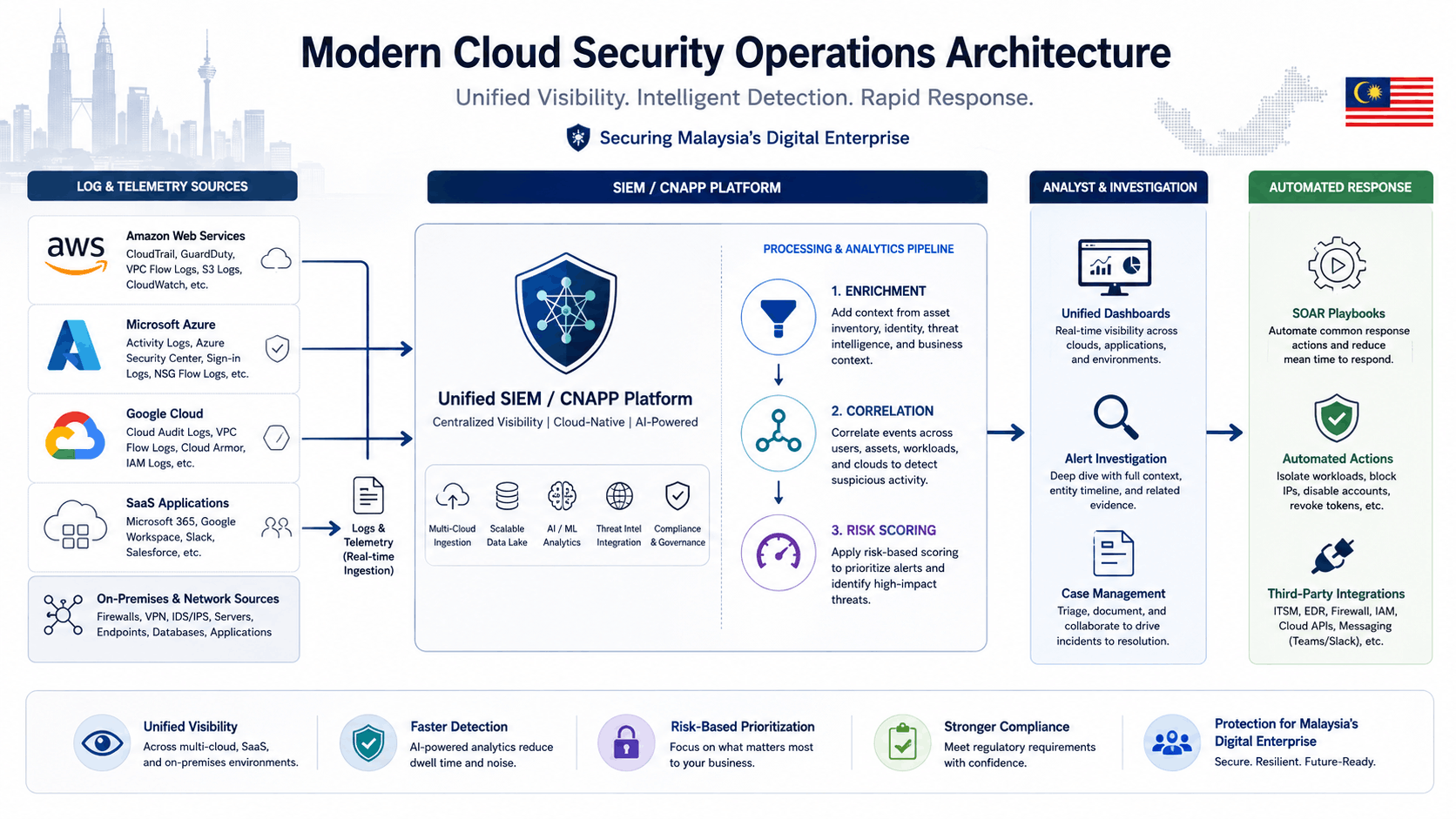
A cloud monitoring system collects events, adds business and security context, applies detection logic and pushes meaningful cases to analysts or automated response workflows.
The process can be divided into five stages.
1. Collect Security Data
The first stage is obtaining reliable telemetry from the cloud environment.
Priority data sources include:
- Cloud administrative audit logs
- Identity and authentication records
- Network flow logs
- Storage-access records
- Application and API logs
- Endpoint and server telemetry
- Container and Kubernetes events
- Database audit logs
- Email and SaaS security events
- Vulnerability and posture findings
A sophisticated SIEM cannot detect an event that was never logged.
2. Normalise the Events
AWS, Microsoft Azure, Google Cloud and SaaS platforms all have different event formats.
Normalisation gives important fields a consistent structure, such as:
- User
- Source IP address
- Device
- Time
- Action
- Cloud account
- Resource
- Result
- Data classification
This allows a central security platform to correlate activity across multiple systems.
3. Add Context
Context determines whether an event is routine, unusual or dangerous.
Useful information includes:
- User department and job role
- Whether the account is privileged
- Asset owner
- Asset criticality
- Data sensitivity
- Approved change ticket
- Device trust status
- Historical login location
- Known vulnerabilities
- Threat-intelligence matches
A login from a new location may be low risk for a travelling salesperson but critical for a dormant administrator account.
4. Detect and Prioritise
Cloud threat detection can use:
- Fixed detection rules
- Behaviour analytics
- Threat intelligence
- Risk scoring
- Attack-sequence correlation
- Machine-learning models
- Known indicators of compromise
The strongest detection rules combine several signals.
For example, a successful login from a new device, then an MFA change, then a large file download is more meaningful than a failed login alone.
5. Investigate and Respond
A cloud alert may lead to:
- Opening an incident ticket
- Collecting additional evidence
- Revoking a user session
- Disabling an account
- Blocking a network connection
- Isolating a compromised workload
- Reverting a configuration
- Informing the system owner
- Escalating to the privacy or legal team
Which Cloud Risks Should Malaysian Teams Monitor First?
Security teams should prioritise alerts that indicate:
- Account compromise
- Exposed sensitive information
- Unauthorised privilege
- Malicious workload activity
- Data exfiltration
- Disabled monitoring controls
Generating alerts for every minor error can overwhelm analysts and reduce trust in the monitoring system.
Priority Detection Categories
| Risk | High-Value Monitoring Signal | Initial Action |
|---|---|---|
| Account compromise | Successful login after repeated failures from an unfamiliar device | Revoke the session and verify the user |
| Public storage | Bucket or database changed from private to public | Block public access and review logs |
| Privilege escalation | Unexpected administrator role assignment | Reverse the change and identify the initiator |
| Data exfiltration | Large download or transfer to an unknown destination | Restrict the transfer and preserve evidence |
| Logging disabled | Audit logging or a security control is turned off | Re-enable logging and investigate |
| Secret misuse | API key used from a new service or location | Disable and rotate the secret |
| Workload compromise | Malware, crypto-mining or suspicious process execution | Isolate the workload |
| Risky sharing | Sensitive SaaS files shared publicly or externally | Remove access and identify recipients |
Related internal guide: Cloud Storage Security in 2026: 5 Threats Businesses Must Know
Alert Fatigue Is a Real Operational Risk
Poorly tuned detection rules can bury meaningful incidents beneath routine activity.
In a December 2025 r/cybersecurity discussion, Reddit user Silver-Neckbeard described a serious alert-management problem:
“In the past four months, I’ve single-handedly resolved over 7,000 alerts.”
Source: Silver-Neckbeard, Reddit discussion on SOC false positives
Discussion link: reddit.com
The user also reported missing detection documentation, investigation playbooks and clear goals for each rule.
This is an individual practitioner’s experience, not a formal industry benchmark. However, it illustrates the operational effect of unmanaged alert volume.
Another Reddit user, Immediate_Brick_3999, reported receiving almost ten alerts each day, with administrative activity repeatedly triggering benign events.
Commenter Loptical highlighted the difference between a false positive and activity that was correctly detected but later found to be legitimate.
Discussion link: reddit.com
Malaysia Cloud Security and Compliance Requirements
Cloud monitoring does not automatically make an organisation compliant.
It provides evidence, timelines and detection capability that may support security, privacy and incident-response obligations.
The exact requirements depend on the organisation’s industry, activities and regulatory status.
Personal Data Protection Act 2010 and the 2024 Amendment
Malaysia’s Personal Data Protection Act regulates personal-data processing in commercial transactions.
The 2024 amendment introduced additional accountability requirements, including data-breach notification and Data Protection Officer provisions.
Official source: Personal Data Protection Department—Personal Data Protection Amendment Act 2024
pdp.gov.my
Section 12B states that a data controller must notify the Commissioner:
“as soon as practicable”
Source: Personal Data Protection Amendment Act 2024, Act A1727
Official document: pdp.gov.my
The Personal Data Protection Department’s breach-notification guideline states that notification should be made as soon as practicable and no later than 72 hours under the conditions described in the guideline.
Official Data Breach Notification Guideline: pdp.gov.my
Organisations should evaluate the actual incident and current requirements rather than treating every security alert as a reportable breach.
Cloud monitoring can support this process by showing:
- When unauthorised access began
- Which account or credential was involved
- What information was accessed
- Whether data was downloaded or transferred
- Which systems were affected
- Which containment actions were completed
Cyber Security Act 2024
The Cyber Security Act 2024 was gazetted on 26 June 2024 and came into operation on 26 August 2024.
It establishes duties and governance relating to National Critical Information Infrastructure and regulates specified cybersecurity service providers.
The National Cyber Security Agency states:
“The Prime Minister appoints 26 August 2024 as the date on which the Act comes into operation.”
Source: National Cyber Security Agency, Malaysia
Page: Cyber Security Act 2024
Official source: nacsa.gov.my
Not every Malaysian company is automatically an NCII entity.
Organisations should determine whether they fall within a designated sector and whether additional duties apply.
Bank Negara Malaysia Risk Management in Technology
Bank Negara Malaysia issued its revised Risk Management in Technology policy document on 28 November 2025.
The document includes detailed cloud governance, oversight, cybersecurity operations and incident-response expectations for financial institutions within its scope.
The document refers to:
“continuous monitoring of cloud service providers”
Source: Bank Negara Malaysia, Risk Management in Technology
Official document: bnm.gov.my
The document also states that financial institutions should establish integrated monitoring and visibility of cloud services, including system communications between:
- Cloud providers
- On-premises systems
- Other technology service providers
BNM also expects cloud incident-response plans to establish clear roles, escalation processes and turnaround times between the financial institution and its cloud providers.
Five Cloud Security Monitoring Tools to Consider
The best tool depends on:
- Cloud platforms
- Log volume
- Existing staff skills
- Regulatory needs
- Data-retention requirements
- Available budget
- Whether the organisation wants a hosted or self-hosted solution
| Tool | Hosting Model | Best Fit | Main Advantage | Main Limitation |
|---|---|---|---|---|
| Microsoft Sentinel | Microsoft-hosted SaaS | Azure, Microsoft 365 and multicloud environments | Central SIEM and automation | Requires cost and ingestion governance |
| AWS Security Hub and GuardDuty | AWS-managed | AWS-focused environments | Native AWS context | May need a central SIEM for broader visibility |
| Google Security Command Center | Google-managed | Google Cloud environments | Native posture and threat findings | Multicloud correlation may require other tools |
| Wazuh | Self-hosted or managed | Control-focused and budget-sensitive teams | Open-source flexibility | Requires maintenance and tuning expertise |
| SentinelOne Cloud Security | Vendor-hosted CNAPP | Larger multicloud and cloud-native environments | Posture and workload visibility | Enterprise implementation and licensing complexity |
1. Microsoft Sentinel
Microsoft describes Sentinel as a cloud-native SIEM that supports multicloud and multiplatform security operations.
It can ingest data, correlate threats, support investigations and automate response actions.
- Strong Microsoft 365 and Azure integration
- Centralised incident investigation
- Automation and orchestration
- Multicloud data connectors
- Threat-intelligence support
- Ingestion and retention costs require planning
- Poor connector selection can create unnecessary data volume
- Detection rules still require tuning
- Skilled analysts are needed for complex environments
Hosting: Microsoft-hosted SaaS
Best for: Azure, Microsoft 365, hybrid and multicloud teams
Official link: learn.microsoft.com
2. AWS Security Hub and Amazon GuardDuty
AWS Security Hub correlates and enriches security signals from services such as:
- Amazon GuardDuty
- Amazon Inspector
- Amazon Macie
GuardDuty contributes findings related to unusual or potentially unauthorised activity.
- Native AWS resource context
- Fast deployment in AWS environments
- Integration with AWS security services
- Centralised finding management
- Useful security posture information
- Primarily designed around AWS resources
- Multicloud teams may still need a central SIEM
- Findings require clear workflow and ownership
- Multiple AWS accounts require structured governance
Hosting: AWS-managed
Best for: AWS-centric Malaysian businesses and cloud teams
Official link: docs.aws.amazon.com
3. Google Security Command Center
Google Security Command Center provides security-posture, vulnerability and threat findings for Google Cloud resources.
- Native Google Cloud visibility
- Posture and vulnerability findings
- Threat detection
- Central asset and finding view
- Integration with Google Cloud services
- Some capabilities depend on the selected service tier
- Broader SaaS and multicloud visibility may require integration
- Findings must be connected to operational playbooks
Hosting: Google-managed
Best for: Google Cloud-focused organisations
Official link: cloud.google.com
4. Wazuh
Wazuh provides cloud-security monitoring integrations for AWS, Microsoft Azure and Google Cloud.
It supports:
- Threat detection
- Security configuration assessment
- Compliance monitoring
- Cloud and on-premises visibility
- Open-source platform
- Can be self-hosted
- Greater infrastructure control
- Multi-environment monitoring
- Suitable for teams with Linux and security engineering skills
- The organisation owns maintenance
- Scaling may require infrastructure expertise
- Detection content requires tuning
- Upgrades, storage and availability remain operational duties
Hosting: Self-hosted or managed through a service provider
Best for: Teams requiring greater deployment control
Official link: documentation.wazuh.com
5. SentinelOne Singularity Cloud Security
SentinelOne positions Singularity Cloud Security as a CNAPP that combines cloud-infrastructure visibility, workload protection and sensitive-data security.
- Cloud posture and workload visibility
- Agentless and agent-based capabilities
- Multicloud support
- Attack-path prioritisation
- Runtime protection options
- More capability than some small environments require
- Implementation needs structured ownership
- Licensing should be evaluated against actual workloads
- Existing SIEM and endpoint tools may overlap
Hosting: Vendor-hosted
Best for: Enterprise, multicloud and cloud-native environments
Official link: sentinelone.com
Five Practical Cloud Security Monitoring Workflows
Workflow 1: Suspicious Account Login
Trigger: A successful login from an unfamiliar device follows repeated failed attempts.
Action steps:
- Check the user’s role and privilege level.
- Compare the location, device and time with previous activity.
- Review MFA changes and recent password-reset activity.
- Contact the user through an approved channel.
- Revoke active sessions when compromise is suspected.
- Reset credentials.
- Investigate subsequent actions.
Workflow 2: Public Storage Exposure
Trigger: A cloud bucket, database or file repository becomes publicly accessible.
Action steps:
- Confirm whether the change was authorised.
- Block public access.
- Identify the stored data.
- Review access and download logs.
- Identify how long the exposure existed.
- Notify the asset owner and privacy team.
- Preserve evidence for breach assessment.
Related guide: Cloud Storage Security in 2026: 5 Threats Businesses Must Know
Workflow 3: Unexpected Privilege Escalation
Trigger: A user or service identity receives administrator access unexpectedly.
Action steps:
- Search for an approved change request.
- Reverse unauthorised access.
- Identify who initiated the change.
- Review the account’s actions after gaining privileges.
- Rotate relevant credentials.
- Review similar role assignments across the environment.
Workflow 4: Abnormal Data Transfer
Trigger: A user, application or workload downloads or transfers an unusual volume of data.
Action steps:
- Identify the user and destination.
- Determine the affected dataset.
- Check whether personal or regulated information is involved.
- Restrict or stop the transfer.
- Preserve logs and timestamps.
- Escalate to incident-response and privacy stakeholders.
- Assess notification obligations where applicable.
Workflow 5: Compromised Virtual Machine or Container
Trigger: Malware, crypto-mining behaviour or an unauthorised process appears.
Action steps:
- Isolate the workload.
- Capture logs and forensic evidence.
- Revoke exposed tokens and secrets.
- Identify the vulnerable image, package or entry point.
- Rebuild from a trusted source.
- Search for similar activity across other workloads.
- Monitor the replacement for recurrence.
Step-by-Step Cloud Monitoring Implementation Plan
Step 1: Inventory the Environment
Document:
- Cloud accounts and subscriptions
- Applications
- Virtual machines
- Containers
- Storage
- Databases
- SaaS platforms
- Resource owners
- Data classifications
- Business criticality
Step 2: Assign Responsibilities
Define who owns:
- Logging
- Detection development
- Alert investigation
- Account containment
- Workload isolation
- Privacy assessment
- Management escalation
- Regulator communication
- Cloud-provider communication
Related internal guide: How to Build a Cloud Security Strategy
Step 3: Enable Essential Logs
Start with high-value sources:
- Identity authentication
- Administrator activity
- Cloud audit events
- Storage access
- Network flow
- Critical application authentication
- Security-control changes
Do not ingest every available log without considering its purpose, retention requirement and cost.
Step 4: Build Five High-Value Detections
Start with:
- Suspicious successful login
- Public storage exposure
- Unexpected administrator access
- Abnormal data transfer
- Disabled audit logging
Step 5: Create Investigation Playbooks
Each playbook should contain:
- Detection objective
- Risk description
- Required evidence
- Investigation steps
- False-positive conditions
- Containment action
- Escalation threshold
- Responsible person
- Closure criteria
Step 6: Test the Workflow
Run controlled simulations where appropriate:
- Create and remove a temporary public bucket
- Generate a test GuardDuty finding
- Assign a test administrator role
- Trigger a failed-login sequence
- Disable and restore a non-production security control
Step 7: Tune Every Week
Review:
- False positives
- Benign true positives
- Duplicate incidents
- Missing context
- Slow investigation steps
- Repeated security weaknesses
- Unused or expensive data
- Failed automation actions
Cloud Security Monitoring Metrics and KPIs
A monitoring programme should be measured by detection quality, coverage and response outcomes.
| KPI | What It Measures |
|---|---|
| Mean Time to Detect | How quickly meaningful suspicious activity is identified |
| Mean Time to Acknowledge | How quickly investigation begins |
| Mean Time to Contain | How quickly malicious activity is restricted |
| True-positive rate | Percentage of alerts representing meaningful risk |
| Benign-positive rate | Correct detections caused by legitimate activity |
| Repeat-alert rate | Whether the same issue continues returning |
| Logging coverage | Percentage of critical systems providing usable logs |
| Playbook coverage | Percentage of priority alerts with documented procedures |
| Automation success | Percentage of automated actions completed correctly |
| Escalation compliance | Whether serious cases were escalated on time |
In-House, Managed or Co-Managed Monitoring?
| Monitoring Model | Best Suited For | Main Consideration |
|---|---|---|
| In-house SOC | Large organisations with mature security teams | Greater control but higher staffing burden |
| Managed SOC or MDR | SMEs and teams without continuous coverage | Provider quality and escalation terms are critical |
| Co-managed monitoring | Internal teams needing after-hours support | Responsibilities must be documented |
| Cloud-native monitoring | Smaller single-cloud environments | Simple deployment but limited cross-platform context |
| Self-hosted SIEM | Teams requiring infrastructure and data control | Maintenance remains internal |
Questions to Ask a Malaysian Monitoring Provider
Before signing a contract, ask:
- Which cloud and SaaS platforms can you monitor?
- Is coverage genuinely available 24/7?
- Where will the security logs be stored?
- Who owns the logs and investigation records?
- How are false positives tuned?
- What is the escalation time for a critical incident?
- Can your analysts disable an account or isolate a workload?
- Which actions require customer approval?
- Are incident-response hours included?
- How are PDPA-related records preserved?
- Can we export our data when the contract ends?
- Are subcontractors involved?
- How is administrator access controlled?
- Can you provide a sample monthly report?
- How frequently are detection rules reviewed?
Our Recommendation: What Should Malaysian Organisations Do Next?
Malaysian organisations should not begin by purchasing the largest SIEM or CNAPP package available.
Start with four actions:
- Identify critical cloud systems and sensitive data.
- Enable identity, audit, storage and administrative logs.
- Implement three to five high-value detection workflows.
- Review false positives and response performance every week.
After the initial detections are working reliably, expand into:
- Workload protection
- Data-security posture management
- Container monitoring
- Threat intelligence
- Automated response
- Broader SaaS monitoring
For small and medium businesses, read: 7 Cloud Security Tips for Small Business 2026
Frequently Asked Questions
What is cloud security monitoring in Malaysia?
Cloud security monitoring involves the continuous analysis of Malaysian organisations’ cloud identities, configurations, workloads, applications, networks and data access to detect suspicious behaviour, security vulnerabilities and unauthorised changes.
Is cloud security monitoring required under Malaysia’s PDPA?
The PDPA does not specify any particular SIEM or cloud-monitoring product. However, monitoring can help an organisation to identify, investigate and document unauthorised access of personal data and support its breach assessment process.
What cloud logs should a Malaysian company monitor first?
Start with:
- Identity and authentication logs
- Administrative audit events
- Storage-access records
- Network flow logs
- Critical application authentication
- Changes to logging or security controls
Does every Malaysian company need a 24/7 SOC?
No. Coverage depends on business hours, data sensitivity, system criticality and impact of incident. Managed or co-managed after-hours monitoring can be useful for organizations that are always on, or that manage high-risk systems.
Which monitoring tool is best for AWS?
AWS-focused organizations may begin with Amazon GuardDuty and AWS Security Hub because they offer native AWS security findings and resource context. A central SIEM may also be needed by multicloud organizations.
Which monitoring tool is best for Microsoft Azure?
Microsoft Defender for Cloud and Microsoft Sentinel are strong options for Azure and Microsoft 365 environments. Tool selection should also consider: log volume, existing licences, analyst skills, response requirements, and retention costs.
Which tool is best for Google Cloud?
Google Security Command Center is the primary native posture, vulnerability and threat finding tool within Google Cloud. For broader SaaS, endpoint or multicloud monitoring, additional SIEM integration may be required.
Can cloud monitoring prevent every data breach?
No. Monitoring improves detection and response, but it does not replace: secure configuration, access control, vulnerability management, staff awareness, backups, and incident-response planning.
What is the difference between a false positive and a benign positive?
A false positive is when a detection rule identifies activity as matching its threat condition when it does not. A benign positive is when the rule correctly identifies the defined behaviour, but further investigation shows the activity was legitimate.
How quickly should a critical cloud alert be investigated?
Alerts that involve administrator access, active malware, public data exposure, logging being disabled or suspected data exfiltration should immediately be elevated into the incident response process as per the organisation’s approved severity policy.
How much does cloud security monitoring cost in Malaysia?
Cost depends on: log volume, data retention, cloud platforms, number of users, number of workloads, required service coverage, automation, compliance reporting, and in-house or managed delivery. Request pricing based on measurable data volume and clearly defined service responsibilities.
Can a Malaysian business self-host its monitoring system?
Yes. Platforms such as Wazuh can be self-hosted. However, the business becomes responsible for: infrastructure, availability, storage, backups, access control, upgrades, platform security, and detection tuning.
What happens after a suspected cloud data breach?
The organisation should: contain the activity, preserve evidence, determine the affected data, identify impacted people and systems, involve security and privacy stakeholders, document the incident timeline, and assess applicable notification requirements.
Conclusion
Effective cloud security monitoring Malaysia programmes blend comprehensive logging, valuable detection rules, clear responsibilities and tested response workflows.
Malaysian organisations should first focus on:
- Compromised identities
- Exposed data
- Unexpected privileges
- Malicious workloads
- Abnormal data transfers
- Disabled security controls
Thousands of low-context alerts do not provide better protection.
Focus on critical assets and assess the quality of detection, calibrate continuously and scale the programme based on validated business risk.
Next resource: Build a Practical Cloud Security Strategy
Author: Safe Network Hub Team
Author Expertise: Cloud Security Researchers & IT Infrastructure Specialists
Last Updated: 3 August 2026
Fact-Check Status: Verified using public information from MyCERT, NACSA, the Personal Data Protection Department and Bank Negara Malaysia.
Share This Network Security Guide
Help IT professionals, network engineers, and students strengthen their cyber defense.
Zubayer Hasan
LinkedIn Profile →Md Zubayer AL Hasan is the lead cybersecurity platform architect and security researcher at SafeNetworkHub. Dedicated to zero-knowledge cryptography, infrastructure vulnerability auditing, and building accessible privacy tools.
0 Comments
No comments yet
Have a question or insight about this network security guide? Be the first to share your thoughts!
Write the first comment →