
Hikvision Default Password: The Quick Answer
Most current Hikvision devices do not use a factory-set universal password. You create the administrator password when the device is activated.
Hikvision’s current U.S. support FAQ states that DVR, NVR, and IP-camera models stopped shipping with default passwords after specified firmware revisions and instead use Secure Activation. For example, Hikvision identifies firmware v5.3.0 as the Secure Activation transition point for several major IP-camera series.
That means your first question should not be:
“Which Hikvision password should I try?”
It should be:
“What state is this device currently in?”
| What you see | What it usually means | Best next action |
|---|---|---|
| Inactive | The device is waiting to be activated | Create the administrator password |
| Active + password known | Device is already configured | Log in normally |
| Active + password unknown | Credentials already exist | Use an official recovery method |
| Existing camera + replacement NVR | Camera may retain its existing credentials | Resolve the camera/NVR credential mismatch |
| Used or inherited equipment | Someone previously configured it | Verify ownership and recover access |
| Very old model/firmware | Legacy behavior may apply | Check exact model and firmware first |
This one check prevents most of the confusion surrounding Hikvision default-password searches.
Hikvision’s official Secure Activation and device FAQ
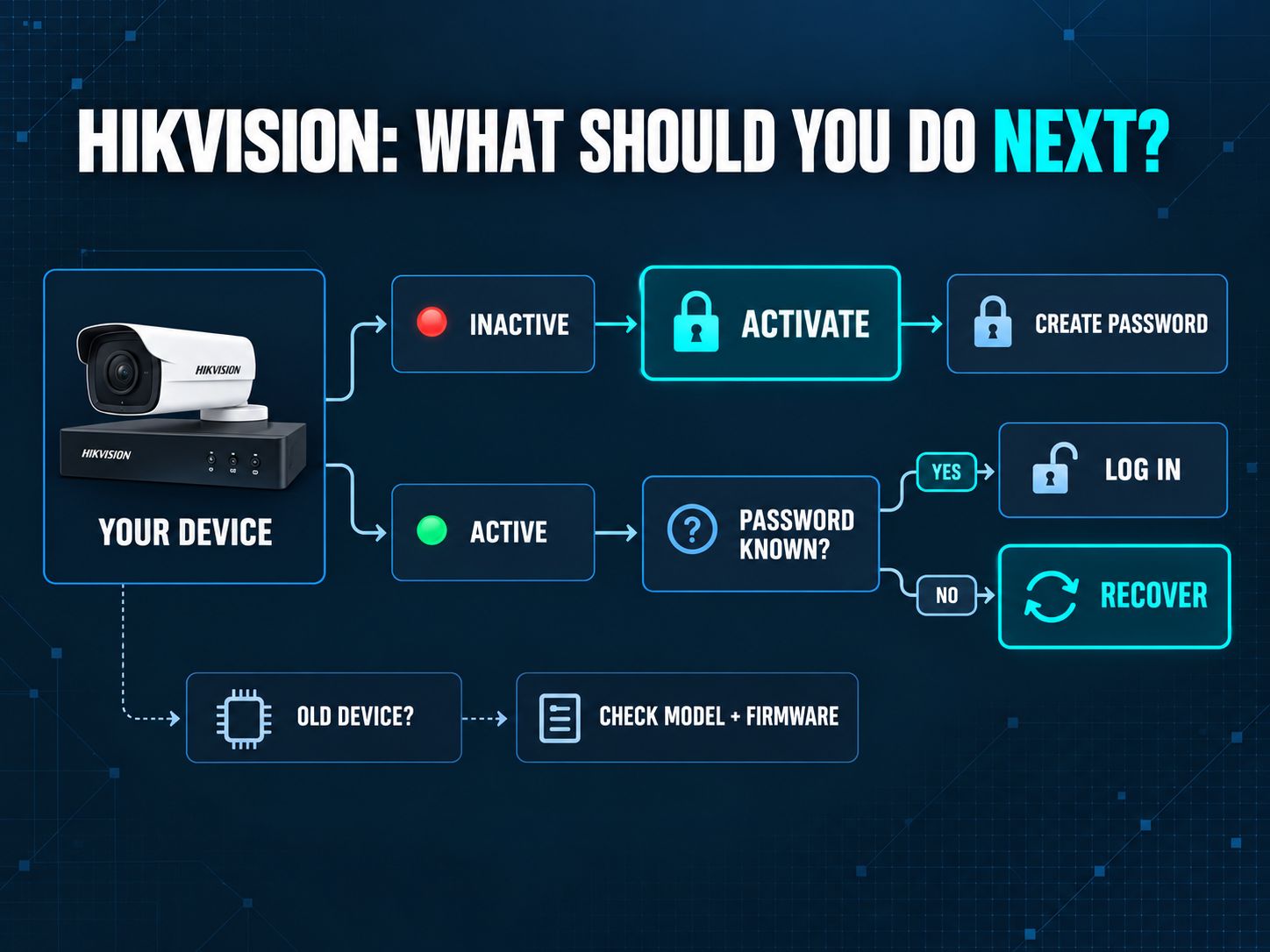
Shareable takeaway: “Inactive Hikvision device? Create a password. Active device with an unknown password? Recover it instead of guessing.”
Does the Password Default Hikvision IP Camera Search Still Have a Universal Answer?
No. For a modern Hikvision IP camera, there normally isn’t one universal password to enter.
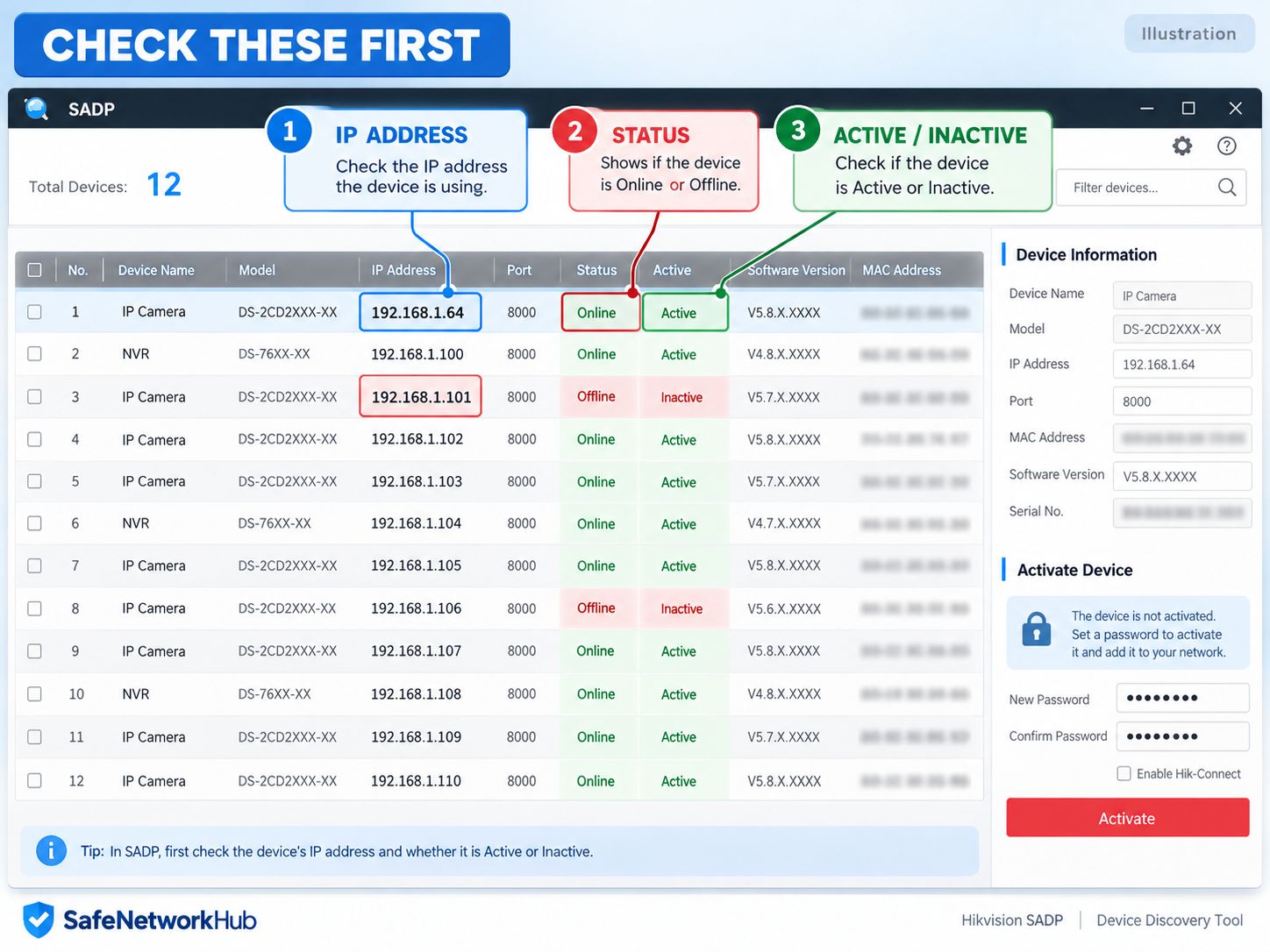
A new supported camera must first be activated. Hikvision’s documentation describes activation as setting the camera’s password before normal use. SADP can show whether the camera is Active or Inactive, helping you determine whether you need activation or password recovery.
That distinction matters for searches such as password default Hikvision IP camera and password default Hikvision camera IP, because a login screen alone does not prove that a factory password exists.
If the camera is Inactive, create a strong unique credential.
SafeNetworkHub’s Password Generator can generate a random password locally in your browser, while its Password Strength Checker can help identify predictable patterns and other weaknesses.
Do not reuse the same administrator password for your camera, email account, router, hosting account, and other systems.
Hikvision Default Password 12345 Not Working: What Does It Mean?
If you searched “Hikvision default password 12345 not working,” don’t assume that another common password will solve the problem.
Hikvision’s support documentation confirms an important historical distinction: older firmware predating Secure Activation behaved differently, while later firmware requires the user to establish a password during activation. Its current support FAQ identifies Secure Activation firmware milestones for major camera and recorder families.
So an old credential failing generally points to one of three situations.
The device may be from the newer Secure Activation generation. It may already have been activated by an installer or previous administrator. Or it may be older hardware whose exact firmware needs to be identified before you follow legacy documentation.
The practical lesson is simple:
Do not treat a legacy password reference as a universal Hikvision login.
This is also why a generic Hikvision DVR default password list is a poor troubleshooting tool for a mixed fleet of old and modern equipment.
Key Point: Firmware generation matters more than a password list.
What Is the Hikvision Default Username?
Many Hikvision interfaces use admin as the administrator account, but knowing the username does not reveal the device password.
This is where users sometimes confuse a default administrator name with a default administrator credential set.
On Secure Activation devices, the administrator password is established during setup. If a device is already Active and you do not know that password, move to recovery rather than testing guessed combinations.
The exact account behavior can vary with product family and firmware, so the device’s own interface and documentation should remain your final reference.
What Is the Hikvision Default IP?
For many Hikvision IP cameras, the initial address depends on firmware generation.
Hikvision’s current U.S. FAQ lists:
| IP-camera firmware | Initial IP address |
|---|---|
| v5.2 or earlier | 192.0.0.64 |
| v5.3 or later | 192.168.1.64 |
That does not mean every installed Hikvision camera is still using that address.
Once deployed, a camera may receive an address through DHCP, use a manually configured static IP, sit on an NVR’s private camera network, or belong to a different VLAN or subnet.
This is why typing 192.168.1.64 into a browser and getting no response does not automatically indicate a password problem.
For Wi-Fi-connected surveillance devices, SafeNetworkHub’s Wi-Fi Security Recommendation Tool can help you review wireless encryption, router administration, WPS, firmware, guest networking, and IoT segmentation without asking for the actual Wi-Fi password.
What Is the Hikvision NVR Default IP?
Do not assume that an IP-camera default address is also a universal Hikvision NVR address.
Recorder networking depends on the device, firmware, DHCP/static configuration, LAN interfaces, PoE architecture, and how the installer designed the system.
If you do not know the recorder’s current address, check its local network configuration or use supported device-discovery methods rather than assigning an address based on an unrelated camera guide.
The same principle applies when searching for Hikvision NVR default IP: discover the real configuration first.
How to Find a Hikvision Camera or Recorder with SADP
SADP is one of the most useful tools when you don’t yet know whether your problem is the IP address, activation state, or password.
Hikvision says SADP discovers supported Hikvision devices on the local network, displays their information, and can show activation status. Hikvision also notes that the computer running SADP should be on the same network context as the Hikvision device.
Suppose a camera isn’t opening at the address you expected.
SADP may reveal that the camera is actually using another IP. It may show the camera as Inactive, meaning you need to activate it rather than recover a password. Or it may show it as Active, confirming that credentials were previously created.
Those are three completely different problems that can look identical from a browser.
For organizations managing many network devices, SafeNetworkHub’s Network Monitoring Assessment can help evaluate whether device inventory, logging, alerting, traffic visibility, and network-health monitoring are being handled systematically.
Shareable takeaway: “Before resetting a Hikvision password, confirm the device’s IP address and activation state. The problem may not be the password at all.”
Hikvision NVR Default Password: Why Existing Cameras Can Complicate Things
A modern Hikvision NVR should not be treated as though it has one reusable universal password—and your NVR password is not necessarily the only credential involved in the installation.
This becomes especially important when replacing a recorder.
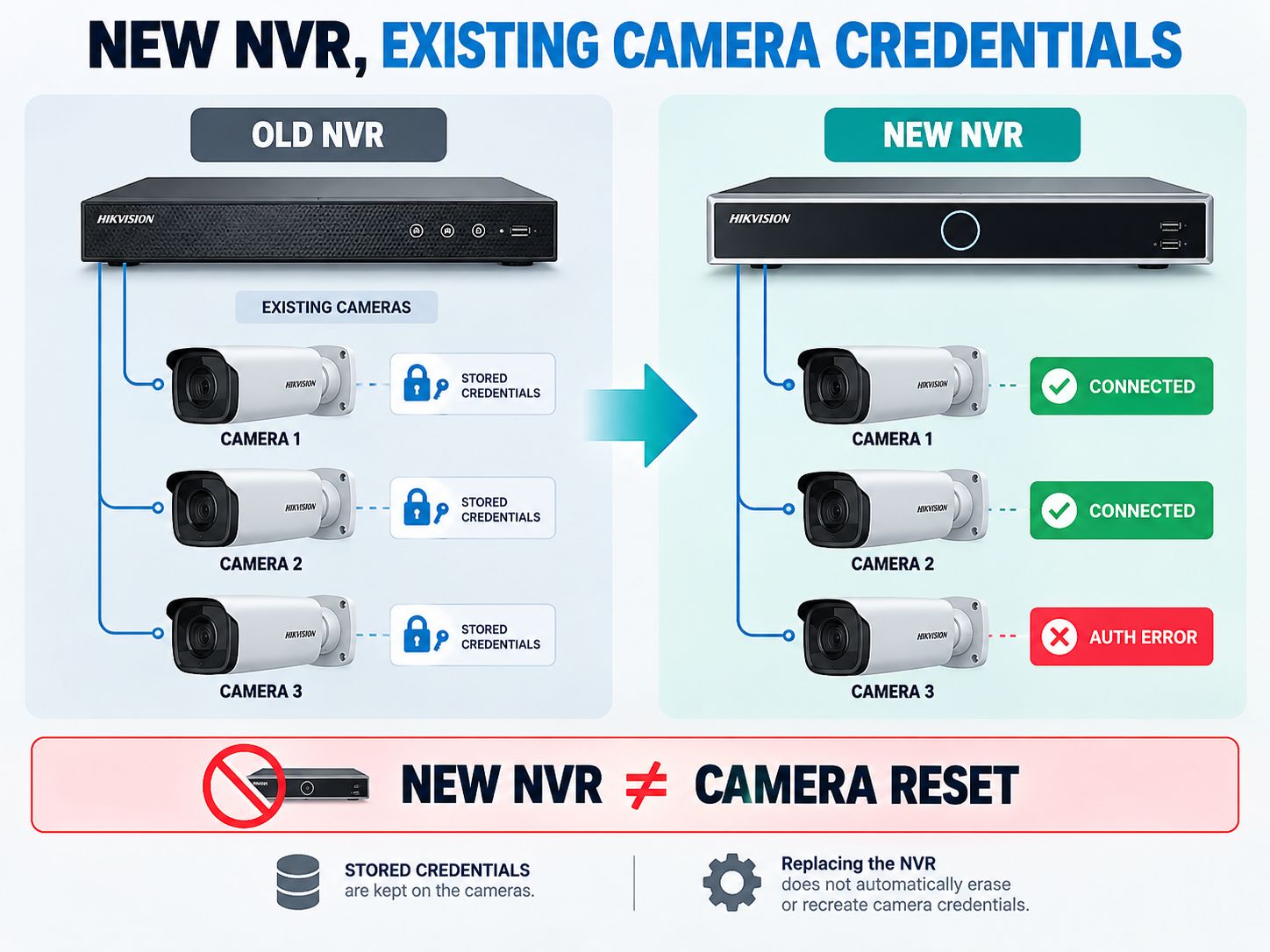
Consider a small office with eight IP cameras connected to an aging NVR. The recorder fails, so the business installs a replacement.
Six cameras come online. Two show authentication errors.
It would be easy to search for a Hikvision NVR default password or assume that the new NVR should somehow know the cameras’ old credentials.
But those cameras may already contain passwords created during their original installation.
Changing the recorder does not automatically make an Active camera Inactive again.
Practical decision
- Determine which devices are already Active.
- Record their IP addresses.
- Identify which cameras authenticate successfully.
- Document any legitimate credentials or recovery information still available.
That can turn an eight-camera reset project into a two-camera credential-recovery problem.
For larger organizations, SafeNetworkHub’s Security Controls Assessment can help review whether asset inventories, administrative access, verification evidence, and security-control ownership are being formally maintained.
What About the Hikvision DVR Default Password?
The same modern-versus-legacy distinction applies to DVRs.
Hikvision’s U.S. support material identifies Secure Activation firmware milestones for several DVR/NVR product families and states that supported models no longer ship with a default password after the relevant firmware transition.
If a DVR is already Active, and the password is unknown, you have a recovery problem, not a reason to work through a password list.
This is also a better way to interpret the keyword password default Hikvision DVR: identify the device generation first, then choose the correct recovery path.
Hikvision Default Password Reset: Which Recovery Method Should You Use?
Use the recovery choices supported by your exact device. There is no single reset procedure that applies to every Hikvision camera, DVR, and NVR.
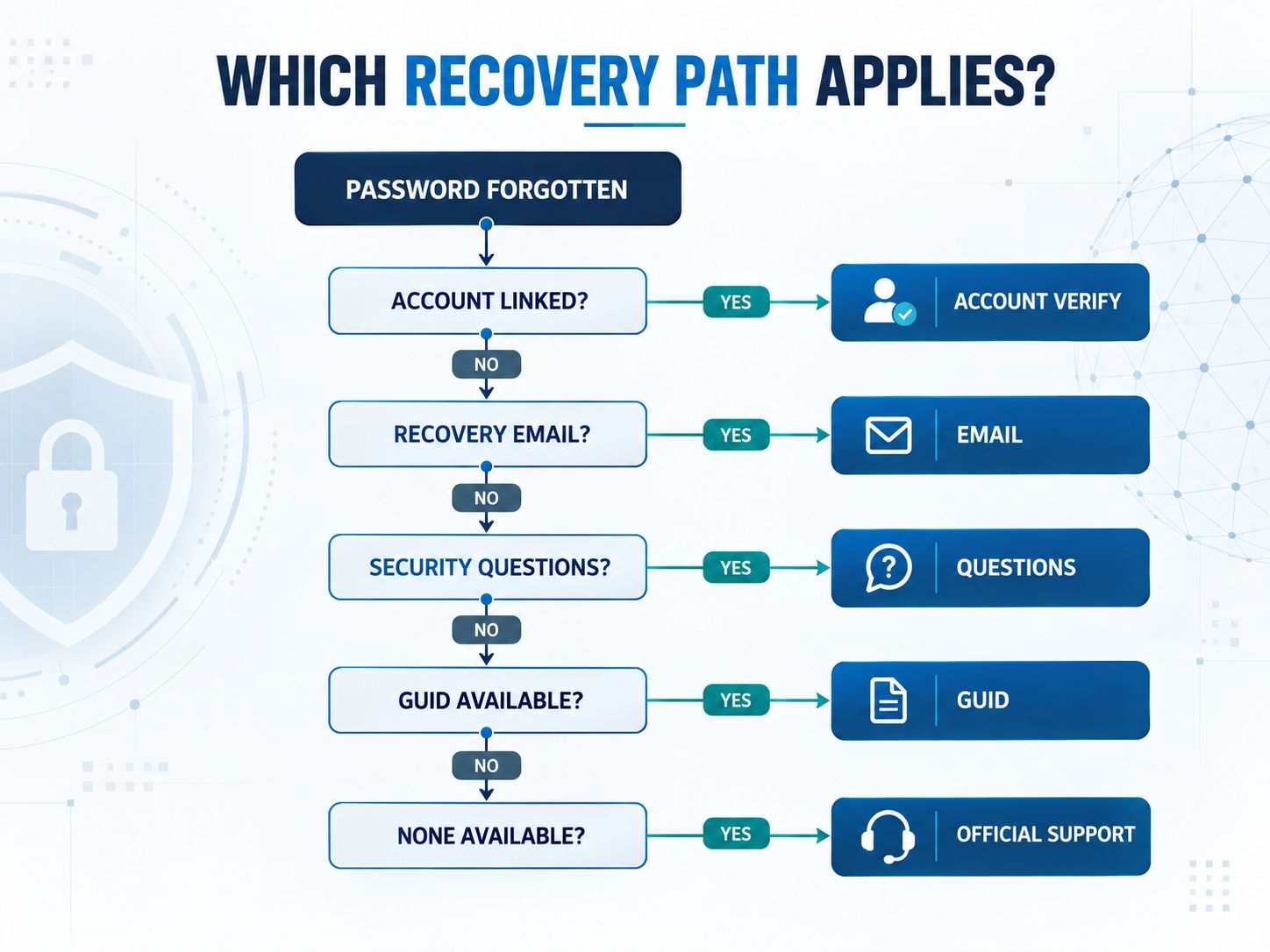
Hikvision’s current password-reset documentation describes four self-service approaches: account verification through Hik-Connect/Hik-Partner Pro, reserved email, security questions, and GUID-file verification. It also documents support-assisted XML/QR/reset-string workflows. Crucially, Hikvision states that not every device supports every method.
| Recovery option | When it can help | Important limitation |
|---|---|---|
| Account verification | Device is associated with the appropriate Hik-Connect/Hik-Partner Pro account | Device/account association is required |
| Reserved email | Recovery email was previously configured | It cannot help if no recovery email was set |
| Security questions | Questions were previously configured | Correct answers are required |
| GUID file | A valid GUID recovery file was previously exported | Availability depends on device |
| Support-assisted reset | Self-service recovery is unavailable | Follow Hikvision’s official verification process |
Hikvision’s official password-reset guide
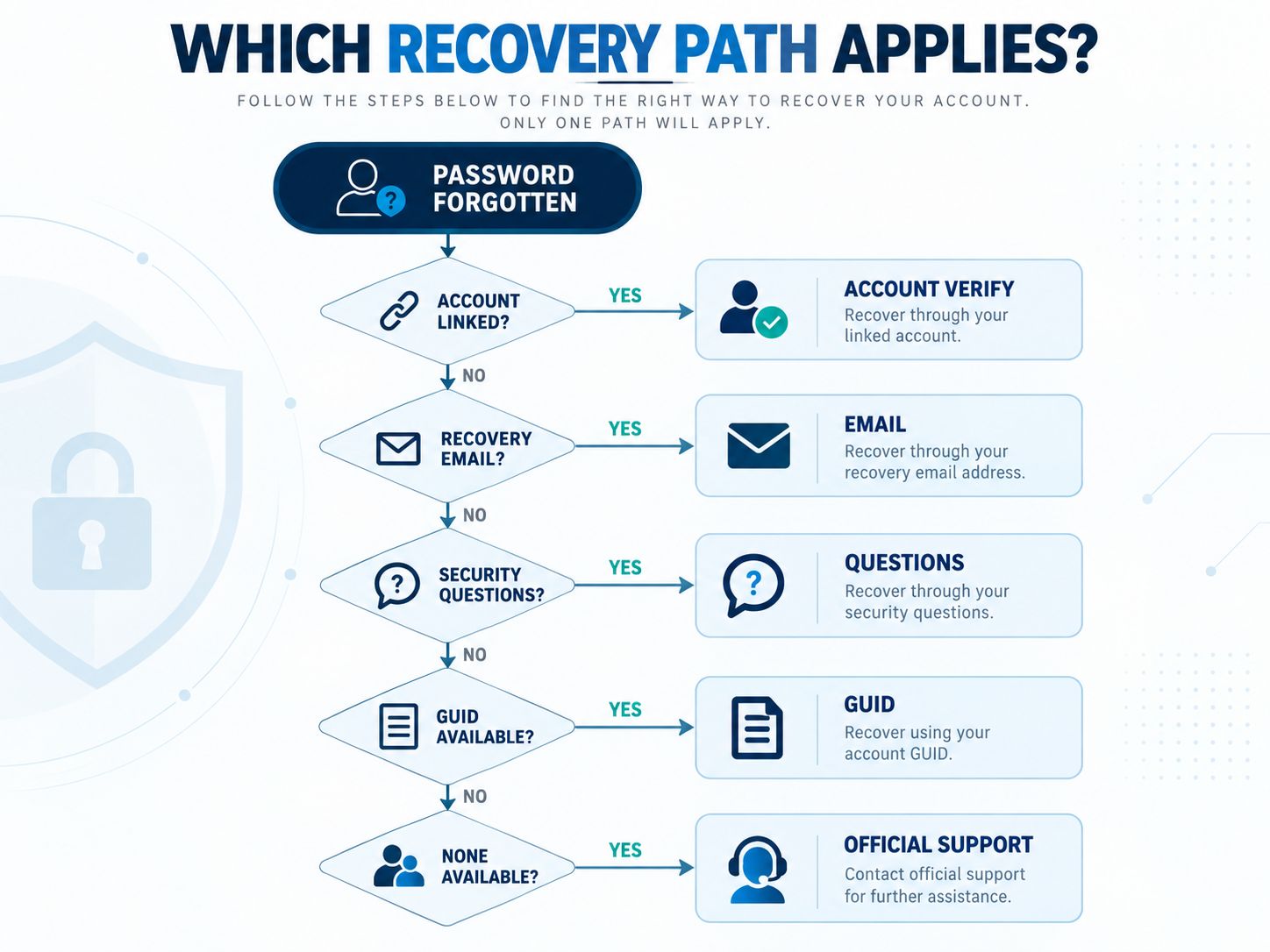
The most important rule is to use the options displayed for your product.
A tutorial recorded on a different firmware version may show controls your camera or recorder does not have.
Hik-Connect Password vs Hikvision Device Password
Your Hik-Connect account password and your camera/NVR administrator password are not the same type of credential.
This distinction prevents a surprisingly common troubleshooting mistake.
The device password controls access to the camera, DVR, or NVR itself.
The Hik-Connect account password controls access to your Hik-Connect account.
A Hik-Connect-linked device may allow account verification as part of supported device-password recovery, but resetting your account login should not be confused with automatically replacing the administrator password stored on every device.
Before resetting anything, identify which login is actually failing.
How to Reset a “192.168 Password”
There is no special “192.168 password.”
Addresses beginning with 192.168 are private network addresses. The password belongs to whichever device is responding at that address.
That device might be a camera, NVR, router, access point, printer, or another network appliance.
For example, opening 192.168.1.64 and seeing a Hikvision activation interface tells you something very different from opening the same address on another network and seeing a router login screen.
The address answers:
“Where did I connect?”
The interface answers:
“What device did I reach?”
Only after identifying the device should you begin its legitimate password-recovery procedure.
Should You Factory Reset a Hikvision Camera?
Factory reset should usually be a deliberate fallback, not your first troubleshooting step.
A reset can make sense when you own the equipment, legitimate recovery methods are unavailable, and you are prepared to rebuild the configuration.
It can be disruptive in an existing surveillance system.
You may lose network parameters, integration settings, recording relationships, or other configuration that has to be recreated afterward.
Before resetting business equipment, document whatever legitimate information remains available: model, firmware, IP address, physical camera location, recorder relationship, and which channels are still functioning.
This is particularly important for systems inherited from another installer or IT provider.
SafeNetworkHub’s Business Network Security Assessment includes administrative access, segmentation, monitoring, backups, and broader network-governance checks that can help organizations identify these documentation gaps before they become emergencies.
What Should You Do After Recovering Access?
Password recovery fixes the immediate lockout. The next goal is preventing the same problem from happening again.
Start by giving the device a unique administrator password and storing it in an appropriate password manager or organizational credential vault.
If supported by the product, configure recovery information while you still have administrative access.
Then review firmware for the exact model and region. Hikvision warns in its U.S. support material that firmware is region-specific, so a file intended for a different region should not be treated as interchangeable.
Next, review how surveillance devices are exposed on the network.
SafeNetworkHub’s Firewall Configuration Assistant can help design least-privilege firewall rules without accessing or modifying your firewall.
If cameras currently share an unrestricted network with employee laptops, servers, and other sensitive systems, the Zero Trust Segmentation Planner can help model separate trust zones and permitted traffic paths.
For a wider organizational review, the network security fundamentals guidance and Business Network Security Assessment cover firewalls, Wi-Fi, remote access, segmentation, endpoints, monitoring, backups, and incident-response readiness.
The computer used to administer surveillance systems also matters. Home and small-office users can evaluate operating-system updates, firewall status, malware protection, encryption, password management, and backups with the Home Computer Security Assessment.
Organizations that need better visibility across their environment can use the Network Security Monitoring Tools assessment to evaluate telemetry, SIEM/NDR coverage, alerts, and detection gaps. If the problem is deciding what monitoring technology fits the environment, the Security Monitoring Tool Finder provides requirement-based matching rather than a generic vendor list.
For additional defensive guidance, SafeNetworkHub’s Network Security category and free security guides for beginners provide related practical resources.
Shareable takeaway: “Recovering the password restores access. Good credential storage, recovery settings and network segmentation prevent the next lockout.”
The 60-Second Hikvision Password Decision Guide
If the device is Inactive: create the administrator password and complete activation.
If the device is Active and the password is known: log in normally and make sure recovery information is documented.
If the device is Active but the password is unknown: use the recovery options shown by that device.
If you cannot find the camera: use supported network discovery to identify its current address and activation state before troubleshooting credentials.
If existing cameras fail after an NVR replacement: investigate the credentials already stored on the cameras before factory-resetting the whole installation.
If the hardware is genuinely old: identify the firmware generation before relying on modern Secure Activation instructions—or an old password table.
If you inherited the system: inventory the cameras and recorder before making irreversible configuration changes.
That sequence is more useful than testing one password after another because each result tells you what the actual problem is.
Common Mistakes That Make Hikvision Password Problems Worse
The most common mistake is assuming that advice for one Hikvision generation applies to every Hikvision product.
Another is treating a known administrator username as proof that a matching universal password must exist.
Users also sometimes confuse the camera’s IP address with the recorder’s address, or confuse their Hik-Connect account credentials with the credentials stored on the physical device.
And in multi-camera systems, resetting everything before documenting the installation can turn one unknown credential into a much larger reconfiguration project.
A better troubleshooting rule is:
Identify first. Recover second. Reset only when necessary.
Our Perspective
For the password default Hikvision query, a password table is no longer the most useful way to answer the reader’s problem.
The key distinction is device state.
An Inactive modern device needs activation.
An Active device already has credentials.
An Active device with unknown credentials needs recovery.
An existing camera that stops authenticating after an NVR replacement may have a recorder-to-camera credential mismatch.
And truly old equipment needs firmware-specific research because legacy behavior can differ from the Secure Activation model.
That approach takes a few minutes longer than copying a password from an old list, but it gives you a much clearer answer about what is actually happening.
Frequently Asked Questions
What is my Hikvision password?
For a modern activated device, it is normally the administrator password established when that device was configured. If you did not perform the installation yourself, an installer, administrator, previous owner, or existing recorder setup may have established the credentials.
What is the default password for CCTV?
There is no universal default password that applies to all CCTV systems. Authentication varies by manufacturer, product generation, model, and firmware.
How do I reset a Hikvision admin password?
Open the supported Forgot Password workflow for the device. Depending on model and firmware, Hikvision documents account verification, reserved email, security questions, GUID-file verification, and support-assisted reset methods. Not every method is available on every device.
Why is Hikvision default password 12345 not working?
Your device may use Secure Activation, may already have been configured, or may belong to a different firmware generation from the legacy documentation you found. Check model, firmware, and activation status rather than continually trying old credentials.
What is the Hikvision default username?
Many Hikvision products use admin as the administrator account. That does not mean a universal password accompanies it on current Secure Activation devices.
What is the Hikvision default password pattern?
There is no universal modern password pattern you can use to predict an activated device’s administrator password. The password is created for the device during setup.
What is the Hikvision default IP?
Hikvision’s U.S. support FAQ lists 192.0.0.64 for IP-camera firmware v5.2 or earlier and 192.168.1.64 for v5.3 or later. An installed camera may subsequently use another address.
What is the Hikvision NVR default IP?
Do not assume the IP-camera factory address applies to every NVR. Recorder addresses vary with model and network configuration. Check the recorder itself or discover its actual network settings.
How do I reset a 192.168 password?
First identify which device is responding at that IP address. 192.168.x.x is an address, not an authentication system. Then follow the legitimate recovery procedure for the camera, recorder, router, or other device located there.
Can SADP tell me whether a Hikvision camera is active?
Yes. Hikvision’s documentation says SADP can discover supported devices and display information including their activation status.
Can SADP reset every Hikvision password?
No single recovery method should be assumed to work with every device. Hikvision explicitly notes that supported password-reset methods vary by product.
Is my Hik-Connect password the same as my NVR password?
No. Hik-Connect account authentication and the administrator credentials stored on the physical recorder or camera are separate authentication contexts.
Should I factory reset the camera if I cannot remember its password?
Not immediately. Check available recovery methods first, especially in an existing multi-camera installation. A factory reset may remove configuration that then has to be recreated.
Final Takeaway
If you came here looking for a Hikvision default password, the safest and most useful next step is not to keep guessing.
Find the device and check its state.
If it is Inactive, activate it and create the administrator password.
If it is Active, credentials already exist. Use them if you know them, or follow the supported recovery process if you do not.
If an existing camera stopped working after changing an NVR, investigate the camera credentials before resetting the entire installation.
And if the hardware is old, verify its firmware generation before trusting either a modern activation guide or a legacy password list.
That gives you what a generic credential table cannot: a clear diagnosis and a practical next step.
Have you dealt with an inherited Hikvision system, an old camera connected to a replacement NVR, or a device that showed Active even though you did not know the password? Share the model and general situation in the comments. Do not post passwords, serial numbers, verification codes, reset files, or other sensitive device information.
Share This Network Security Guide
Help IT professionals, network engineers, and students strengthen their cyber defense.
Zubayer Hasan
LinkedIn Profile →Md Zubayer AL Hasan is the lead cybersecurity platform architect and security researcher at SafeNetworkHub. Dedicated to zero-knowledge cryptography, infrastructure vulnerability auditing, and building accessible privacy tools.
0 Comments
No comments yet
Have a question or insight about this network security guide? Be the first to share your thoughts!
Write the first comment →