
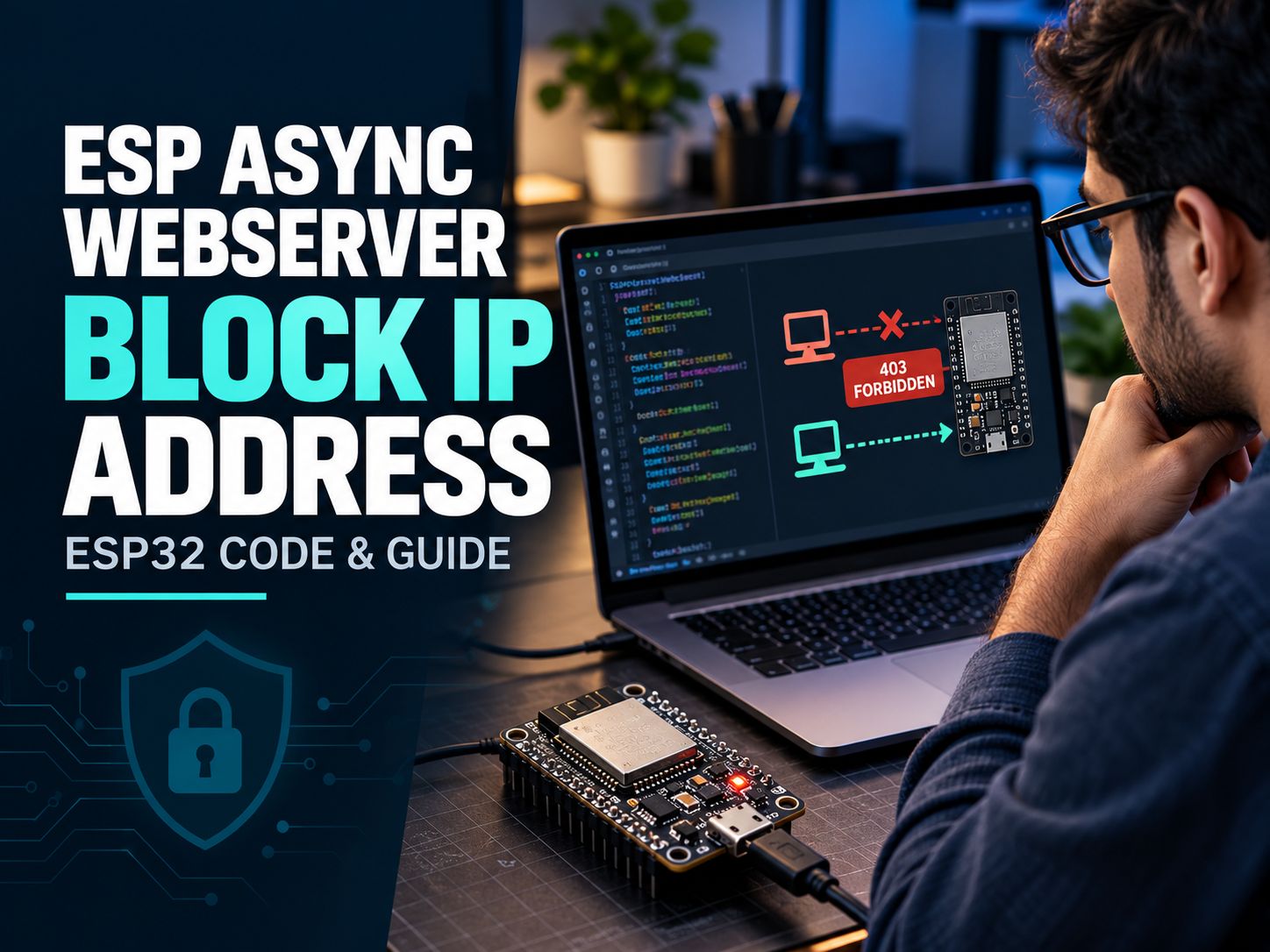
How Do You Block an IP Address in ESPAsyncWebServer?
You can block an IP address by inspecting the client’s remote IP before the requested HTTP handler runs. When the address matches a blocked value, send a 403 response and stop processing.
The essential code is:
IPAddress clientIP = request->client()->remoteIP();

if (clientIP == IPAddress(192, 168, 1, 50)) {
    request->send(403, "text/plain", "Forbidden");
    return;
}
This comparison belongs inside a request handler or middleware callback. The example rejects 192.168.1.50.
Important distinction: This blocks an HTTP request, not the device’s Wi-Fi connection. The client can still communicate with other services unless separate network controls prevent it.
Which IP-blocking method should you use?
| Your goal | Recommended approach |
|---|---|
| Block one device from all normal HTTP routes | Global middleware |
| Protect a single route | Route-level check |
| Permit only one administrator | IP allowlist with authentication |
| Block several devices | Array of blocked IPv4 addresses |
| Restrict an entire network | CIDR/subnet matching |
| Prevent unwanted network connections | Router or firewall rules |
For ordinary ESP32 web interfaces, middleware is a good starting point. If your goal includes isolation between IoT devices and other systems, explore the broader Network Security resources before choosing an architecture.
Complete ESP32 ESPAsyncWebServer Block IP Address Example
This example uses the maintained ESP32Async implementation of ESPAsyncWebServer and its middleware API.
Step 1: Install the required libraries
You need an ESP32 board, Arduino IDE, Wi-Fi access, and these libraries:
- ESP Async WebServer by ESP32Async
- Async TCP by ESP32Async
Install compatible releases from the Arduino Library Manager. For source code and library information, use the maintained ESP32Async GitHub repository.
The original me-no-dev/ESPAsyncWebServer repository was archived on January 20, 2025. Older examples may target APIs or dependencies that differ from current releases.
Step 2: Upload the complete sketch
Replace the Wi-Fi credentials and the example blocked IP with values from your own network.
#include <Arduino.h>
#include <WiFi.h>
#include <AsyncTCP.h>
#include <ESPAsyncWebServer.h>

// Wi-Fi credentials
const char* ssid = "YOUR_WIFI_SSID";
const char* password = "YOUR_WIFI_PASSWORD";

// Create server on HTTP port 80
AsyncWebServer server(80);

// Client IPv4 address to block
const IPAddress blockedIP(192, 168, 1, 50);

void setup() {
  Serial.begin(115200);

  WiFi.mode(WIFI_STA);
  WiFi.begin(ssid, password);

  // Wait up to 15 seconds for Wi-Fi
  unsigned long startTime = millis();

  while (WiFi.status() != WL_CONNECTED &&
         millis() - startTime < 15000) {
    delay(250);
  }

  if (WiFi.status() != WL_CONNECTED) {
    Serial.println("Wi-Fi connection failed");
    return;
  }

  Serial.print("ESP32 IP: ");
  Serial.println(WiFi.localIP());

  // Global HTTP IP-blocking middleware
  server.addMiddleware(
    [](AsyncWebServerRequest* request,
       ArMiddlewareNext next) {

      IPAddress clientIP =
          request->client()->remoteIP();

      if (clientIP == blockedIP) {
        Serial.print("Blocked client: ");
        Serial.println(clientIP);

        request->send(
          403,
          "text/plain",
          "Forbidden"
        );

        return;
      }

      // Continue with the request
      next();
    }
  );

  // Homepage
  server.on("/", HTTP_GET,
    [](AsyncWebServerRequest* request) {
      request->send(
        200,
        "text/plain",
        "ESP32 web server is running"
      );
    }
  );

  // Status endpoint
  server.on("/status", HTTP_GET,
    [](AsyncWebServerRequest* request) {
      request->send(
        200,
        "application/json",
        "{\"status\":\"online\"}"
      );
    }
  );

  server.begin();
  Serial.println("HTTP server started");
}

void loop() {
  // No handleClient() polling required
}
The sketch follows the documented middleware callback pattern. Hardware compilation and runtime behavior should still be verified against the exact board, Arduino core, and installed library versions.
Step 3: Understand what happens when a client connects
The request follows this sequence:
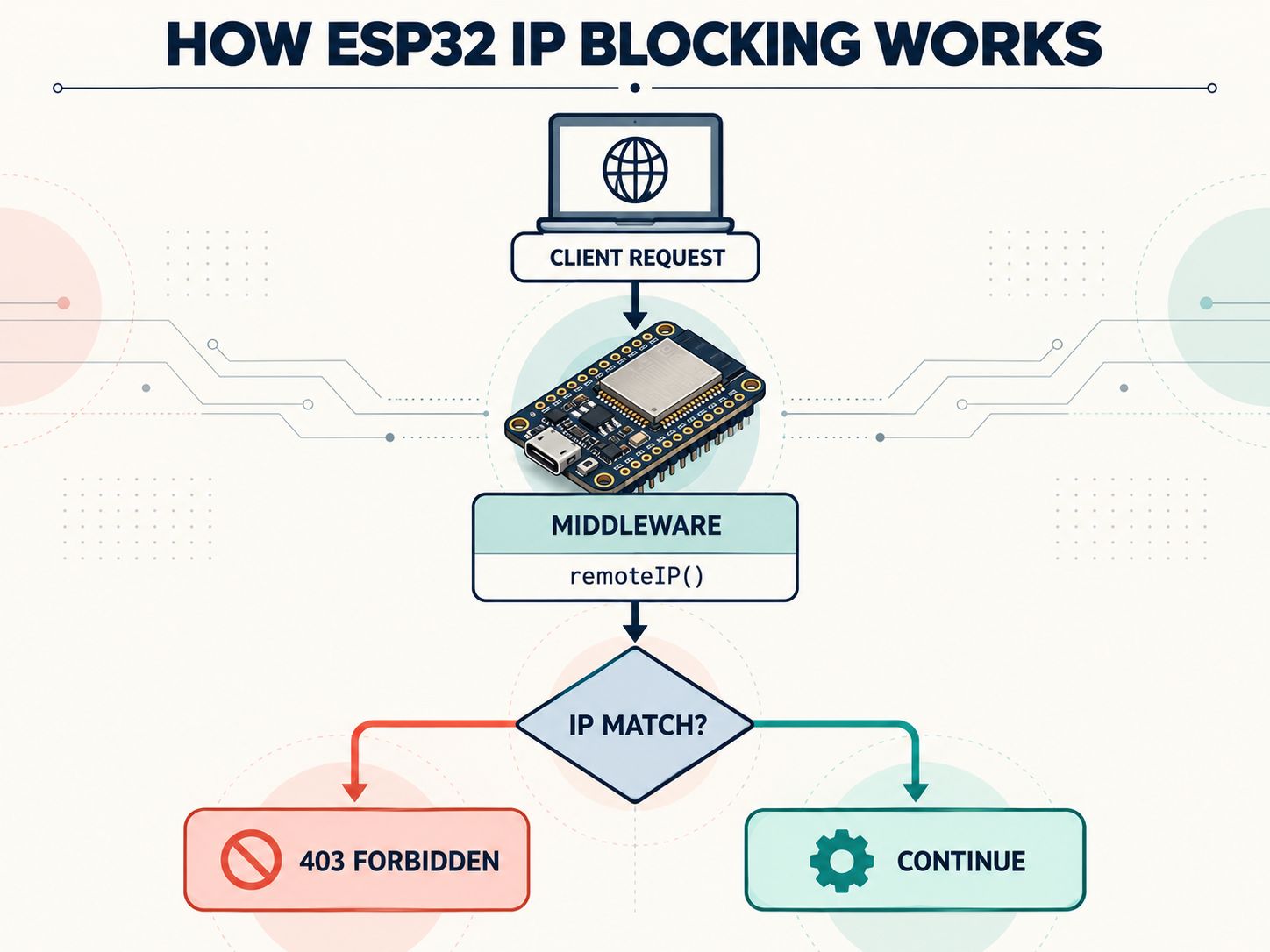
Client connects → Middleware reads remote IP → IP compared with deny rule → Request denied or forwarded
If the IP matches, the server returns 403 and does not call next(). Otherwise, next() forwards the request toward the appropriate handler.
Consider these illustrative results:
| Client IPv4 | Rule evaluation | Expected response |
|---|---|---|
| 192.168.1.50 | Matches blocked IP | 403 Forbidden |
| 192.168.1.51 | No match | 200 OK |
| 192.168.1.100 | No match | 200 OK |
These are predicted results from the example logic, not independently measured hardware results.
Pro tip: Preserve access through a trusted device or USB firmware flashing while testing new restrictions. A mistake in an allowlist can prevent legitimate remote administration.
How Can You Block Multiple IP Addresses on ESP32?
Use a small array of blocked addresses and compare the connecting client with each entry.
Add this code above setup():
const IPAddress blockedIPs[] = {
  IPAddress(192, 168, 1, 50),
  IPAddress(192, 168, 1, 60),
  IPAddress(192, 168, 1, 70)
};

bool isBlocked(const IPAddress& clientIP) {
  for (const IPAddress& blocked : blockedIPs) {
    if (clientIP == blocked) {
      return true;
    }
  }

  return false;
}
Then replace the original single-address comparison inside the middleware with:
if (isBlocked(request->client()->remoteIP())) {
  request->send(403, "text/plain", "Forbidden");
  return;
}

next();
Keep the blockedIPs array and isBlocked() function outside setup(), as shown.
This approach is suitable for a small, fixed list. Each additional IP introduces another comparison, so consider a more structured representation for larger policies.
Can you block an entire subnet?
Yes. Instead of checking whether two IPv4 addresses are identical, compare their network portions using a subnet mask.
For example, 192.168.1.0/24 identifies the full address block from 192.168.1.0 to 192.168.1.255.
A straightforward matching function is:
bool matchesSubnet(
  IPAddress client,
  IPAddress network,
  IPAddress mask
) {
  for (int i = 0; i < 4; i++) {
    if ((client[i] & mask[i]) !=
        (network[i] & mask[i])) {
      return false;
    }
  }

  return true;
}
Use it in your middleware condition:
if (matchesSubnet(
      request->client()->remoteIP(),
      IPAddress(192, 168, 1, 0),
      IPAddress(255, 255, 255, 0)
    )) {
  request->send(403, "text/plain", "Forbidden");
  return;
}

next();
This denies requests whose observed IPv4 address falls within the specified /24 range.
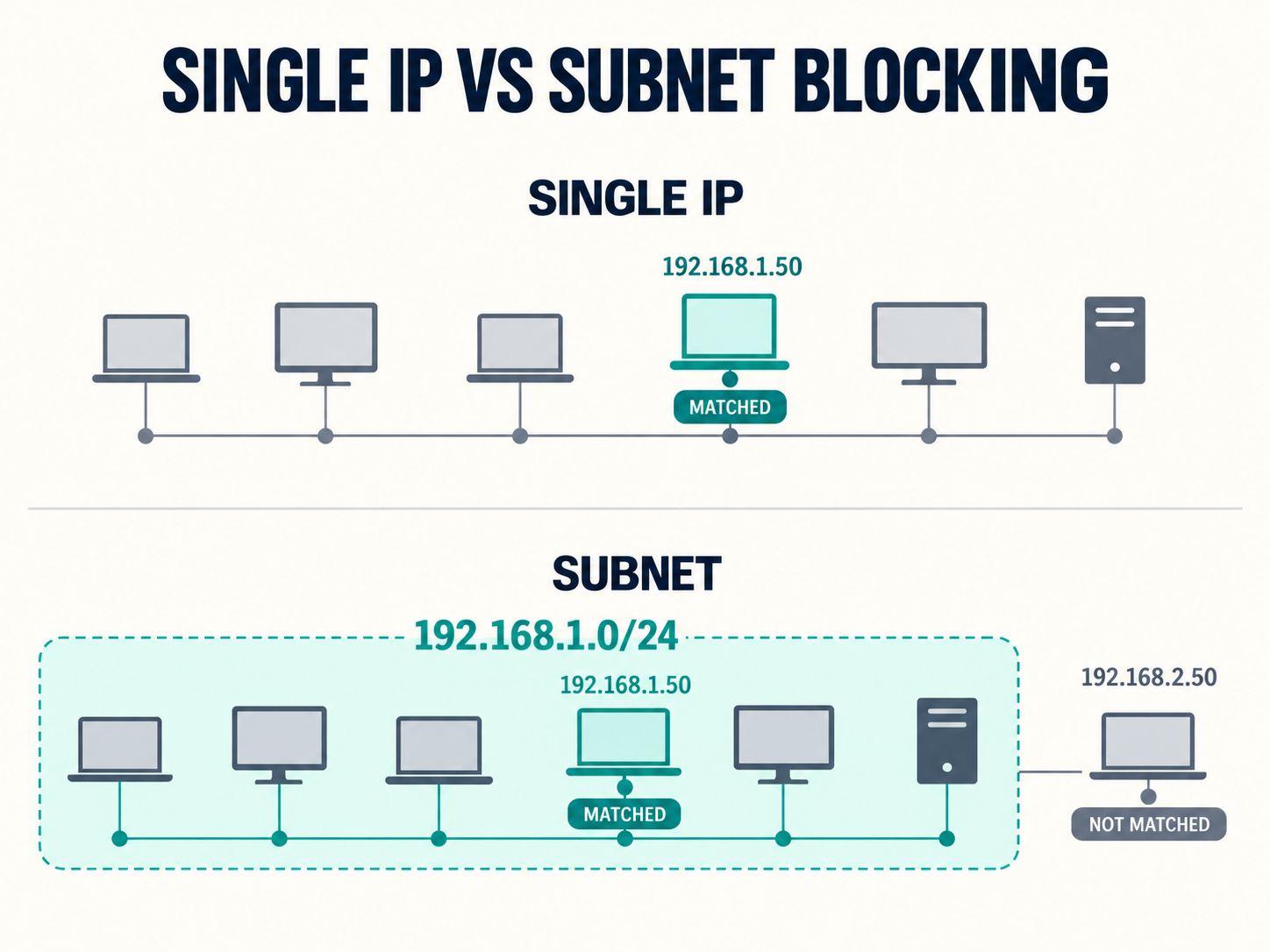
Before applying a network-wide restriction, confirm the address range with the IPv4 Subnet Calculator.
Warning: Blocking a subnet may deny an entire local network, including your own administrative computer. Test the matching logic and preserve a recovery method before deploying it.
How Do You Allow Only Trusted IP Addresses?
An allowlist is often more appropriate than a denylist when only a small number of devices should access the server.
For example, to allow only 192.168.1.10, use this decision inside the middleware:
const IPAddress allowedIP(192, 168, 1, 10);Declare the constant outside setup(). Then use:
IPAddress clientIP = request->client()->remoteIP();

if (clientIP != allowedIP) {
  request->send(403, "text/plain", "Access denied");
  return;
}

next();
Use this replacement instead of the denylist check, not alongside it without reviewing rule order.
An allowlist is a useful additional restriction for an administration page. However, trusted IP addresses may change because of DHCP, network switching, or gateway configuration.
Assigning a DHCP reservation to the administrator’s device can help avoid unexpected address changes.
Security note: IP allowlisting does not replace authentication. A permitted IP may represent a shared computer, gateway, or network rather than a uniquely trusted person.
ESPAsyncWebServer IP Blocking vs Router Firewall: Which Is Better?
ESPAsyncWebServer middleware and router firewalls operate at different layers. Neither approach should be described as interchangeable.
| Feature | ESPAsyncWebServer middleware | Router/firewall policy |
|---|---|---|
| Reject HTTP requests | Yes | Depends on configuration |
| Return HTTP 403 | Yes | Generally not the purpose |
| Block traffic before ESP receives it | No | Can, when traffic crosses the enforced boundary |
| Protect other ESP services | No | Can, if rules cover those services |
| Require firmware changes | Usually yes | Usually no |
| Fit a single sensitive HTTP route | Yes | Less granular at the HTTP route level |
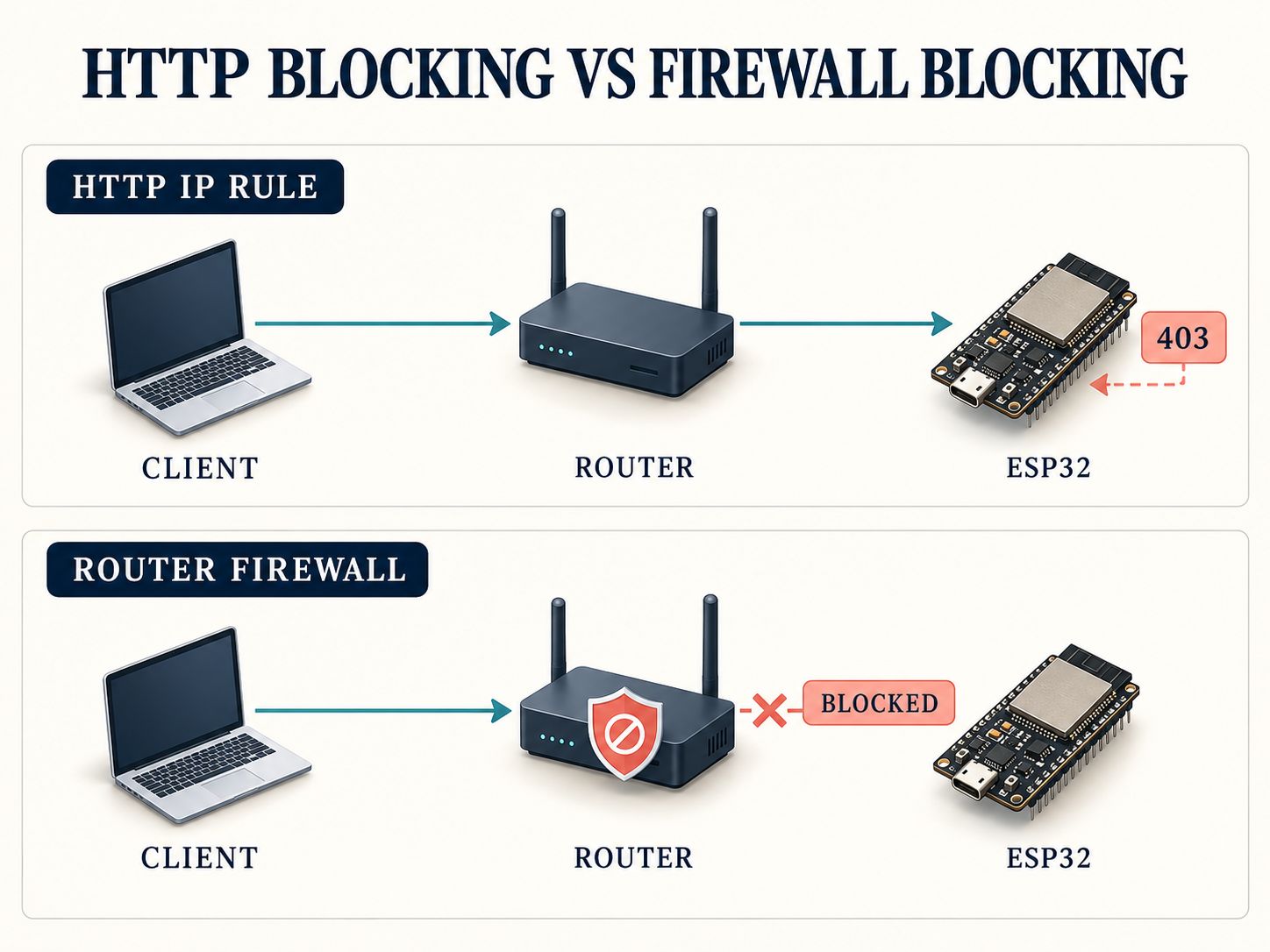
For a private ESP32 web application, middleware may be sufficient as an additional access restriction. For network isolation, use appropriate infrastructure controls.
SafeNetworkHub’s Firewall Configuration Assistant can help plan least-privilege access policies. Where IoT devices share a network with sensitive systems, the Zero Trust Segmentation Planner can support broader architectural decisions.
Neither planning tool directly configures an ESP32 or router.
Why Is ESPAsyncWebServer Not Blocking the IP Address?
Start by checking whether the server sees the IP you expected. An IP block that appears ineffective often results from address confusion, DHCP changes, or an unprotected request path.
1. You are comparing the ESP32 IP instead of the client IP
Different networking methods return different addresses.
| Expression | What it identifies |
|---|---|
WiFi.localIP() |
ESP’s station-interface IP |
WiFi.softAPIP() |
ESP’s SoftAP-interface IP |
request->client()->remoteIP() |
IP of the connecting network peer |
request->client()->localIP() |
ESP’s local endpoint IP for the connection |
If you want to block a client, inspect its remote IP, not the ESP’s own address.
A practical troubleshooting step is to log the remote IP for each test request and compare it with your rule.
2. DHCP assigned the client a different address
If the blocked device receives a new local IP, a rule matching its previous address will no longer match.
Check the client’s current address and consider a DHCP reservation where appropriate.
If you manage several connected devices, review your wireless configuration with the Wi-Fi Security Recommendation Tool.
3. The request is coming through a proxy or gateway
The ESP might see the address of a connecting proxy instead of the original user.
Do not blindly substitute an X-Forwarded-For header for remoteIP(). HTTP clients can supply untrusted headers, and a proxy setup requires a defined trust boundary.
For strict IP enforcement, apply the rule at a trusted point in the traffic path.
4. The code uses an outdated or incompatible library
Some older examples were written before the current middleware implementation.
A compile error involving ArMiddlewareNext, addMiddleware, or missing header files may indicate a library-version mismatch.
Confirm the library publisher and dependency versions. Remove conflicting duplicate installations, then compile the simplest server sketch before adding the IP rules.
An unexpected reboot is not automatically evidence of an IP-blocking bug. Record the serial exception and check board/core compatibility separately.
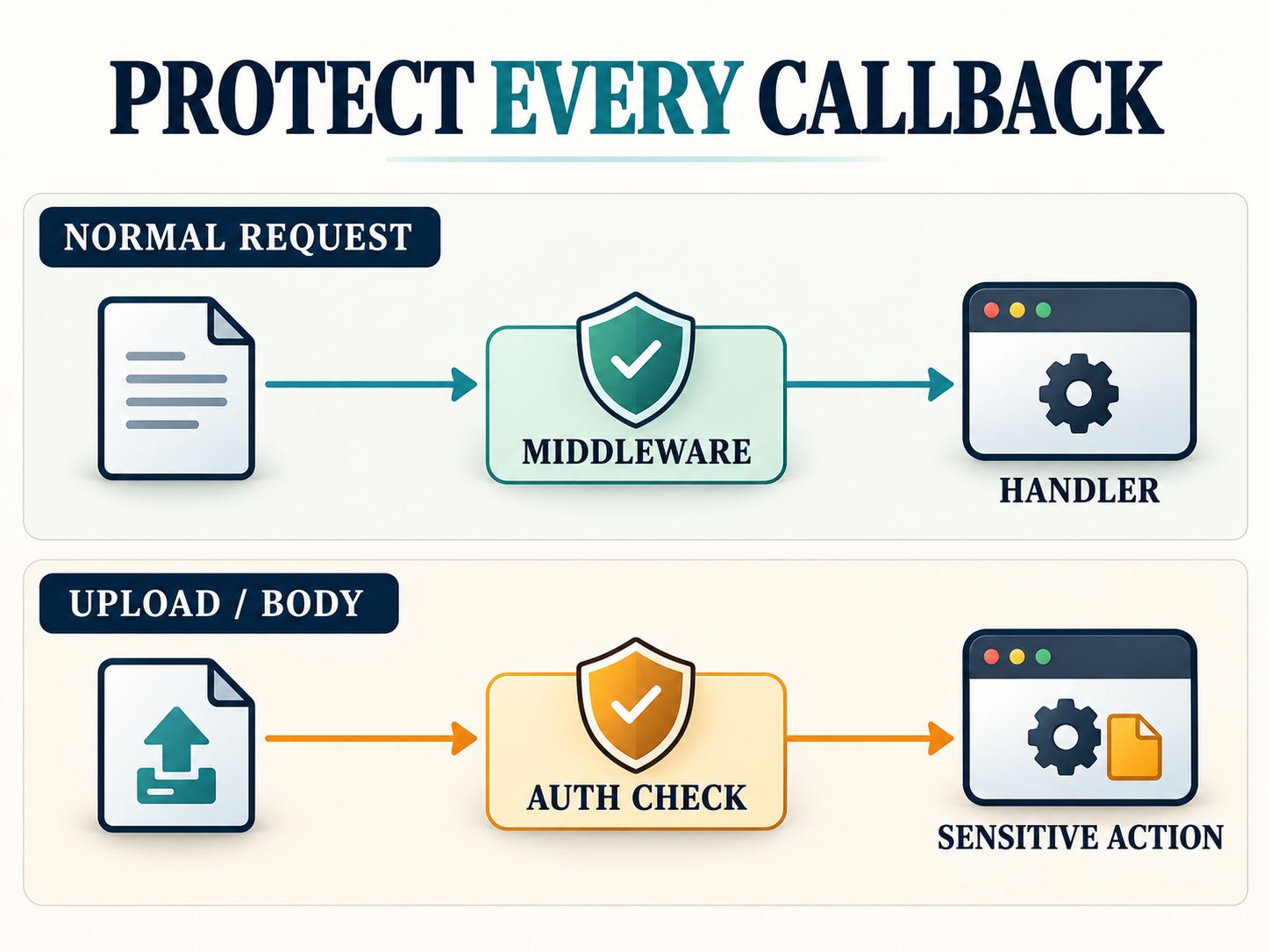
5. Upload and request-body callbacks need additional protection
This is an important limitation.
The maintained library’s middleware documentation explains that upload and request-body callbacks do not run the normal middleware chain.
As a result, a global deny rule should not be assumed to prevent every sensitive side effect during body processing.
If an upload or body callback writes files, changes configuration, or performs privileged operations, check authorization inside that callback before taking action.
6. The problem is actually a Wi-Fi connection failure
A client receiving HTTP 403 is different from a client that cannot reach the ESP at all.
If the browser times out, first verify Wi-Fi association, device addresses, routing, and the server startup log.
For home IoT deployments, the Home Cybersecurity Checker provides a broader review of router and smart-device isolation practices.
How Can You Test an ESP32 IP Block?
Use two client devices on a network where both should otherwise reach the ESP. Assign one client the blocked address and leave the other permitted.
Test 1: Identify the server IP
Open the Arduino Serial Monitor at 115200 baud. The sketch prints its Wi-Fi address.
Suppose the ESP reports:
ESP32 IP: 192.168.1.80
HTTP server started
This is a sample address for the following test commands.
Test 2: Send a request from the blocked device
On the client actually assigned 192.168.1.50, run:
curl -i http://192.168.1.80/The expected HTTP status is:
403 ForbiddenThe Serial Monitor should also identify the blocked client.
Test 3: Send the same request from an allowed device
Run the same command from another computer whose address does not match the block rule:
curl -i http://192.168.1.80/Expected response:
200 OKThe response body should contain:
ESP32 web server is runningTest 4: Check every relevant route
Repeat the tests for /status and any additional routes your project exposes.
For applications with uploads, WebSockets, or real-time features, create separate tests for the security checks associated with those features.
Test 5: Verify recovery
Restart the ESP and reconnect the client devices. Confirm that the intended rule still applies.
Also confirm that you can recover from an accidental block by using a trusted management device or reflashing the firmware.
Practical test matrix
| Scenario | Expected result |
|---|---|
Blocked IP requests / |
403 |
Allowed IP requests / |
200 |
Blocked IP requests /status |
403 |
Allowed IP requests /status |
200 |
| Client changes its assigned IP | Rule evaluated against new address |
| Device loses Wi-Fi connectivity | Connection failure, not an HTTP 403 |
| Sensitive upload/body callback | Requires separate authorization verification |
Evidence status: These outcomes describe the expected behavior of the example code. They should be confirmed on the target board before being described as observed test results.
For more complex deployments, review appropriate network monitoring approaches alongside your device’s local logs.
What Security Limitations Should You Understand Before Deployment?
IP blocking is useful, but it should be treated as one control in a broader security design.
Authentication: Require authentication for sensitive configuration and control endpoints. Never assume that an allowed IP automatically identifies a legitimate administrator.
Network boundaries: Keep unnecessary services inaccessible from untrusted networks. A firewall placed at the right network boundary can reduce exposure before traffic reaches the ESP.
Encryption: A basic ESPAsyncWebServer example using HTTP on port 80 does not provide encrypted transport. Avoid sending sensitive credentials over untrusted networks. For remote administration, consider a properly configured VPN or trusted TLS gateway.
Logging: Log denied access where useful, but avoid retaining client IP data longer than necessary.
Request processing: Review uploads, request bodies, WebSocket handling, and other callbacks individually. Do not assume one middleware function automatically covers every operation.
For a structured application-level review, use the Website Security Checklist. If you also maintain a public-facing gateway, the Network Security Assessment may help review its observable configuration; it is not a test of a private ESP32’s blocklist.
Key takeaway
A client that receives HTTP 403 has reached the web application. If you need to prevent the connection from reaching the device, enforce access restrictions at the appropriate network boundary.
Frequently Asked Questions
Can ESPAsyncWebServer block a specific IP address?
Yes. Read the client’s remote IP inside a request handler or middleware and return HTTP 403 when it matches the blocked address.
What is the ESP Async WebServer block IP address GitHub example?
For maintained implementations, use the ESP32Async project and its middleware API. The older me-no-dev repository is archived, so code from older issues may require adaptation.
Can ESP8266 use the same IP-blocking approach?
Yes, IP-based HTTP request filtering is possible with ESP8266. The maintained project also supports ESP8266, but its networking headers and dependencies differ from ESP32. Verify your installed library version before reusing middleware code.
Can I block multiple clients?
Yes. Compare the connecting IP against an array or other collection of addresses. For subnet-wide policies, use mask-based matching.
Does blocking an IP disconnect the device from Wi-Fi?
No. Returning HTTP 403 does not disconnect a Wi-Fi station or implement network-layer filtering.
Can an ESP32 block an entire subnet?
Yes, when your application implements IPv4 network-mask matching. Be careful not to block the management network or your own recovery access.
Can I make ESPAsyncWebServer accessible only to my computer?
You can use an allowlist containing your computer’s current IPv4 address. Pair it with authentication and stable network addressing when possible.
Why does a blocked IP still connect?
The client may have a different IP, the request may come through a proxy, or some processing may occur outside the protected HTTP handler. Inspect the remote IP and test each relevant callback.
Is this the same as setting a static IP on ESP32?
No. Setting a static IP changes the ESP’s own network address. Blocking an IP controls how the application responds to a connecting client.
Does IP blocking protect WebSocket and file-upload endpoints?
Not automatically in every implementation path. Review how middleware and callbacks interact in your installed release and protect sensitive operations at the point where they execute.
Should I use a denylist or allowlist?
Use a denylist when you need to reject particular clients. Consider an allowlist when only a small, stable set of trusted devices should have access. Neither should replace authentication.
Final Recommendation
For most small ESP32 HTTP projects, global middleware is a practical starting point for blocking specific client IP addresses. Use an allowlist for restricted administration, subnet matching for network ranges, and infrastructure firewalls when you need stronger isolation.
The critical steps are to identify the correct remote IP, use compatible libraries, test allowed and denied clients, and protect sensitive callbacks that run outside normal middleware processing.
Explore more defensive networking utilities in the SafeNetworkHub Tools Directory.
Have you implemented IP blocking on ESP32 or ESP8266? Share your board, library version, and any errors in the comments. A clear report of what worked—or failed—can help other developers troubleshoot their own setups.
Share This Network Security Guide
Help IT professionals, network engineers, and students strengthen their cyber defense.
Zubayer Hasan
LinkedIn Profile →Md Zubayer AL Hasan is the lead cybersecurity platform architect and security researcher at SafeNetworkHub. Dedicated to zero-knowledge cryptography, infrastructure vulnerability auditing, and building accessible privacy tools.
0 Comments
No comments yet
Have a question or insight about this network security guide? Be the first to share your thoughts!
Write the first comment →