
Current process:
Search → Find your record → Select the correct match → Submit removal request → Verify later
What Is GladIKnow?
GladIKnow is a people-search service that provides searchable information about individuals in the United States.
People-search services can aggregate information from sources such as public records, other data sources, and publicly available information. The FTC describes people-search sites as a type of data broker that can compile information into searchable reports.
Depending on the record and available sources, people-search databases may contain information such as:
- Names
- Current and previous locations
- Phone numbers
- Email addresses
- Property information
- Family or associate information
- Education or employment information
- Public-record information
The exact information available varies by person and source.
What Is the Current GladIKnow Opt Out Removal Process?
The current GladIKnow Privacy Choices page provides a direct removal form rather than requiring you to purchase a report.
GladIKnow currently describes the process in three stages:
- Search for your record using your name, city, and state.
- Choose the correct matching record.
- Provide an email address if you want a confirmation email.
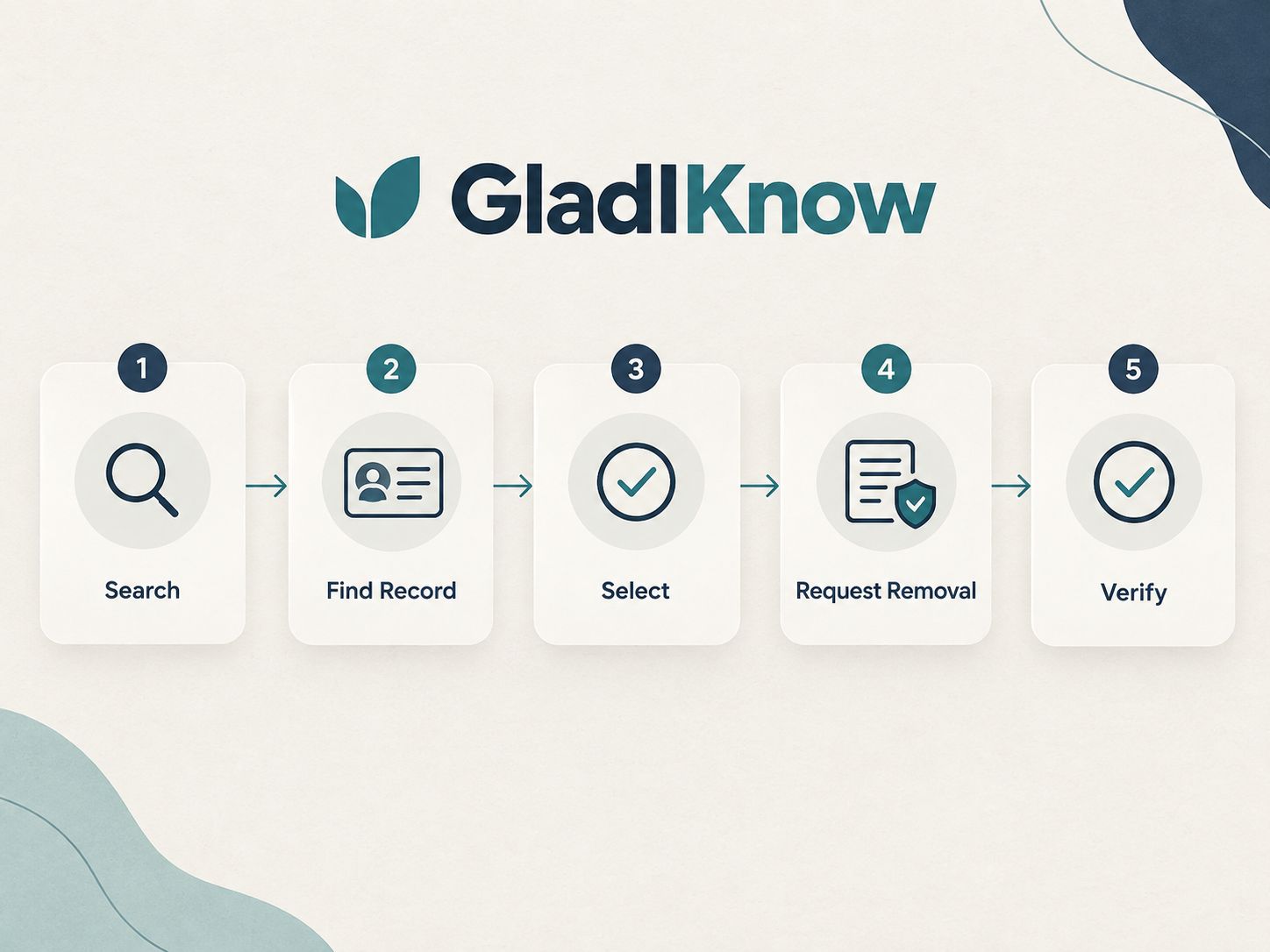
This is important because some older opt-out guides still describe a different process involving a public profile, an “Unlock Report” button, a CAPTCHA, and an “Opt Out/Remove My Data” link.
Current vs. Older GladIKnow Instructions
| Current Privacy Center | Older Guides |
|---|---|
| Start from Privacy Choices | Start from GladIKnow search |
| Name + city + state | Search for profile |
| Select matching record | Open or unlock profile |
| Submit removal request | Find opt-out link |
| Optional email confirmation | CAPTCHA may be described |
| Current official workflow | May reflect an earlier interface |

How Do You Remove Your Information From GladIKnow?
Step 1: Open GladIKnow’s Privacy Choices Page
Go directly to GladIKnow’s Privacy Choices page.
The page currently includes a section titled “Remove my Personal Information.”
You do not need to start with an old third-party guide if you can access the current official form directly.
Step 2: Enter Your Name, City, and State
The current form asks for:
- First name
- Last name
- City
- State
Then select Search.
Step 3: Find the Record That Belongs to You
Review the search results carefully.
If several people have the same or a similar name, do not select the first result automatically.
Compare available information such as:
- City
- State
- Age, if displayed
- Previous locations
- Address information
- Other identifying details
The goal is to identify your record, not simply a record with your name.
Step 4: Select the Correct Match
GladIKnow’s current privacy center specifically instructs users to choose the right match after searching.
This step matters when your name is common.
For example, if three people named John Smith appear in the same state, selecting the wrong record could result in a request concerning someone else.
Step 5: Submit the Removal Request
After selecting the correct record, follow the instructions displayed by GladIKnow to submit the removal request.
The current privacy page says GladIKnow will acknowledge requests promptly and work to complete them as soon as reasonably possible. If additional time is required, the company says it will notify you in writing.
Step 6: Add Your Email if You Want Confirmation
The current GladIKnow page says that you can enter an email address if you wish to receive a confirmation email.
This is an important detail because older guides may make email verification sound like a mandatory part of every request.
Follow whatever fields and instructions the live form presents when you submit your request.
Step 7: Save Your Confirmation
If you receive a confirmation email, keep it.
It gives you a useful record of:
- Your request date
- The email used
- The removal request
- Any follow-up instructions
Step 8: Check GladIKnow Again
Do not stop at submission.
After a reasonable processing period, search GladIKnow again and check whether the listing is still publicly available.
This gives you a second verification point.
Removal Verification Checklist
What Happens After You Submit a GladIKnow Removal Request?
GladIKnow says it will acknowledge the request promptly and work to complete it as soon as reasonably possible. If it needs additional time, the company says it will notify you in writing. If it cannot fulfill the request, it says it will explain why and provide information about appealing the decision.
The practical next step is therefore simple:
Submit → Acknowledge → Process → Verify

How Long Does GladIKnow Take to Remove Your Information?
GladIKnow does not currently publish a universal fixed processing deadline on its Privacy Choices page.
Instead, it says it will acknowledge requests promptly and work to complete them as soon as reasonably possible. If more time is needed, it says the requester will be notified in writing.
Is GladIKnow Opt Out Free?
Yes, the current GladIKnow Privacy Choices page provides a direct personal-information removal request without describing a payment requirement for submitting the request.
You do not need to pay a third-party privacy company simply to access the official GladIKnow removal form.
That does not mean every privacy-removal service is unnecessary. Paid services can handle opt-outs across multiple data brokers, which can save time if you have many listings.
Does GladIKnow Require an Email Address?
The current privacy center says an email address can be provided if you want to receive a confirmation email.
So the current page should not be described as requiring email verification in every case.
What Information Do You Need to Opt Out of GladIKnow?
The current GladIKnow removal form asks for your:
| Information | Purpose |
|---|---|
| First name | Identifies the person |
| Last name | Narrows the search |
| City | Helps identify the correct record |
| State | Helps distinguish matching records |
| Email address | Optional confirmation, according to the current page |
You may need additional information to distinguish your record from other people with similar names, but avoid providing unnecessary personal information.
What If You Cannot Find Yourself on GladIKnow?
First, check whether the city and state you entered match the information associated with the listing.
If you have moved, try a previous location where appropriate.
You can also check:
- Name spelling
- Middle name or initial
- Previous city
- Previous state
- Different record matches
If you cannot find a record, that does not necessarily mean your information is absent from every people-search database.
What If GladIKnow Shows Several Records With Your Name?
Compare the records carefully and select only the records that actually belong to you.
Useful clues may include:
- Location
- Previous addresses
- Age
- Relatives
- Other profile information
If more than one distinct record belongs to you, you may need to submit removal requests for the applicable records individually.
What If the GladIKnow Opt-Out Process Looks Different?
Follow the current live privacy page.
This is one of the biggest problems with search results for this topic: different guides can show different versions of GladIKnow’s interface.
Some third-party guides describe an “Unlock Report for Free” and CAPTCHA workflow, while GladIKnow’s current Privacy Choices page presents a direct record-search and removal-request process.
What Should You Trust?
- Current GladIKnow Privacy Choices page
- Current GladIKnow privacy documentation
- Recent third-party guides for additional context
- Older screenshots only as historical reference
Can Your Information Reappear After a GladIKnow Opt Out?
Yes, information can potentially reappear on people-search websites.
The FTC explains that opting out does not eliminate the underlying public records. It also notes that information may reappear when public records change or when information about relatives, neighbors, or associates remains available.
That is why privacy maintenance is different from a one-time deletion request.
A Better Long-Term Approach
Check periodically for:
- Your name
- Your phone number
- Your current address
- Previous addresses
- Common name variations
If your information returns, submit another removal request.
Does GladIKnow Removal Delete Public Records?
No.
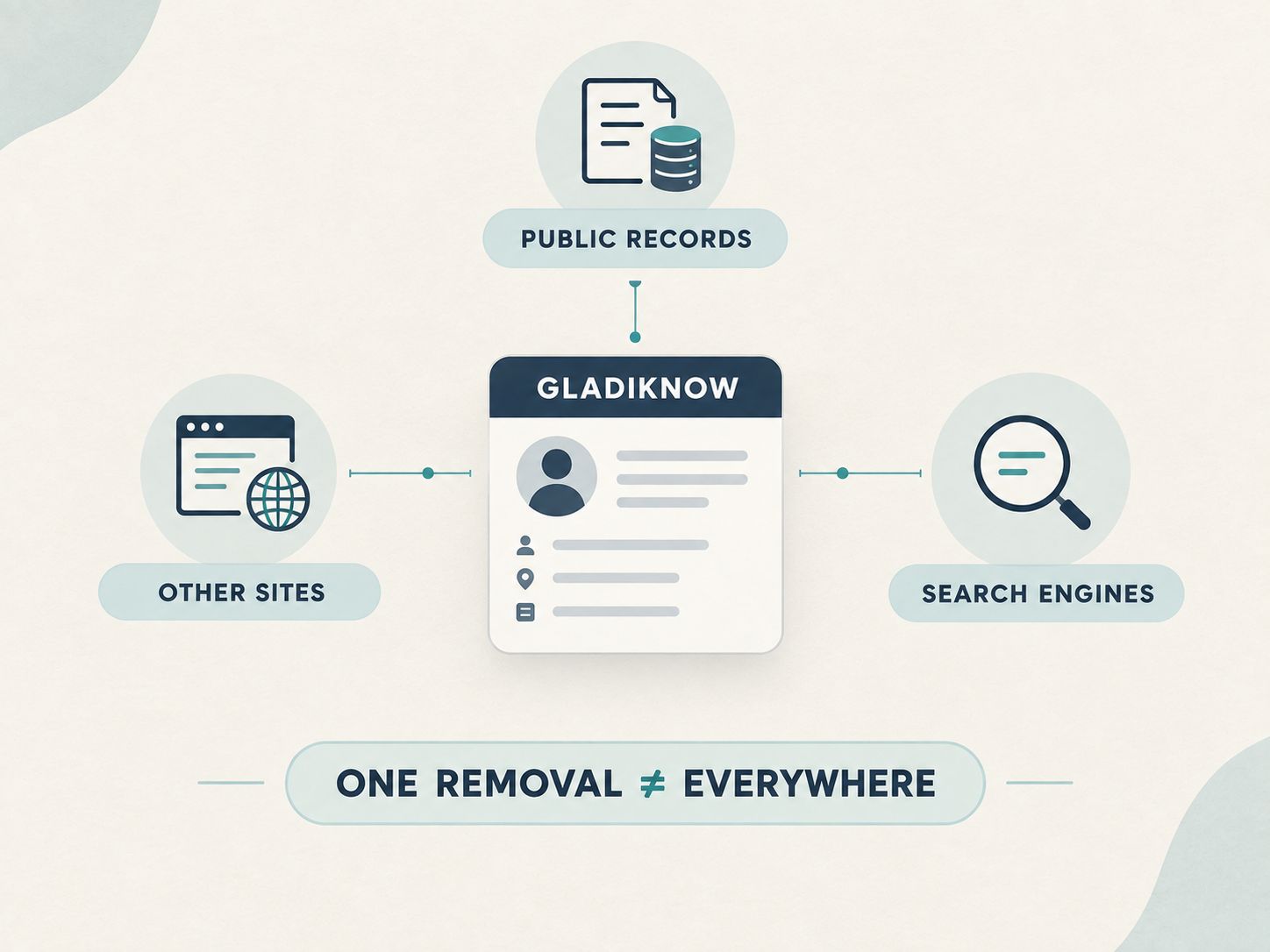
A GladIKnow removal request applies to information displayed through GladIKnow. It does not erase the underlying government or public records from their original sources.
The FTC specifically notes that opting out of people-search sites does not delete information from public records, meaning someone may still find the underlying record through a government website.
GladIKnow removal ≠ public-record deletion.
Does GladIKnow Removal Remove Google Search Results?
Not necessarily.
There are two separate systems:
GladIKnow
Controls its own listing.
Google
Controls its search index.
Removing a GladIKnow listing does not automatically mean Google’s index will update immediately.
Likewise, a Google result can sometimes remain visible temporarily even after the source page has changed or disappeared.
Does a GladIKnow Opt Out Remove Your Information From Other Websites?
No.
An opt-out from one people-search service does not automatically remove the same information from every other data broker.
For broader privacy cleanup, create a list of the websites where your information appears and handle each site’s removal process separately.
Why Do People-Search Sites Have So Much Personal Information?
People-search sites can combine information from multiple sources.
According to the FTC, people-search sites may obtain information from other data brokers, publicly available social-media profiles, and federal, state, and local public records.
Those sources can contain information such as:
- Property records
- Address history
- Professional licenses
- Civil records
- Certain criminal records
- Family relationships
- Education or employment information
The exact data available varies by source and individual.
What Privacy Rights Does GladIKnow Currently List?
GladIKnow’s current Privacy Choices page lists residents of the following states as potentially having privacy rights under applicable state laws:
- California
- Colorado
- Connecticut
- Delaware
- Florida
- Indiana
- Iowa
- Kentucky
- Maryland
- Minnesota
- Montana
- Nebraska
- New Hampshire
- New Jersey
- Oregon
- Rhode Island
- Tennessee
- Texas
- Utah
- Virginia
GladIKnow says applicable rights may include access, correction, deletion, and opting out of the sale of personal information.
What Is the Difference Between GladIKnow Removal and a Legal Privacy Request?
A practical GladIKnow opt-out is focused on removing your information from its platform.
A statutory privacy request can involve rights defined by a particular state law, such as access, correction, deletion, or opting out of certain forms of data processing.
GladIKnow’s current Privacy Choices page combines its removal tool with information about state privacy rights.
If you are exercising a legal right rather than simply requesting a listing removal, make sure you understand which law applies to your situation.
What Are the Most Common GladIKnow Opt-Out Mistakes?
1. Following an outdated guide
The interface can change.
2. Selecting the wrong person
A matching name does not prove the record is yours.
3. Expecting a fixed processing time
GladIKnow’s current page does not promise a universal number of days.
4. Assuming one opt-out covers the entire internet
It does not.
5. Confusing website removal with public-record deletion
They are different processes.
6. Forgetting to verify
Always check the listing again.
7. Giving unnecessary personal information
Use only what is needed for the request.
How Can You Verify That GladIKnow Removed Your Information?
After your request has had time to process:
- Return to GladIKnow.
- Search using the same identifying information.
- Check whether your previous listing is still available.
- Search variations of your name if appropriate.
- Check Google separately.
- Check other people-search sites.
If the listing remains available, review the current GladIKnow privacy instructions and consider submitting or following up on the applicable request.
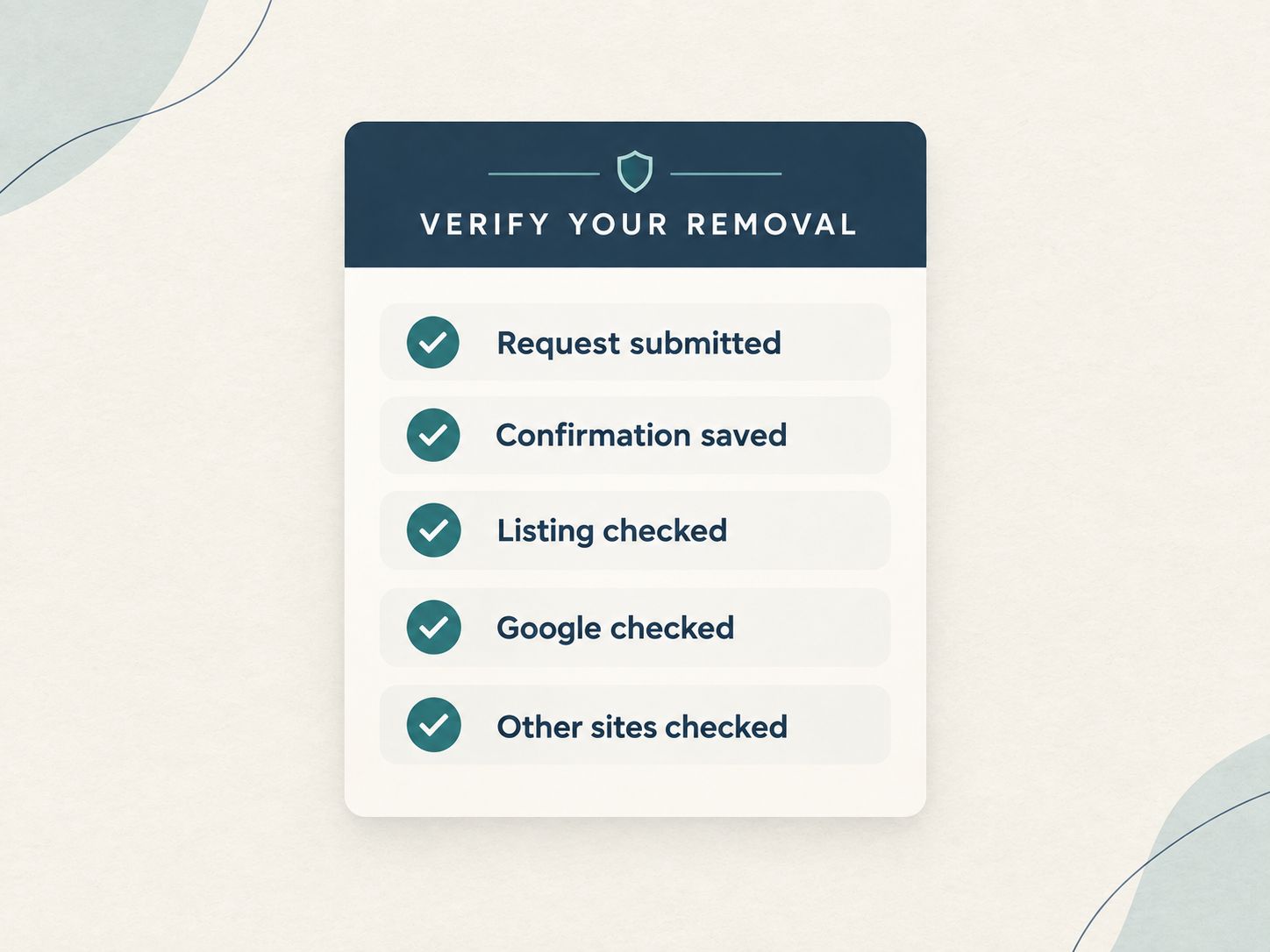
Simple Verification Record
Should You Manually Opt Out or Use a Removal Service?
For one GladIKnow listing, manual removal is usually the straightforward option because the company provides its own privacy form.
If your information appears on many people-search websites, a removal service can save time by handling multiple opt-outs.
The FTC describes both approaches: consumers can opt out individually for free or pay a service to handle opt-outs.
| Factor | Manual Opt-Out | Removal Service |
|---|---|---|
| Direct GladIKnow request | Yes | Usually handled for you |
| Cost | No service fee | Usually paid |
| Time required | More | Less |
| Multiple data brokers | Manual work | Depends on coverage |
| Ongoing monitoring | You handle it | Depends on provider |
| Control | Direct | Delegated |
What Should You Do After Removing Your GladIKnow Listing?
GladIKnow removal is only one part of reducing your online exposure.
After completing the request, consider reviewing your broader digital footprint.
- People-search sites
- Data brokers
- Reverse phone directories
- Public social profiles
- Old accounts
- Search-engine results
- Publicly visible contact information
Keep a simple spreadsheet or note containing the site name, request date, confirmation status, and verification date.
What Did We Update From Older GladIKnow Guides?
This is where this guide differs from many existing articles.
Older approach
Some older or recently republished third-party guides describe:
Search → Profile → Unlock Report → Opt Out → CAPTCHA → Confirmation
Current official approach
GladIKnow’s current Privacy Choices page describes:
Name + City + State → Search → Choose the right match → Removal request → Optional email confirmation
What Should You Expect From Data-Broker Removal?
The broader lesson from consumer privacy guidance is that data removal is usually not a one-and-done task.
The FTC recommends periodically checking people-search sites because information can reappear when databases receive new information or public records change.
That means a practical privacy routine looks more like:
Find → Remove → Verify → Monitor → Repeat when necessary
What Are the Best Tips for a Cleaner GladIKnow Removal?
Tip 1: Start with the official page
Third-party guides can become outdated.
Tip 2: Match the record carefully
Your name may be shared by many people.
Tip 3: Save evidence
Keep confirmation emails and request dates.
Tip 4: Do not promise yourself a fixed deadline
Use GladIKnow’s current processing language rather than an old third-party estimate.
Tip 5: Think beyond GladIKnow
The same information may appear elsewhere.
Tip 6: Recheck periodically
Data can return to people-search databases.
What Are the Steps for GladIKnow Opt-Out?
- Open the GladIKnow Privacy Choices page.
- Enter your first name.
- Enter your last name.
- Enter your city and state.
- Search for your records.
- Select the correct record.
- Submit the removal request.
- Save confirmation and verify the listing later.
Frequently Asked Questions About GladIKnow Opt Out
How do I remove my information from GladIKnow?
Use GladIKnow’s Privacy Choices page, search for your record using your name, city, and state, select the correct match, and submit the removal request.
Is the GladIKnow opt-out free?
The official removal form does not describe a payment requirement for submitting a personal-information removal request.
How long does GladIKnow removal take?
GladIKnow currently says it will acknowledge requests promptly and complete them as soon as reasonably possible. It does not currently publish a universal fixed deadline on the Privacy Choices page.
Does GladIKnow require CAPTCHA?
Some older third-party guides describe CAPTCHA as part of an earlier workflow. The current GladIKnow Privacy Choices page does not describe CAPTCHA as one of its main removal steps.
Does GladIKnow require an email address?
The current page says you can provide an email address if you want a confirmation email.
What if I cannot find my profile?
Check your city and state, previous locations, spelling, and other matching information. If you still cannot find a record, the information may not be exposed through the current search interface.
What if there are several people with my name?
Compare location and other identifying information before selecting a record. Do not assume that every matching name belongs to you.
Does GladIKnow removal delete public records?
No. Removing information from a people-search site does not delete the underlying public record.
Does GladIKnow removal delete my Google result?
Not necessarily. GladIKnow and Google are separate systems, so search results can remain indexed even after a source listing changes.
Does one GladIKnow opt-out remove me from other data brokers?
No. Other people-search websites have their own databases and removal procedures.
Can my information return after removal?
Yes. Information can reappear on people-search sites when databases receive new information or public records change.
Can I use a privacy-removal service instead?
Yes. A paid service can handle opt-outs across multiple sites. Before subscribing, check its coverage, reporting, and monitoring practices.
Is this guide legal advice?
No. This guide explains the practical removal process and current public information. Privacy rights vary by jurisdiction and situation.
Final GladIKnow Removal Checklist
Is the GladIKnow Opt-Out Process Difficult?
The current GladIKnow removal process is relatively direct: search for your record using your name and location, select the correct match, and submit the removal request through the Privacy Choices page.
The harder part is understanding what the removal actually accomplishes.
A GladIKnow opt-out can address your listing on GladIKnow, but it does not erase the underlying public record, automatically remove information from other data brokers, or guarantee that a search-engine result disappears immediately.
For that reason, treat GladIKnow removal as one step in a broader privacy-maintenance process.
If your goal is to reduce your overall online exposure, remove the GladIKnow listing first, verify the result, and then review other places where your personal information may be publicly searchable.
Share This Network Security Guide
Help IT professionals, network engineers, and students strengthen their cyber defense.
Zubayer Hasan
LinkedIn Profile →Md Zubayer AL Hasan is the lead cybersecurity platform architect and security researcher at SafeNetworkHub. Dedicated to zero-knowledge cryptography, infrastructure vulnerability auditing, and building accessible privacy tools.
0 Comments
No comments yet
Have a question or insight about this network security guide? Be the first to share your thoughts!
Write the first comment →