
The real challenge is knowing what to search, where to look, how to verify it, and when to stop.
This guide explains how to find professional profiles without compromising privacy while keeping the search focused on public professional information, minimal data collection, and reasonable verification.
What Does Privacy-First Professional Profile Search Mean?
Privacy-first professional profile search means using publicly available professional information to answer a specific professional question without collecting unrelated personal information.
Consider this example.
You need to confirm whether Jordan Lee works as a product designer at Company X.
You may need:
- Jordan Lee’s name
- Job title
- Company
- Location
- A public professional source
You probably do not need:
- Home address
- Family information
- Private phone number
- Private social accounts
- Passwords
- Restricted profile data
That distinction is the foundation of this entire approach.
The goal is not to find everything about a person. The goal is to find enough reliable information to answer the professional question.
Which Search Method Should You Use?
The best starting point depends on what you already know.
| What you know | Start here | Why it helps | Main limitation |
|---|---|---|---|
| Name + company | Strong professional context | Visibility varies | |
| Name only | Public web search | Broad discovery | Many false matches |
| Company only | Company website | First-party information | Not everyone is listed |
| Profession + event | Conference or professional directory | Adds context | Information may become outdated |
| Work or publication | Portfolio, author or research page | Can identify the person from professional activity | Requires more research |
| Existing profile | Independent second source | Helps verify the match | Takes another search step |
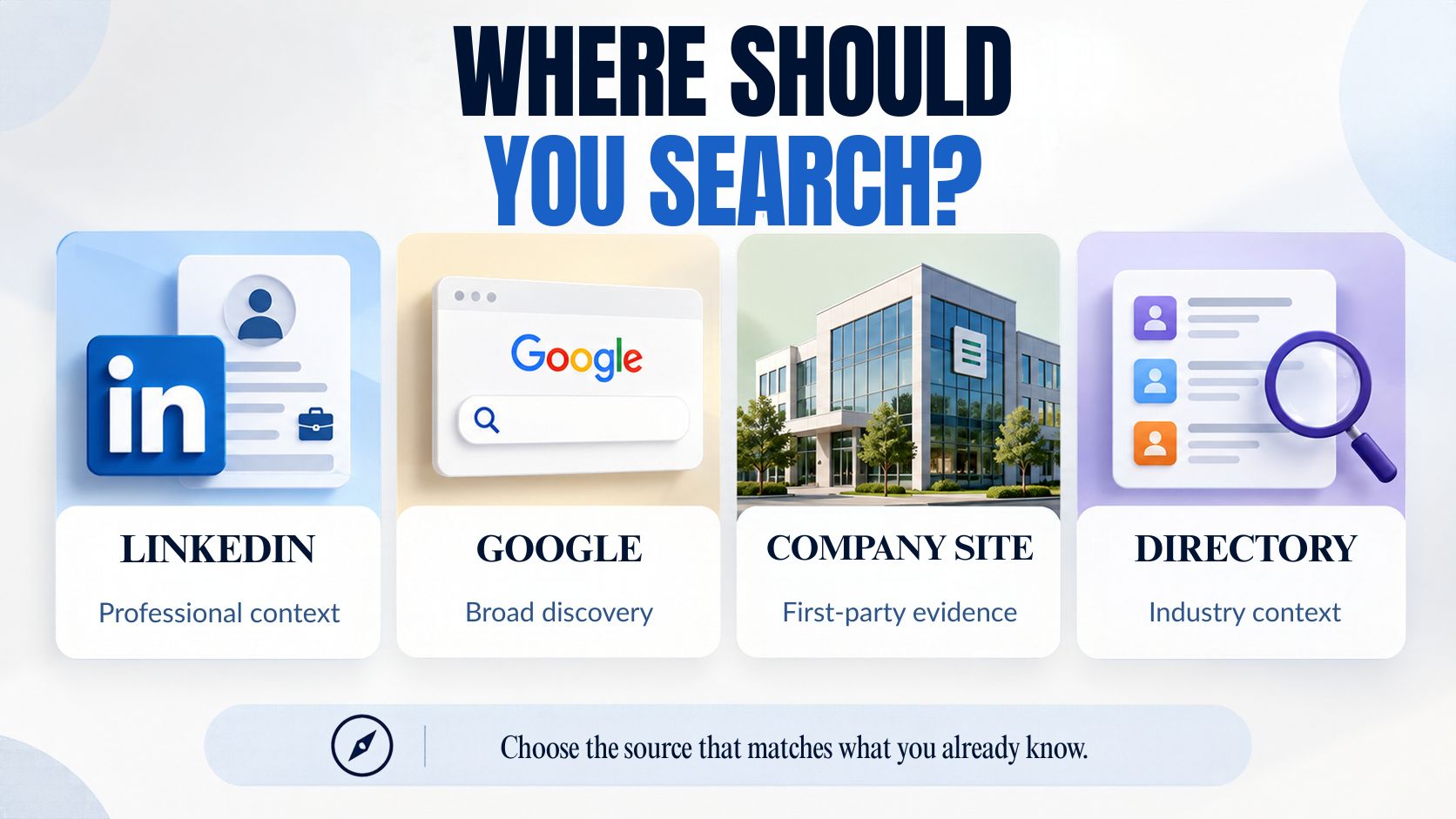
This is an important difference between finding a profile and verifying a profile.
Finding is about discovery.
Verification is about evidence.
You should not treat the two as the same task.
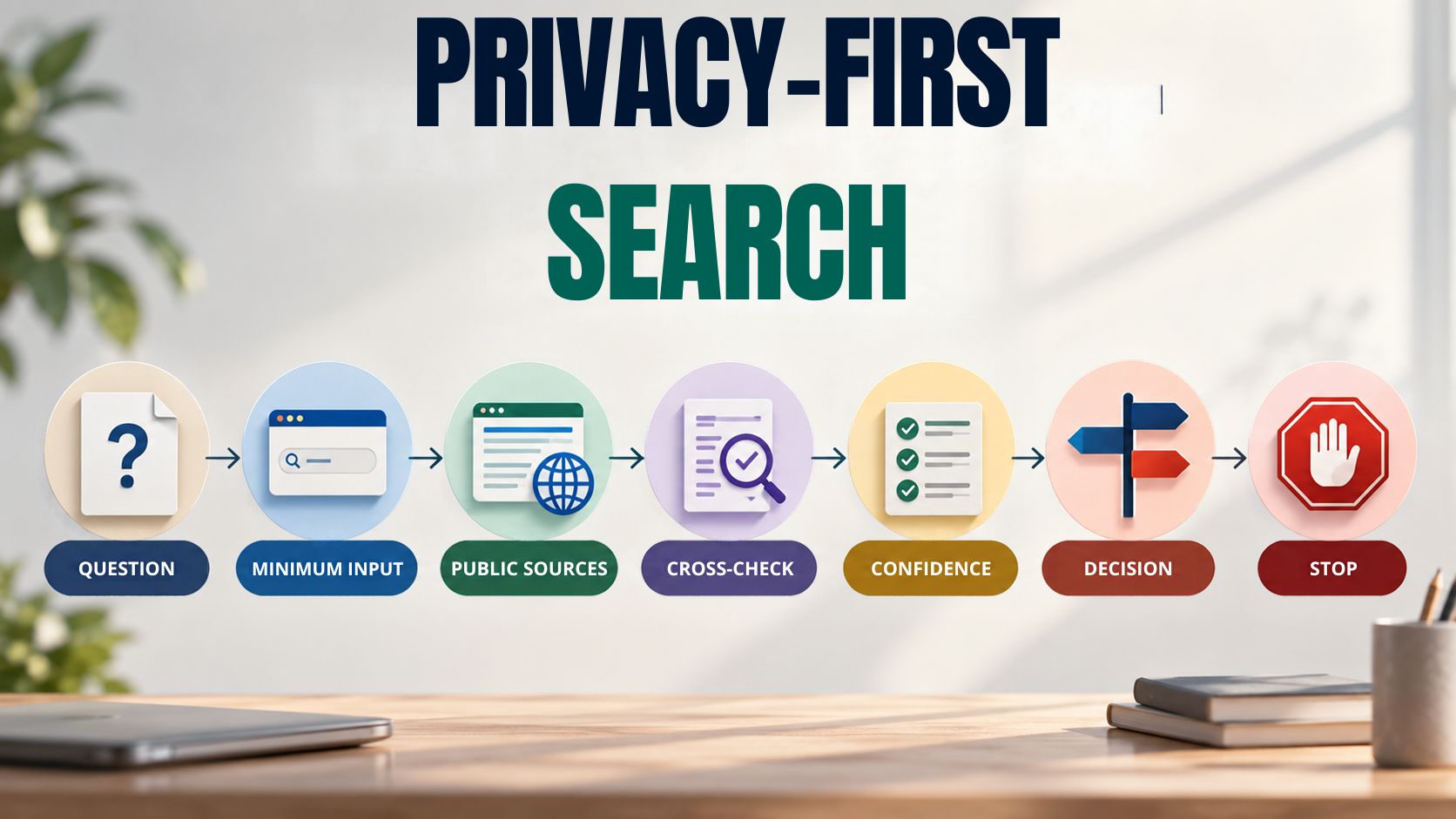
How Can You Find Professional Profiles Without Compromising Privacy?
Use this sequence:
Purpose → Minimum information → Public sources → Cross-check → Confidence → Stop
1. Define the professional question
Write down exactly what you need to establish.
For example:
“Does this Jordan Lee work at Company X?”
That is a specific research task.
“Find everything about Jordan Lee” is not.
2. Start with the smallest useful search
Try the person’s name first.
If that produces too many results, add the company or role.
3. Use public professional sources
Look at LinkedIn, company pages, conference pages, professional directories, portfolios, author pages or other relevant public sources.
4. Cross-check important information
A second independent source can help distinguish a real match from a stale or incorrect profile.
5. Decide how strong the evidence is
Treat the result as a likely match unless the available evidence genuinely supports a stronger conclusion.
6. Stop when the question is answered
Do not keep searching simply because more information exists.
What Professional Information Should You Use First?
Start with attributes that describe a person’s professional identity.
| Signal | Value |
|---|---|
| Full name | Initial discovery |
| Job title | Separates similar names |
| Current company | Strong professional identifier |
| Industry | Narrows broad results |
| Country or city | Helps distinguish candidates |
| Previous employer | Useful when roles recently changed |
| Specialty | Adds professional context |
| Portfolio | Provides supporting evidence |
| Company biography | Confirms affiliation |
| Conference page | Provides time-specific evidence |
| Publication or author page | Useful for researchers and subject experts |
Do not collect every available field at the beginning.
Add one professional signal when the existing search is too broad.
That makes the search both more precise and less intrusive.
How Can You Search LinkedIn More Privately?
LinkedIn has built-in privacy controls for profile viewing, so use those controls instead of attempting to bypass the platform’s visibility rules.
LinkedIn currently provides three profile-viewing choices:
- Your name and headline
- Private profile characteristics
- Private mode
In private mode, the person whose profile you view is shown a private-mode member rather than your name and profile details. LinkedIn documents the setting under Settings & Privacy → Visibility → Profile viewing options.
For current platform-specific details, see LinkedIn’s official profile-viewing guidance.
That is different from using a browser’s private or incognito window.
A browser’s private window primarily affects local browser storage and history.
LinkedIn’s private-mode setting determines how your profile visit is represented to the other member.
That distinction is worth understanding before assuming that “incognito” means the same thing as “anonymous on LinkedIn.”
For readers managing their own public exposure, LinkedIn also provides controls over which profile sections are eligible for public visibility and search-engine display.
Can Professional LinkedIn Profiles Appear in Google?
Yes, depending on the member’s settings.
LinkedIn says public-profile information can be displayed to people who are not signed in and can appear in search tools such as Google and Bing. It also explains that only eligible profile sections are included and that a more limited preview may sometimes be displayed.
There is another important detail: changes to a public LinkedIn profile do not necessarily appear immediately in search results. LinkedIn says search tools can take several weeks or even months to detect and refresh changes.
So an old search result should not automatically be treated as a current professional record.
Search-engine result = discovery signal.
Current first-party evidence = stronger confirmation.
What Should You Do When a Name Is Common?
Add professional context rather than increasingly personal information.
Suppose you search:
Alex Morgan
and receive hundreds of possible matches.
Try:
Alex Morgan + Product Designer
Then:
Alex Morgan + Product Designer + Company X
Then add location if you still need to narrow it.
The useful progression is:
Name → Role → Company → Location
Each new signal should have a purpose.
You are trying to reduce ambiguity, not increase the amount of personal information you collect.
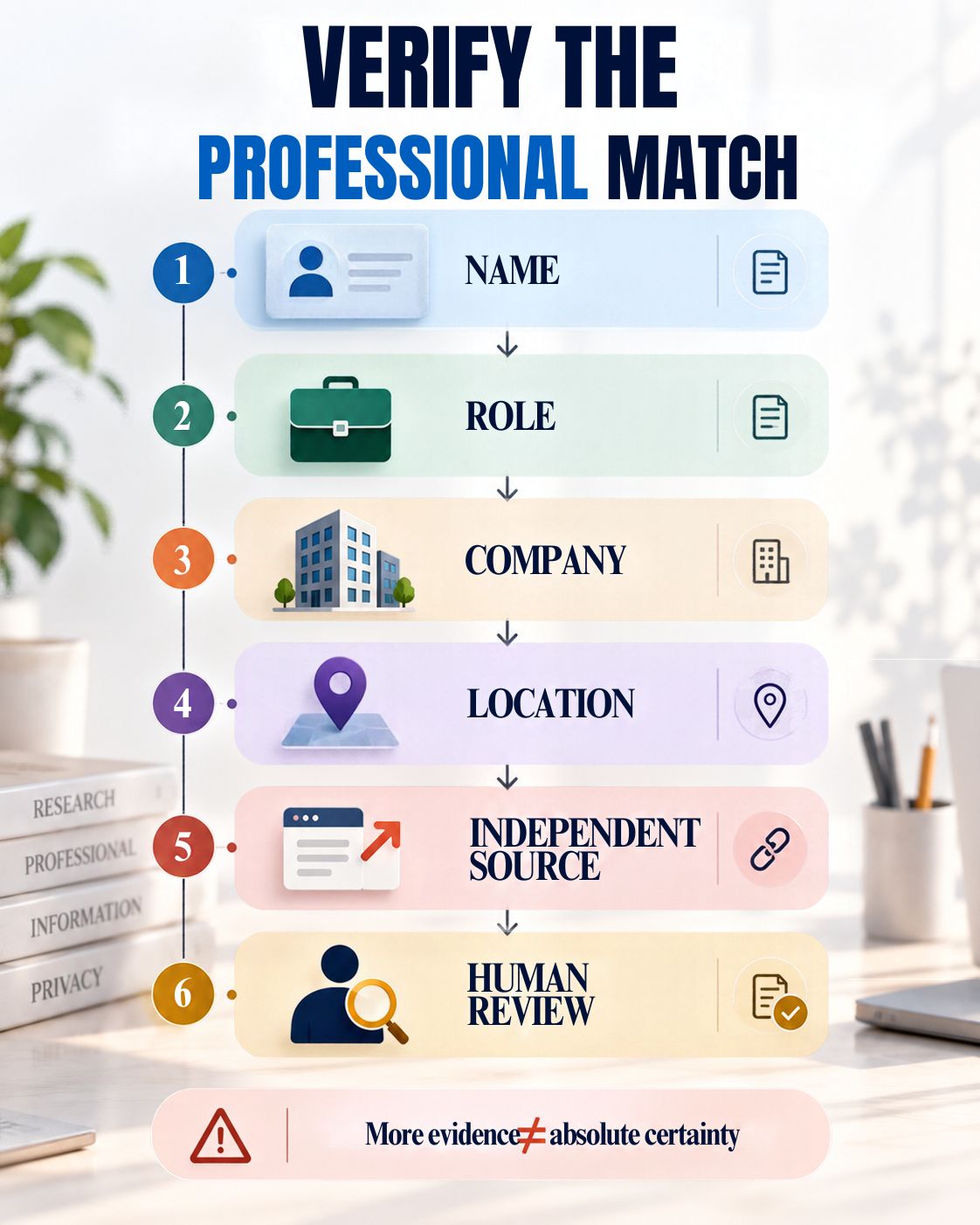
How Can You Tell Whether You Found the Right Person?
Use several independent professional signals.
Name match
Does the name match?
Role match
Does the job or professional specialty match?
Company match
Does the company match?
Location match
Does the public location make sense?
Career match
Does the career history appear internally consistent?
Independent confirmation
Can another credible public source confirm the affiliation?
This is more reliable than treating one profile as automatically correct.
How Strong Is the Evidence?
A useful tool should distinguish different levels of confidence instead of presenting every search result as equally reliable.
| Evidence level | Typical situation | Suggested wording |
|---|---|---|
| Low | Name only | Possible match |
| Moderate | Name + role + location | Likely match |
| Strong | Name + role + company + consistent history | Strong public match |
| Corroborated | Strong match + independent first-party source | Strongly supported by independent sources |
| Formal verification | Appropriate authorized verification process | Verified through separate process |
This wording matters.
A tool should not turn:
“This profile appears to match.”
into:
“This is definitely the person.”
A public-profile search is not automatically a legal identity-verification service.
Which Public Sources Are Most Useful?
Not every source deserves equal weight.
Official company page
Useful for current organizational affiliation.
Professional profile
Useful for career history, title and professional context.
University or research profile
Useful for academic and research identities.
Conference page
Useful for an event-specific professional role.
Publication or author page
Useful for researchers, writers and specialists.
Public directory
Useful for discovery but should usually be corroborated.
Search-engine snippet
Useful for finding the original page, but weak as evidence by itself.
The more consequential the decision, the more important source quality becomes.
What If Two Public Sources Disagree?
Do not simply select the result that confirms what you expected.
Look at:
Date + source quality + first-party status + independent confirmation
For example:
- A 2024 conference bio lists Company A.
- A current company page lists Company B.
- The person’s current professional profile also lists Company B.
The older conference biography may simply be outdated.
The right response is not to hide the conflict.
The right response is to explain it and use the strongest current evidence.
Can You Find a Professional Without a LinkedIn Account?
Sometimes.
Public professional information can also appear on:
- Company websites
- Conference pages
- University pages
- Professional associations
- Portfolio websites
- Publication pages
- Business directories
- Industry publications
If one source does not provide enough information, move to another legitimate public source.
Do not interpret a restricted profile or missing information as permission to bypass the restriction.
For broader privacy-related discovery, the Data Protection Tool Finder can help users locate privacy and data-protection tools by task.
What Information Should You Avoid Collecting?
Avoid information that does not contribute to the professional purpose.
That includes, where unrelated:
- Home addresses
- Private phone numbers
- Private email addresses
- Family information
- Private messages
- Passwords
- Login credentials
- Hidden accounts
- Restricted profile information
- Precise personal-location information
Ask:
Would I still need this information if the professional question were already answered?
If not, there is usually little reason to collect it.
This is where the concept of data minimisation becomes practical rather than abstract.
For a broader review of everyday privacy practices, the Online Privacy Assessment evaluates browser, tracking, account and app-permission habits.
Why Does Data Minimisation Improve Professional Research?
Data minimisation is one of the EDPB’s core GDPR principles. The EDPB also identifies purpose limitation, accuracy, storage limitation, integrity and confidentiality as core principles for personal-data processing.
But the idea is useful even before a legal analysis begins.
Suppose you need to identify the marketing director at a company.
You need:
Name + company + role
Adding:
age + family details + home address + personal accounts
does not necessarily improve the professional answer.
It creates more information without necessarily creating more useful evidence.
For a broader review of organizational data practices, the Data Privacy & Security Assessment can be used as an informational assessment.
What Is the Difference Between Public and Private Information?
A person may intentionally publish:
Public professional information
- Job title
- Employer
- Professional biography
- Portfolio
- Public business contact
- Conference biography
- Published work
That is different from:
Private information
- Personal telephone number
- Home address
- Private account
- Family information
- Private messages
- Credentials
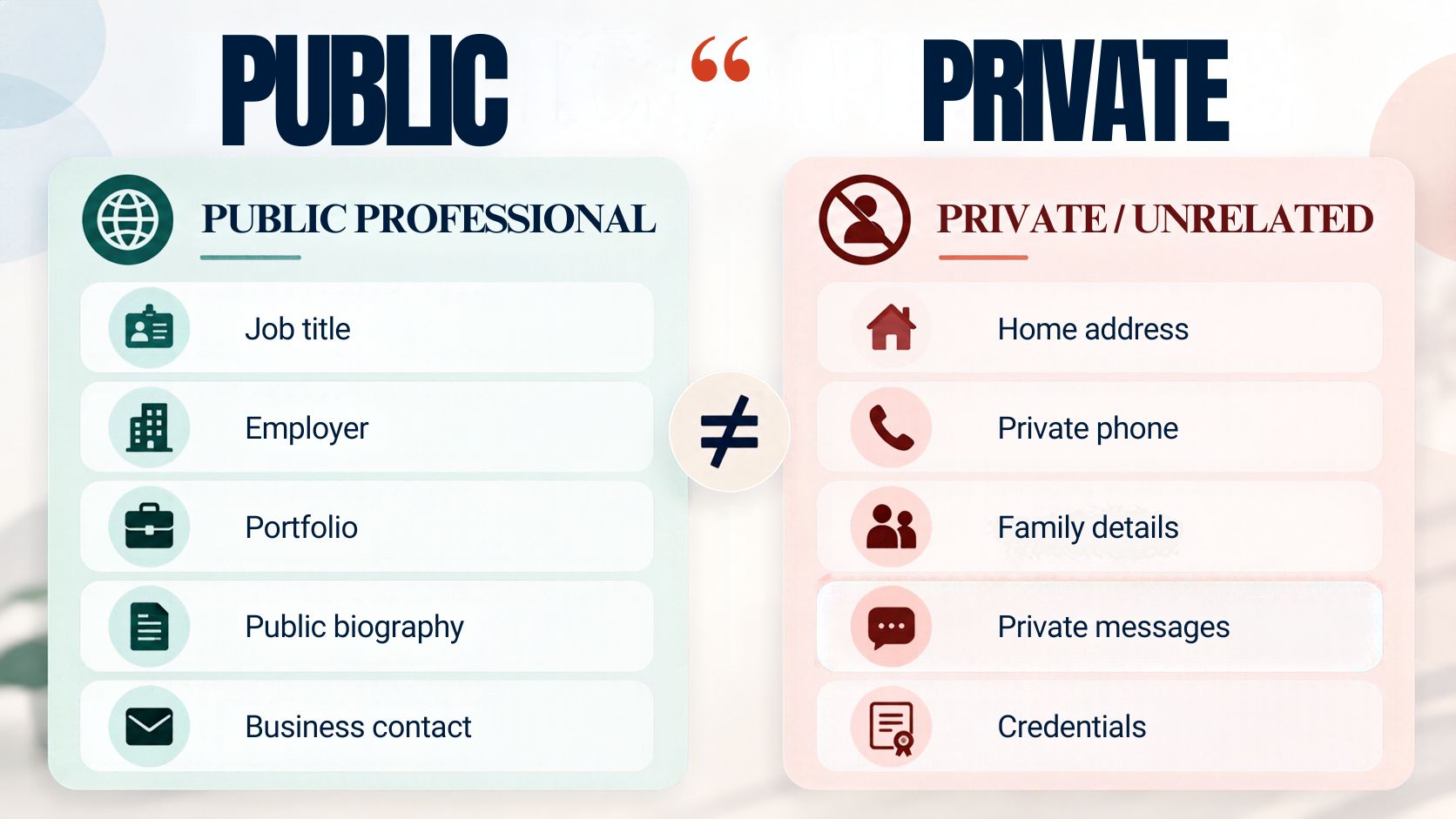
The distinction is not merely technical.
It is a question of purpose and context.
The fact that something may exist somewhere online does not automatically make it appropriate to collect, retain, combine or publish.
What Should a Professional Profile Tool Return?
The most useful result is not the longest result.
A tool should surface evidence that helps the user decide whether the profile is relevant.
| Result | Example |
|---|---|
| Name | Jordan Lee |
| Professional role | Product Designer |
| Company | Example Technologies |
| Location | Berlin |
| Primary public source | Professional profile |
| Supporting source | Company website |
| Matching signals | Name + role + company |
| Confidence | Strong public match |
| Recommended action | Human verification |
This is more useful than dumping dozens of unrelated personal attributes onto the screen.
The interface should show why the result appears relevant.
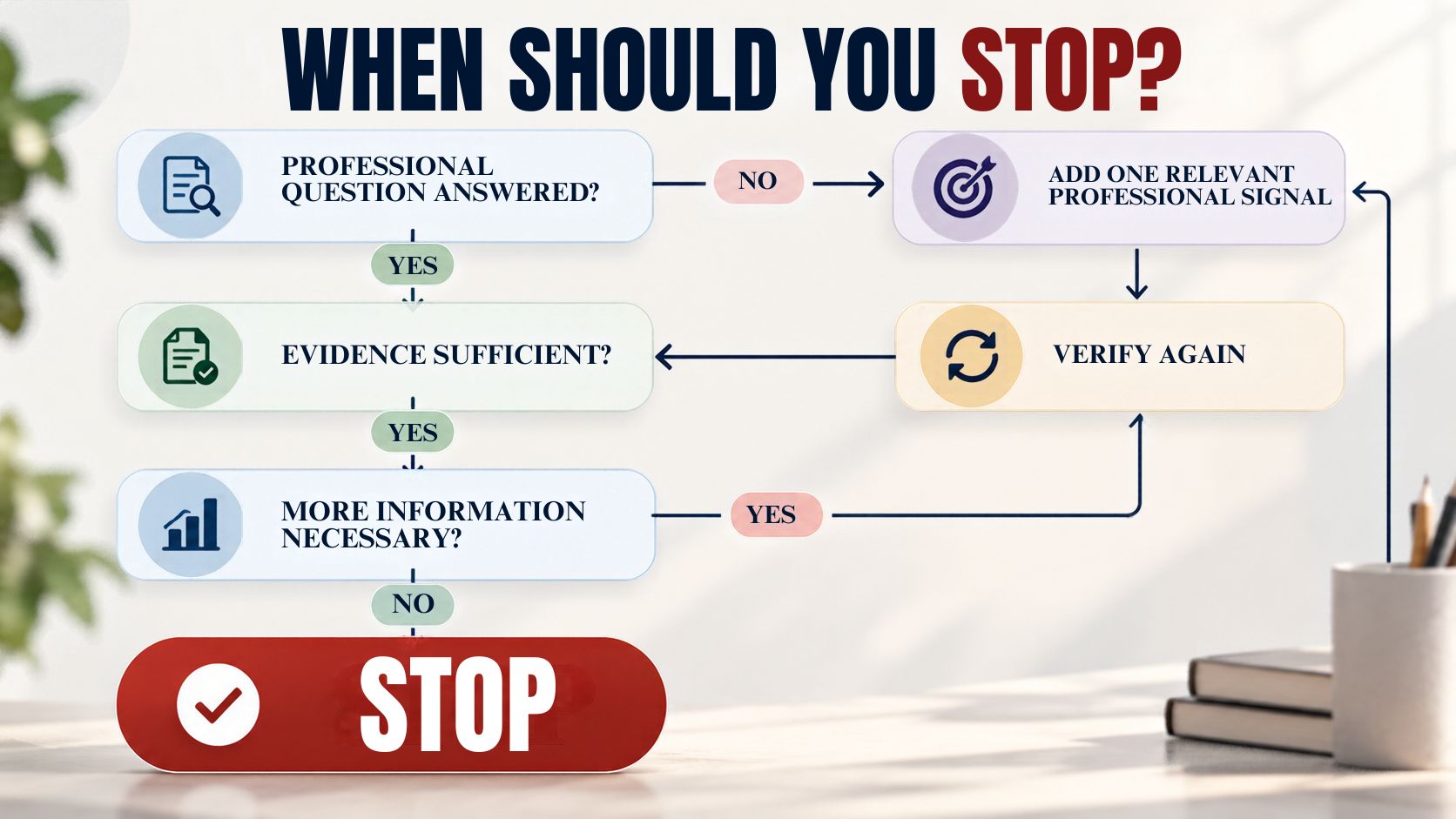
When Should You Stop Searching?
This is one of the most important rules on the page.
Suppose your question is:
“Does Jordan Lee work at Company X?”
You find:
- A current professional profile listing Company X.
- An official company page listing Jordan Lee.
- A consistent professional title.
The question is answered.
Searching further for Jordan’s private contact details does not make the original answer meaningfully stronger.
The strongest privacy control may be knowing when you already have enough information.
This “stop rule” is one of the core principles that differentiates our methodology from simple people-search advice.
What Should a Privacy-Friendly Profile Finder Never Do?
A responsible tool should not:
- Request passwords
- Collect account credentials
- Bypass authentication
- Circumvent private-profile settings
- Reveal hidden personal contact data
- Encourage fake accounts for privacy circumvention
- Track physical location
- Facilitate harassment
- Build personal dossiers
- Present uncertain matches as verified identities
These boundaries should be visible inside the product interface.
The Privacy Checker provides a related example of making privacy-focused diagnostic boundaries visible rather than hiding them.
How Can Recruiters Use Professional Profile Search Responsibly?
Recruiters generally need professional context, not a complete personal record.
A practical workflow is:
Role requirement → public search → profile discovery → evidence check → human review
Focus on:
- Relevant skills
- Professional experience
- Current or recent role
- Industry background
- Public portfolio
- Public company affiliation
A public profile should not automatically be treated as formal employment verification.
For organizations assessing how PII is handled, the PII Compliance Checker provides an informational organizational privacy-practices assessment and explicitly distinguishes itself from legal advice or certification.
How Can Sales Teams Use Professional Profiles Without Becoming Intrusive?
Use professional information to establish relevance.
For example:
Company → Department → Role → Public professional profile → Business reason for contact
That is usually enough to decide whether someone is a relevant business contact.
It is not necessary to create a detailed personal dossier before sending a professional message.
And finding someone’s public professional profile does not create an obligation for that person to respond.
How Can Researchers Verify a Public Professional Identity?
Use at least two meaningful sources when the identity matters.
First source
Find the person’s professional profile or public biography.
Second source
Find an independent organizational, publication, conference or academic source.
Compare:
- Name
- Role
- Organization
- Date
- Relevant professional history
If they disagree, investigate the discrepancy.
Do not select the source merely because it supports your preferred conclusion.
Organizations dealing with large datasets can use the Sensitive Data Discovery Tool to identify possible PII, PHI, credentials and other sensitive patterns before retaining information unnecessarily.
How Should Professional Information Be Classified?
Once profile research moves into an organization’s internal systems, classification becomes important.
A simple model is:
| Classification | Example |
|---|---|
| Public | Public job title |
| Internal | Internal research note |
| Confidential | Non-public candidate information |
| Restricted | Sensitive or regulated personal information |
The Enterprise Data Classification Engine uses a four-tier Public, Internal, Confidential and Restricted model for organizational data.
This creates an important separation:
Finding public information is one task.
Storing and governing information after finding it is another.
What Should the Tool’s Privacy Notice Explain?
The interface should clearly explain:
- What the user enters
- What sources are used
- What the tool returns
- What the tool does not attempt to find
- Whether information is stored
- Whether processing occurs locally
- Whether results require human verification
This is especially important for a tool that deals with professional identities.
SafeNetworkHub’s Privacy Notice Builder can help organizations create a tailored privacy-notice draft for their own data-collection practices.
The tool’s notice should describe the actual implementation. It should not make generic promises that the product cannot substantiate.
How Can Organizations Assess the Privacy Risk of This Type of Processing?
The question changes when profile research becomes a recurring organizational process.
At that point, organizations may need to evaluate:
- Purpose
- Data categories
- Sources
- Retention
- Access
- Security
- Data-sharing
- Risk to individuals
The Privacy Impact Assessment Tool can be used as an informational diagnostic to structure that type of review.
It is not legal advice or a formal regulatory determination.
What Are the Most Common Professional Profile Search Mistakes?
- Searching only by name — Common names produce false matches.
- Trusting the first result — Search ranking is not identity verification.
- Relying on one source — Public information can be incomplete or outdated.
- Collecting unrelated personal information — More data does not automatically mean better evidence.
- Assuming public means unrestricted — Visibility does not remove context or purpose.
- Ignoring dates — Professional roles can change.
- Continuing after the question is answered — Extra collection creates more exposure without necessarily improving the decision.
How Should US Readers Think About Privacy?
US privacy obligations vary depending on factors such as the state, organization, industry, information involved and purpose of processing.
That makes blanket claims about “what is legal in the US” inappropriate for a general profile-search tool.
A more useful operating rule is:
Use relevant professional information, minimise collection, respect platform controls, and seek appropriate privacy or legal review when profile research becomes part of a regulated or high-impact decision.
Professional-profile discovery should not be treated as a substitute for a formal process when one is required.
What Should EU Readers Know About GDPR?
The EDPB identifies the following as core GDPR principles:
- Lawfulness, fairness and transparency
- Purpose limitation
- Data minimisation
- Accuracy
- Storage limitation
- Integrity and confidentiality
For professional-profile research, those principles can be translated into five practical questions:
- Why are we searching?
- What information do we actually need?
- Is the information accurate enough for the purpose?
- How long do we need to keep it?
- Who can access it afterward?
For the current official principles, see the European Data Protection Board’s GDPR principles guidance.
The answers depend on the actual processing activity. This article is informational and does not determine whether a specific use is GDPR-compliant.
What Makes a Professional Profile Finder Genuinely Privacy-First?
A privacy-first tool should optimise for six things:
Relevance
Show information related to the professional purpose.
Evidence
Explain why a result appears relevant.
Transparency
Show the source or source type.
Restraint
Avoid unnecessary personal information.
Uncertainty
Make ambiguous matches visibly uncertain.
Stopping
Tell the user when additional searching is unlikely to add useful evidence.
That is the core methodology behind this page.
How Should the Search Interface Be Designed?
A useful interface could contain:
Name or professional keyword
e.g. Jordan Lee
Role
e.g. Product Designer
Company
e.g. Example Technologies
Location
e.g. Berlin
Search
Privacy safeguards
- Public professional information only
- No passwords or credentials
- No private-profile bypass
- No hidden-contact discovery
- Human verification for important decisions
This makes the privacy boundary part of the product itself.
How Should Search Results Be Presented?
A strong result page should not simply show a name and a link.
It should explain the evidence.
Jordan Lee
Product Designer
Example Technologies
Berlin
Source: Public professional profile
Supporting evidence: Official company page
Matching signals: Name + role + company + location
Confidence: Strong public match
Recommended action: Review the supporting source before making an important decision
That presentation gives users a reason to trust the process without pretending that the system knows more than the evidence supports.
What Should You Do If You Need a Broader Privacy or Security Assessment?
A professional-profile search is only one privacy-related task.
When your goal changes, use the appropriate tool.
For broader privacy habits, use the Online Privacy Assessment.
For organizational privacy practices, use the Data Privacy & Security Assessment.
For data-discovery maturity, the Data Discovery Assessment reviews inventory, sensitive-data discovery, classification and data-flow visibility.
For broader cybersecurity product research, the Security Tool Finder provides comparison and shortlist capabilities.
The important point is to use each tool for the problem it is actually designed to solve.
What Is the Complete Privacy-First Workflow?
Use this process whenever you need to find a professional profile:
- Define the question
What exactly are you trying to establish? - Use minimum professional information
Start with name, role, company, industry or location. - Choose the strongest relevant source
Prefer a current professional profile or first-party organizational source. - Narrow gradually
Add context only when ambiguity remains. - Cross-check
Use an independent source when the result matters. - Assess the evidence
Decide whether it is a possible match, likely match, or strongly corroborated public match. - Stop
Do not search for unrelated personal information. - Protect what you retain
If notes or records are stored internally, classify and protect them appropriately.
Frequently Asked Questions
Can I look up a professional profile without a LinkedIn account?
Sometimes. Public professional information can also appear on company websites, conference pages, portfolios, university pages, professional associations and search engines.
Can I view a LinkedIn profile without revealing my name?
LinkedIn provides a private-mode profile-viewing option that displays the viewer as a private-mode member rather than exposing the viewer’s name and profile details to the profile owner.
Does LinkedIn private mode make me completely anonymous?
No. It is a LinkedIn profile-viewing privacy control, not a guarantee of complete online anonymity.
Can LinkedIn profiles appear in Google?
Yes, when the relevant public-profile settings allow it. LinkedIn says public profile information can appear in search tools such as Google and Bing.
What should I do when several people have the same name?
Add professional context such as role, company, location or industry and then verify the likely match with another credible source.
Can I find someone using only their company?
Sometimes. Start with the company’s public team, leadership or staff pages and then use professional information to narrow the search.
Should I collect a person’s private email address?
No, not merely because it may be discoverable somewhere. Use a professional contact method that the person or organization intentionally makes available for professional communication.
Can recruiters use professional-profile research?
Yes, for legitimate professional discovery, but public profile research should not automatically be treated as formal employment verification or a substitute for applicable hiring-screening procedures.
Can sales teams use public professional profiles?
Yes. Use relevant professional information to establish whether the person is an appropriate business contact and keep subsequent outreach respectful.
Can public professional information be outdated?
Yes. Roles, employers and biographies change. Check important information against current or first-party sources where possible.
Can this tool verify a person’s identity?
It can help identify a likely professional match based on public evidence. It should not claim formal identity verification unless a genuine verification process exists.
Is this a background-check service?
No. It is a professional-profile discovery and verification aid.
Is public information automatically appropriate to collect?
No. Public visibility does not eliminate the need for a legitimate purpose, proportionality, accuracy and responsible handling.
What is the biggest privacy mistake when searching professional profiles?
Continuing to collect personal information after the original professional question has already been answered.
Our Perspective
A good professional-profile search should feel more like careful research than surveillance.
Start with a clear question. Use the minimum professional information needed to narrow the search. Prefer credible public sources. Cross-check important facts. Make uncertainty visible. And stop when you have enough evidence.
That approach does not promise unlimited access to people.
It gives you something more useful: a repeatable way to find the right professional information without unnecessarily expanding the search into someone’s private life.
Find Professional Profiles Without Compromising Privacy
Start with what you already know.
Name → Role → Company → Public Source → Cross-Check → Confidence → Stop
Use public professional information. Respect profile-visibility controls. Avoid credentials and private data. And treat search results as evidence to review rather than unquestionable identity proof.
Privacy notice: This tool is intended for legitimate professional, research, recruiting, networking and business purposes. Do not submit passwords, private credentials, confidential information or personal data that you are not authorized to process.
Before You Search
Ask one question:
What professional fact am I actually trying to confirm?
A clear question produces a faster search, better evidence and less unnecessary data collection.
💬 Have you ever found multiple professional profiles with the same name and struggled to identify the right one? Share your experience in the comments.
Share This Network Security Guide
Help IT professionals, network engineers, and students strengthen their cyber defense.
Zubayer Hasan
LinkedIn Profile →Md Zubayer AL Hasan is the lead cybersecurity platform architect and security researcher at SafeNetworkHub. Dedicated to zero-knowledge cryptography, infrastructure vulnerability auditing, and building accessible privacy tools.
0 Comments
No comments yet
Have a question or insight about this network security guide? Be the first to share your thoughts!
Write the first comment →